
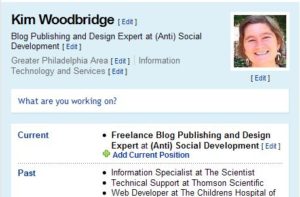
There are a number of online tools to assist in building an online resume or portfolio. Here I will be discussing two of them and showing the examples that I made.
They are Krop Creative Database, and VisualCV. I considered adding LinkedIn but I think most people have heard of it and may devote a separate entry to it.
I’m sure you have at least a familiarity with LinkedIn but have you heard of the other two? Before I started doing research for this article I had only heard of LinkedIn and even though I have a LinkedIn account I have not used it to it’s full potential.
Krop Creative Database
Krop has a free and a paid version of it’s online portfolio. With the paid version you also get different styles and headers, domain mapping, unlimited image storage and RSS. Both accounts give you a pdf export from the online resume and your resume is included in their job database. Krop, however, seems designed for Web Developers and Graphic Designers. I suppose it is intended for the online artistic types. I did not realize this until I was setting up my profile and needed to fill in the professional information.
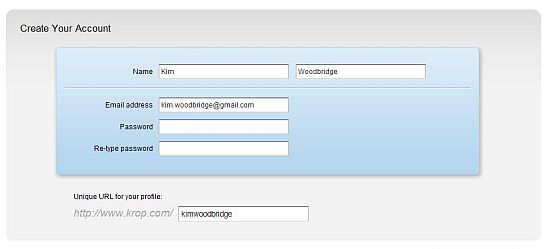
Create Account Screen
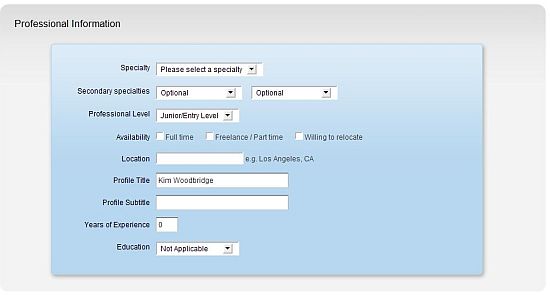
Enter Professional Information
To test this tool I only entered minimal information but you can view what I created.
Krop also has a screencast that can be viewed below.
Screencast – Portfolio Hosting at The Krop Creative Database from QBN on Vimeo.
VisualCV
VisualCV is an online resume tool for job seekers and networkers that turns a flat paper resume into a visual and interactive one. Photos, charts, etc can easily be added. It is completely free. The sign-up is one quick screen and after that you login and start building your resume.
I was then presented with the following screen. I was not completely sure how to get started. I was half tempted to use the option to email VisualCV my resume so they could start the process for me (I didn’t see a charge for that anywhere) but it takes up to three days and I didn’t feel like waiting a couple of days to finish this article.
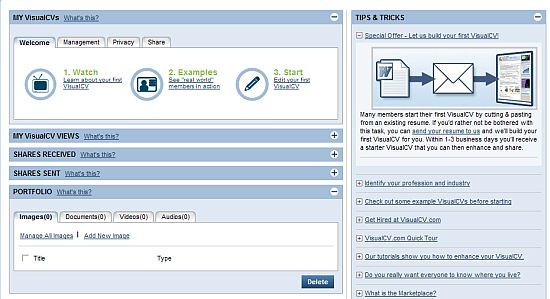
Ok, so you click on #3, which says Start. I guess that was kind of obvious and I am just being a little dense right now. You are then presented with the Edit Screen. You can add a photo, select from a number of styles, add work history and education information.
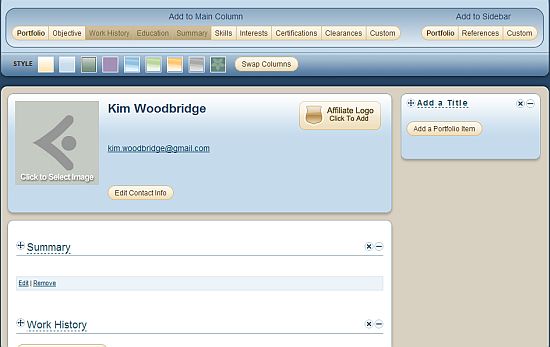
You can upload an image of yourself, other images, video clips and slideshare presentations. I was surprised by all of the options.
On the right is the portfolio section although you can move the columns around. This was very cool. You can add an image or a video and link it to a site. I added one image for my elephant site but once I flesh this out, I will add images from sites that I have worked on. So far, this is much more impressive then Krop’s portfolio system.
Editing the rest of the fields is straightforward and I think the best way to get started is to copy information from your current resume.
Here is the edit screen with some of the fields filled in.
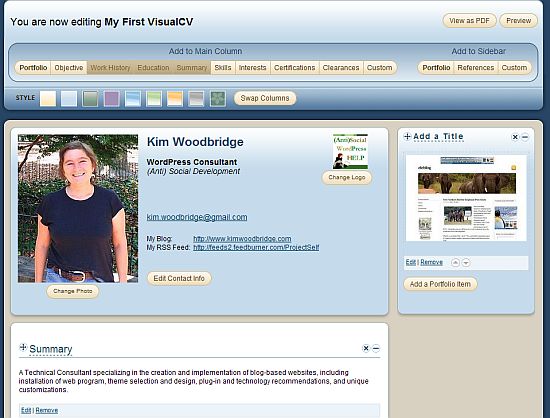
And then when you preview and leave the editing screen it looks like this.
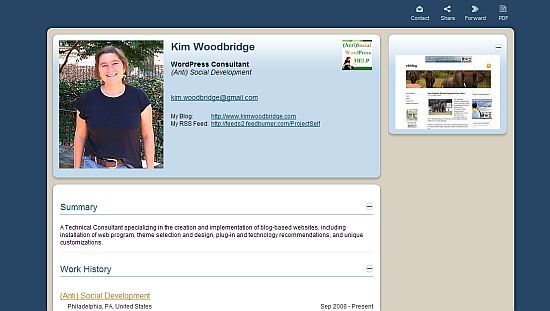
Like Krop, you can also view and save as a pdf.
If you would like to view what it looks like online, it is at Kim Woodbridge’s VisualCV
Conclusion
As I mentioned everyone knows about LinkedIn and LinkedIn differs from these tools as it as social resume. You can add contacts, join groups and network. But if you just want to create an online resume and portfolio VisualCV and Krop are better suited for that task. After trying the two I would have to say that I like VisualCV much better. I was confused about how to get started but once I figured that out it had a lot more features and was easier to use. I also prefer how it looks when it is finished. Additionally, Krop is better suited for Artists and Graphic Designers.
Does anyone know of other online resume and portfolio sites? If so, let me know and I will try them out too.

Hey Kim thats very nice! I mean especially nice compared to the tradition CV that we use and see..
Ben Pei´s last blog post – Don’t You Want To Retire At 21?
Hi Ben – I don’t know how traditional employers will react to them but
I’m sure for positions in creative fields they will work great.
Hi Kim,
These are two really useful and neat tools. For some reason I never thought of looking for a site to make writing and formatting a resume easier. I hope I don’t need to take advantage of these anytime soon but their really useful links to have.
Thanks!
Jim´s last blog post – Awareness Test
Hi Jim – I think they could be useful with certain types of jobs more than
others. And you know what they say – the time to look for a new job is as soon as you get hired ;-)
Nice. I like VisualCV. …Fortunately, I am not looking for a job. And hopefully I won’t be anytime soon… Job hunting, especially now is probably not a fun experience!
Shirley´s last blog post – Website Ownership: 4 Biggest Myths & Realities
Hi Shirley- I like VisualCV too. I thought I would like the other one better
until I started using them and then found VisualCV much easier to use.
I don’t think job hunting is ever fun but I’m sure it is much harder now.
Since I will be relocating this year, these tools will really come in handy! Off to del.ici.ous!
Carla´s last blog post – Is it too late?
Hi Carla – I hope you are moving somewhere that you want to be :-)
I’m not currentyl using an online resume or portfolio, but I can see this being the waves of the future. For some fields more than others. I really like the two tools and their results. I’m thinking that it will take a site with those tools and a good social netoworking aspect to take over the field.
Gennaro´s last blog post – Free Entertainment In Las Vegas
Hi Gennaro – LinkedIn has an online resume and a social networking aspect to it. I have a full profile there though I haven’t used it to the extent that I could.
Those are pretty nice. I would assume that we will be moving more towards electronic resumes, since so many companies allow emailing of resumes. Not to mention it is better for the environment. :)
~ Kristi
Kikolani | Blogging, Poetry, Photography´s last blog post – Twitter Photo Mosaic
Hi Kristi – That’s a good point about the environmental aspect. I don’t know the last time I actually mailed a resume – it’s been email for awhile. Although I’m sure they print them out on the other end.
Hi Kim,
I’m bookmarking this in case things don’t pick up soon. ;-)
Cheers
George
Tumblemoose´s last blog post – Keep Your Copyrights: Don’t Sell the Farm
Hi George – Things will pick up :-)
But, it can be a good idea to have an online resume anyway. I’m
frequently asked for one from potential clients – well, a resume, not
an online one.
Hi Kim – The Visual CV one looks brilliant. Did you Twitter this, because I know there’s plenty people on there looking for jobs who would find this tool really useful.
Hi Cath – I really liked VisualCV – at first I thought I would like the first
one better but I didn’t. And someone from the company emailed me
this morning telling me the link in my article wouldn’t work because I
had my profile set to private. I was able to fix that before the article
had been up very long – pretty good customer service!
I tweeted it this morning and after I read your comment I tweeted it
again – thanks!
I haven’t hear about these. Thanks – useful as always and I agree with Cath – you should twitter this – I am going to.
Hi Vered – Thanks! I was just making test profiles for the article but
I think I will actually finish the VisualCV one.
Kim, Nice find. I will need to soon start preparing CV as i may loose the job soon :(
Will check this out without fail!
Nihar´s last blog post – Greet your Blog visitors using WP Greet Box wordpress plugin
Hi Nihar – I’m sorry to hear that :(
Now here’s my lecture. There are some things I am easygoing about
and others that I obsess over. Keeping my resume current is one
of those things I tend to obsess over. I try to update it every 3 months.
It’s much easier to remember what you’ve done and what projects
you accomplished in the last 3 months then when you are suddenly scrambling to find a new job. I think it’s best to always be prepared.
VisualCV looks really nice, neat and clean also very useful, I believe it will be another internet success, going to build one now.
Chinese Girl´s last blog post – Train Shenyang-Xiliu 6666
Hi – Great! If you don’t mind, you could share it with us. I’d love to see what someone else creates with it.
Hey Kim,
Thanks for sharing these wonderful web tools. They are definitely not like LinkedIn which has a semi-business network application. I liked the screenshots :)
Btw, looks like you are starting a ‘career & job-hunting’ related series from what I see before & after this post :) Good pick for the current economic conditions.
Ajith Edassery´s last blog post – SEO – Link Building Series: Keyword Research & Optimization (for Short & Midterm traffic boost)
Hi Ajith – Thanks! Yes, I had a mini-job series this week. People
need to start using all tools available.
There are a lot of online profile creation tools, Linkedin being the most popular one. But, be careful about these tools because they may not allow you to include all the information you want. Instead, you can go for the services of professional resume writers who listen to your needs and create your resume based on it.
Hi – That is very true. And possibly an idea for another article.
I was thinking of designing madhurkapoor.com so that it can act like my online portfolio but these tools look better.
Madhur Kapoor´s last blog post – Create a Personal File Sharing Server with HFS
Hi Madhur – You could link to the profile. Or maybe make one of them and they use the layout for your own portfolio.
I was searching for site to create CV online and this helped me!!
great work..
Arun | BE Folks´s last blog post – How to avoid get rich scam sites
Hi Arun – If you use one of them, I would be interested in seeing the
final product.
Hi Kim,
that was a well written article and I am on Visual CV it’s a great way to promote yourself. I also tried a new thing “Video Resume” Instead of uploading it to Youtube where everybody can see me I used the service pf http://www.mayomann.com which is free and that also got Employers attention.
What are your thoughts on using Video Resumes??
Hi Teresa – I haven’t thought that much about video resumes. But they
could be really useful when you are applying for a freelance job and
won’t actually be meeting the people you are working with.
I do know that I am not my natural self when being filmed and I would
have to worry about my always messy hair ;-)
I’m going to take a look at the site – thanks for telling me about it.
VisualCV is a great tool. Many employers are looking for unique employees and when presented with a stack of traditional CVs and a visual, interactive on they’ll surely pay closer attention to the one that stands out.
Hi Odzyskiwanie – I agree. I made a quick profile for the examples in
this article but I need to go back and make a full profile.
Great links! Thanks. For some reason I have a big aversion to creating a resume. Seems kind of easy this way.
Lori´s last blog post – BeeDragon on Facebook
Hi Lori – Oh so do I! I find it very intimidating and I am filled with self-doubt when I’m creating one. I have to actually finish the VisualCV one that I started for this article.
Thanks for the great post. I just found another great site which I just signed up and started using today called
Makenzie´s last blog post – The Wonderful World of Social Networking
opps left out the name of the site! Carbonmade.com
Makenzie´s last blog post – The Wonderful World of Social Networking
Hi Makenzie – Thanks for the info – I’ll check it out.
Hey, nice post and I think that online resumes are the way to go. I use http://www.connectcv.com – have you seen / used this one?
Hi William – Thanks for the link – I haven’t checked that one out yet.