
If you schedule your WordPress posts and want your visitors to get excited about what’s coming soon, you can list them in your sidebar.
I always schedule my posts and frequently write 5-6 posts at a time when I have a block of time and schedule them over the next couple of weeks. I get a little stressed out if I don’t have something scheduled and have to write something the night before. Anyway …
I don’t think I would use this feature because I don’t want to spoil the surprise. This is probably why I didn’t want to know the gender of my child when I had an ultrasound ;-) But, for certain types of sites, I think this could be a really useful feature.
There are two plugin solutions and one code solution. And even though I don’t want to use this feature I went ahead and tested the plugins. Yeah, you can thank me later.
The code
This code snippet is from WP Recipes and takes advantage of the attribute post_status=future. This can be used on a template where you want the posts to be listed. It will work in a Text Widget if you are using a plugin like Exec-Php, which allows code to be run in text widgets. (I tested it.) It will also work in a non-widgetized sidebar.
<?php
$my_query = new WP_Query('post_status=future&order=DESC&showposts=5');
if ($my_query->have_posts()) {
    while ($my_query->have_posts()) : $my_query->the_post();
        $do_not_duplicate = $post->ID; ?>
        <li></li>
    <?php endwhile;
}
?>
Two Plugin Solutions
I tested both of these plugins because they hadn’t been updated in awhile and they both worked fine. I did find, however, that they don’t like being activated at the same time. When they are both active, the widget for only one of them shows up in the list of widgets. Maybe they are too similar.
Upcoming Posts Widget
This plugin creates an Upcoming Posts widget that works much like the Recent Posts widget. You can give it a title and select how many future posts will be listed. And that’s it.
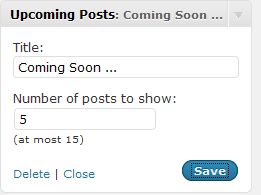
I found that the list of upcoming posts was styled differently than my other widgets – the lists of posts was bold – so, if I were going to use this I would have to tweak my stylesheet a little. I don’t know if everyone will experience the same issue or not.
Upcoming Posts
This plugin is much like the previous one in that it adds and Upcoming Posts widget. This one, however, has more features than the first one.
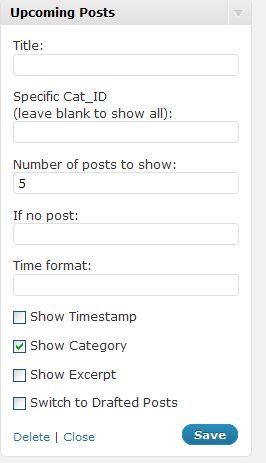
You can give it a title, select how many posts will be listed, display upcoming posts from a specific category, include a timestamp, include an excerpt, and more. If I were going to use these plugins I would probably go with the this one because of the additional features but there are instances when the simpler one would be sufficient.
Do you schedule posts? Would listing upcoming or future posts be useful for you?
photo credit: ILMO JOE

Do I schedule posts? I doubt that many, if any, schedule post to the extent that I do and plan to.
I currently have 229 posts scheduled, the farthest one out December of 2012.
This all part of a project that has been been on the back burner for a while now, but that I’ve been putting quite a bit into recently. It uses material from the 1860s for posts, mostly from diaries, with some other sources also used. It’s intended to be a sesquicentennial, day-by-day view of the American Civil War, largely in the words of those experiencing it and writing about it.
The project is called Diaries of the Civil War and I’ve gone “live” with it with a Thesis based blog at http://dotcw.com.
The idea of being able to list upcoming posts is intriguing, but, since the whole idea of what I’m doing is day-by-day writings from the civil war, I don’t know if it will work for me, especially since the title of each post will be the same as the title of the diary from which it came. Still, I will keep it in mind as a possibility. I still have a lot of work to do with content as well as developing the site design further.
.-= Mike´s last blog ..Kite Surfer =-.
Hi Mike – I think you win the prize for the most scheduled posts – wow!
I do schedule posts but not consistently. This is a great idea. But since I’m not consistent, that would leave it blank if I didn’t have something scheduled. I’ll add this to my list of possibilities.
Thanks, Kim
.-= Pat Alexander´s last blog ..Who Is On Your Agency’s Team? =-.
Hi Pat – I always schedule them but sometimes I have 7 scheduled and other times I have none and need to hurry up and write a post. I’m not sure I want to ruin the surprise either ;-)
I don’t think this feature is for me, but I am curious if these future posts will go to the RSS feed, and if true, wouldn’t it be confusing for subscribers?
Hi Tawny – They won’t go to the RSS feed until they are published. The code is pulling posts that have the status of future and displaying them on the sidebar.
Interesting… I do schedule mine in advance, but I sometimes change my mind and write something else at the last minute. :)
.-= vered – blogger for hire´s last blog ..Am I Putting Ideas Into My Kids’ Heads? =-.
Hi Vered – I do that too – I had one post last month that kept getting pushed back because I was replacing it with something else.
I don’t schedule posts though I have thought about it. When I get a post done, I want to share and get feedback. I can’t even wait until morning if I write late at night. But your directions are always so clear, I shared anyway. By the way, Jim Connolly blogged about the wisdom of scheduling posts last week. If a marketing coach thinks it is a good idea, perhaps I should think about it too.
.-= Julie Walraven | Resume Services´s last blog ..Time Wasters: Not My Problem =-.
Hi Julie – I’ve stuck to my posting schedule for about a year now so scheduling helps me with that. Last week I felt great because I was really ahead and now I’m back to needing to write some new ones. Scheduling them helps too when I’m on vacation.
I have to agree with you that I think the best way to keep readers excited is to have them guessing on what your going to write about next. I have no idea sometimes what I am going to write about and in the last minute boom there comes.
Hi James – For me the element of surprise works too – I think for other sites letting people know what is upcoming might work really well. For example, game reviews would be a good one – I’d like to know which reviews were coming up.
Very cool and definitely a possibility, thanks!
Currently, I don’t schedule consistently enough, and I probably don’t want to leave it blank.
.-= Dennis Edell | Direct Sales Marketing´s last blog ..Less is More – Here’s My Current To-Do List =-.
Hi Dennis – I wouldn’t want it to be blank either. I suppose the default message could say something funny like “The monkeys are busy typing”
lol indeed. Can ya code that in?
.-= Dennis Edell | Direct Sales Marketing´s last blog ..The Future of DEDC – Part 4 – FINALIZED!…..? =-.
The Upcoming Posts plugin has a field where you can specify the message that is displayed when there aren’t any upcoming posts ;-) And in the code solution it could be done by adding an else statement into the code.
Sweet! Thanks for the update. ;)
.-= Dennis Edell | Direct Sales Marketing´s last blog ..Attention Commenters: VALID Email Addresses PLEASE! =-.
List upcoming posts…… now that’s an idea!
post bookmarked for a future project!
Great! I’ve never wanted to do it because I like the element of surprise but it could help generate excitement for the visitors.