

11/22/09 – Since the last Facebook update, this information is no longer accurate. Please view my updated article on this topic.
Last week when I wrote the article about removing a facebook application from your news stream, I wanted to re-add Mafia Wars, which I had previously removed. I wanted to add it back so I could go through the steps of removing it and take some screen shots.
Of course, as with many options in Facebook, wanting to re-add an application was easier than actually doing it because it was hard to find the setting. Facebook is not intuitive to use.
So, if you accidentally removed the wrong application or if you really miss the Mafia Wars status updates, here is how you can get the application back in your news stream.
- Login and go to your Home page
- Scroll down to the very bottom and find the link that says Edit Options

- You will then get a pop-up listing the Pages and Applications that are hidden from your news stream. It defaults to Pages so you will want to click on the button that says Applications.
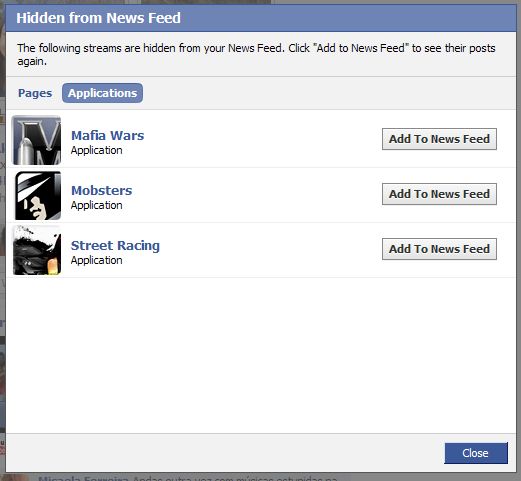
- Click on the button that says Add to News Feed and then Close
It seems so simple but I though it would be the reverse of how I hid the application in the first place. And a button called Edit Options does not imply that you will be able to use to unhide applications and pages.
photo credit: _marmota

I actually had some trouble finding how to do this. Thanks for clearing it up. :-)
A lot of things in Facebook seem a lot more convoluted than they need to be.
Hi Jim – Exactly! Why would unhide be under Edit Options? It’s annoying.
This no longer works. I hid an app today and I have yet to find a way to re-add it. The only thing that shows up under the Options menu now is a way to hide and un-hide friends. No app are listed there anymore. Please let me know if anyone figures this out again.
Hi Jeff – I will have to update this article. Here’s what you do:
1. Go to Home
2. Click on News Feed (not LIve News Feed)
3. Go to Hide someone or an application. It doesn’t matter what you select.
4. You will then get a box of Options that has Friends, Pages, and Applications. You can unhide things from there.
It doesn’t give me the option to choose news feed or live news. All I get is sort recent stories or highlighted stories. When I hide something it only gives the option to undo it. It doesn’t give me the box of options.
Hi Annette – Yes, Facebook has changed the newstream at least once since I wrote this article. Are you able to unhide items that were previously hidden?
Thanks Kim!! I was getting so frustrated trying to figure out how to add an app back to my news feed.
Hi Katie – I’m glad it helped. I don’t know why they keep moving things around.
Hey Kim…I saw your information about if you removed news feed from your facebook home page. I accidentally removed the gifts portion of farmville from my husbands home page however he can still play. the answers that you provided are no longer available since facebook has had another update can you please help
Hi Astrien – Did you check the updated article and the comments?
http://www.kimwoodbridge.com/updated-how-to-unhide-a-facebook-application-or-page/
There might be something there that will help.
Thank you, I accitdently hidden a friend and had trouble finding them but they are back
Hi Kelli – It can be difficult to find the settings you need on Facebook.
Hi Kim,
Today I did something so stupid it’s a wonder I haven’t deleted myself!
I right clicked on one of the big square Mafia Wars I-helped-your-turn icons and turned it off/hid it. Now ALL the icons are missing and the notifications are so small I can barely make them out on the screen.
Do you know of any way to restore these icons? I have tried several of the other suggestions, but as the application is still functioning nothing shows as “hidden”.
Any suggestions appreciated; if you need to access the account to see it for yourself, let me know!
Deaun
Hi Deaun – I haven’t encountered this before. Some suggestions:
1. Log out of facebook and back in
2. Clear your browser cache
3. Try accessing facebook in a different browser.
Before all the facebook changes I had Fish World and Happy Aquarium to my news feeds….you could click and see which things were being given away quickly….I cannot add these two back to the news feed and I have been trying forever….Island Paradise is there on its own but the other two never showed up again and I have not a clue what to do.
Can anyone help
Hi Lynne – Take a look at this article and the comments. There should be something in there that will help.
http://www.kimwoodbridge.com/updated-how-to-unhide-a-facebook-application-or-page/
I’m trying to figure out how to edit the bar to the left side of your page when you sing on to facebook? It has status updates, news feed, pages, photos, etc… I can see farmville over there, but would like other apps over there and can’t figure out where to edit that.
Hi Kesha – This article is outdated due to changes with Facebook.
Perhaps this one will help.
http://www.kimwoodbridge.com/how-to-remove-a-facebook-application-from-your-news-feed/
HELP!!! I removed Farmville instead of Farmvillan!! I didn’t just hide it, I removed it..PLEASE help me retrieve my Farm..PLEASE!!
Hi Kathy – I’ve never played Farmville so I don’t know if you can get your farm back after removing the application. You should be able to add the application back by going to the Farmville main page and clicking on the Add Application link.
If you blocked the application, go to “applications” on the left. Then go to “see all your applications” if you need to and then see “to control how your friends see your activity click here” the to “edit blocked applications”. This does not work if you hit “hide” rather than “block” application however and I am still working on how to retrieve those. The tabs no longer appear in edit options.
I finally found it. If you have your news feed set to “most recent”,it won’t work. You must change it over to “top news” at the top of your home page, just above your newsfeed.
Then go down to the bottom and select “edit options”, then click on the Tab that says “Applications”
Hi April – It’s really annoying that it won’t work with Most Recent and with Top News – I’m glad you found the solution.
Ahhh, I have no idea how to get Cafe World back in my newsfeed! When I do what you suggest all that pops up are friends and only so I can hide them. There is no way to unhide an application! Going crazy here!
Hi Julia – When I test this I am unable to unhide applications. Is it possible that you blocked it?
this option is no longer available. i have not found anything on fb help or searching net on how to do it now. there is no “edit” option at bottom of newsfeed anymore . which took me 4eva to get to bottom of page to find out arrghhhh.