

Since the last Facebook update, I have been unable to locate a simple way to filter my news stream by pages or pages that I am fan of.
This is annoying because I follow a variety of topics on Facebook and filtering news in this way was a quick way way to get information.
Earlier, I had made lists, such as Activism, WordPress and Philly. Since I already have those lists, I can filter by those topics but there isn’t a way to filter by all pages.
The best way, that I have found, to manage this is to create a list that includes all of your pages or at least the ones you are most interested in.
Here’s what you do.
- Login to Facebook
- Go to the Home page
- On the left, click on Friends
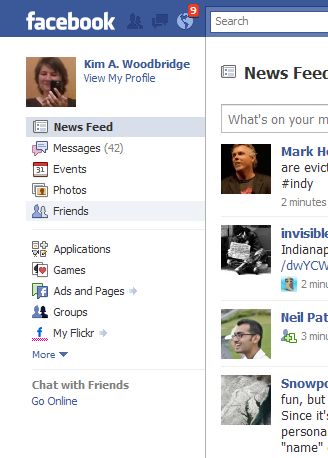
- On the top right of the list of friends, click on the ‘Create a List’ button
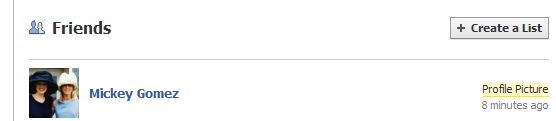
- The pop up box will contain all of your friends and all of the pages that you are a fan of. For some reason, all of the fan pages have a question mark for the avatar and this has to be a Facebook glitch. After the list is created and you filter by it, the avatars will display properly.
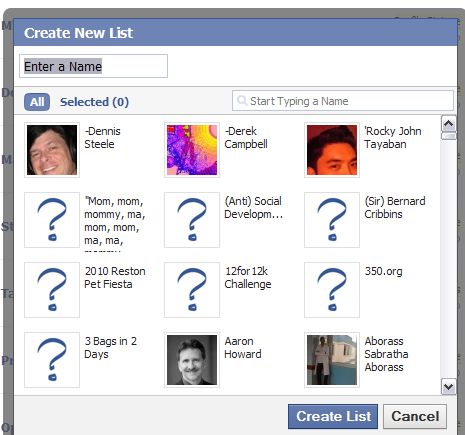
- Name the list and start selecting the pages that you would like to include. If you want to view all of your fan pages in the filter, then include all of them.
- You can now select that list under friends to filter the news stream.
Even though lists are useful, this is tedious and is a really roundabout way to filter the news stream by fan pages. I’m not sure why this functionality is missing since the last update.
And if I’m missing something really obvious on a better way to do this, please please let me know.
photo credit: ajschu

I use this approach to control my streams, but creating and editing lists en masse in Facebook is next to useless. The options for adding removing, relocating friends are just so limited. I want to be able to open one or more lists and drag and drop people on an ad hoc basis. There are other properties missing. The whole system is a terse and tense mess.
Hi David – It really is a mess. And if they would get it in order it would be a much more valuable way to follow news. I keep saying this but I wish they would fix what doesn’t work rather than continually changing the interface.
Nice tip Kim. I am already having as many as 6 lists. However, I still find it difficult to easily read updates. In principle, having more friends is too bad lol
.-= Ajith Edassery´s last blog ..Facebook fan page: Create one for your brand or business today =-.
Btw, how to remove these lists? Dang, I have some old lists that I wanted to remove.
.-= Ajith Edassery´s last blog ..Facebook fan page: Create one for your brand or business today =-.
Hi Ajith – I’ve found that due to too many friends and less free time that it’s really difficult to keep up with it – it’s a shame too because my friends posts some great links and some really funny stuff.
It took me a bit to figure out how to delete lists – I may use this for an article.
Go to Account in the top right.
Edit Friends
Click on the name of the list from the left side
You will then have buttons at the top of the page –
Create New, Edit and Delete
Intuitive, huh? Not.
Did that after I posted the query… I had to browse some FB discussion forums to figure that out lol.. thanks anyway.
.-= Ajith Edassery´s last blog ..Facebook fan page: Create one for your brand or business today =-.
Another missing feature is the ability to add members who are fans as friends – via the list of fans. We can make people an admin from here, why not a friend?
I’ve been making a Facebook wishlist (in my head) and hadn’t even thought of that – you should be able to easily make fans friends …
It’s this Facebook attitude that we know better than the users which is starting to frustrate me.
It would also be nice to be able to re-order lists based on when people became friends, fans, etc, or alphabetically and to have buttons next to each name however they’re displayed for sending fan invites, making and unmaking friends. Check boxes and bulk changes would be nice too…sooooo many things.
David – We could go on and on ;-)
Indeed, we need lists. I have setup mine few months back for easy monitoring, still increasing. Hopefully we get to create sublist from lists. Think my wishlist for FB is getting longer than ever. :)
@wchingya
Social/Blogging Tracker
.-= Ching Ya´s last blog ..How To Receive Notification for New Responses in Facebook Discussion Board =-.
Hi Ching Ya – I wasn’t even thought about sub-lists. For now I would settle for them being easier to manage and find the settings for :-)
Kim – I am so glad notepad files are never-ending, my FB resource file is already scrolling nicely. ;)
.-= Dennis Edell´s last blog ..Meet CJ – My Awesome New Designer! =-.
Hey Dennis – You could just bookmark my Facebook category :-P
That’s an option. lol
.-= Dennis Edell´s last blog ..48hr Downtime – Lots Done-LOTS More To-Do! =-.