

You can update your Facebook status and upload photos straight from your cell phone to Facebook.
I’m not a big fan of talking on the phone but since my cell is always with me, as it’s the only phone I have, I take a lot more photos with it than I do with my camera. Once you set up Facebook Mobile, you can send the photos straight to Facebook. And if something really exciting is going on or, as is frequently the case in my life, your kid says something really funny, you can update your Facebook status from anywhere that you can get a signal. (Not in Northern Vermont).
Everyone gets the same number to text to, FBOOK or 32665, but your mobile number needs to be tied to your account. Go to Facebook Mobile Account, select your carrier from the drop down menu, input your number, and then you are on your way. Unfortunately, if your carrier isn’t listed, then you won’t be able to use this service. Facebook doesn’t charge for it but you will be charged by your carrier based on your text messaging plan.
Facebook will send a confirmation text to your cellphone and then you can start using the service. I added FBOOK to my contacts and can easily send a text or photo message directly to Facebook.
Changing the settings is pretty easy (for once with Facebook). When logged into Facebook click on the Settings button to the right of your name to get to the Account page. You will know have a tab that says Mobile. For more information follow millsriversdaschool .
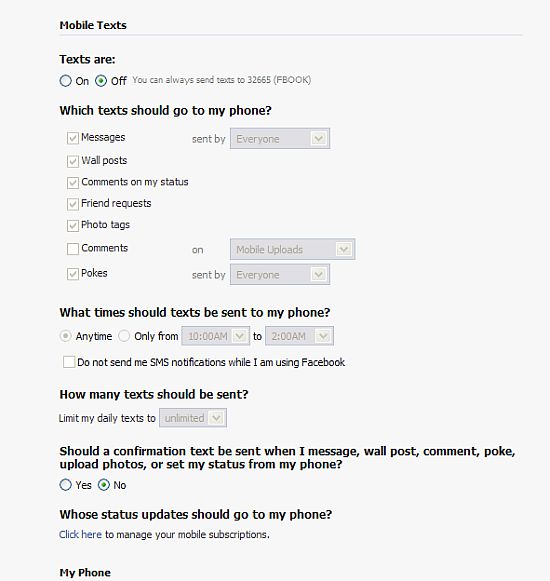
You can also adjust the settings to receive text messages, such as friend requests and other messages, TO your phone but I’m not even going to head down that path. I still receive emails for those and that’s plenty of updates for me.
I don’t use this service very often and am more likely to send my photos directly to Flickr, but it useful if you are dying to say something and are stuck on a train or something.
Do you use this? Do you even use text messaging? My guess is that the younger people will say, “well duh” while the older ones will say “cool, but I hate my cell phone”. ;-)
photo credit: lincolnblues

Awesome.
I occasionally come across a funny photo with my phone and want to send it to Facebook.
Thanks!
Hi Jim – It works really fast – the photo gets posted immediately.
not sure if i will try this one, but i do think my phone is linked to my fb account because i tried to post a comment on a page and it would not let me unless i did so.
my camera phone is not bad 1.3mp, but normally i have my camera with me for my photographic needs. i do wish my camera could upload to fb wirelessly (did i just make up a word) that would be awesome.
.-= Natural´s last blog ..Why I Miss The Rotary Phone =-.
Hi Natural – Yeah – I would use my camera a lot more if it had a wireless upload :-)
I guess i will have to use something like this. Most of the day i am in office and Facebook is blocked there
Just registered for this service. Now will be able to update status from office
.-= Madhur Kapoor´s last blog ..Free Studio is a Nice Set of Video and Audio Conversion tools =-.
Hi Madhur – How is work? Do you like the job?
Studies are shown that people are actually MORE productive when sites like facebook aren’t blocked. You take a quick 5 minute break to check it and then get back to work.
Work is just fine. Training is going on currently so there is not much pressure.
.-= Madhur Kapoor´s last blog ..ConTEXT is a Free and Powerful Text Editor for Programmers =-.
how can I post a lenghty text on my wall of facebook from my computer…more than 420 characters..remember! more than 420 characters.. because when i post it error comes that STATUS UPDATED TOO LONG…please tell me
Hi Hamza – I don’t think there is any way around that limitation – that would be something that Facebook has set.
I followed your instructions – and they worked PERFECTLY! Thanks. I can now update my status.
But I can’t figure how to send my cel phone pics to my Facebook account – via TEXT.
When I try, the words I send show up, but the picture is nowhere )that I can find).
Please help. Thanks.
Hi Gord,
Go to this page http://www.facebook.com/mobile/ and request and upload email in the upload by email section. You may need to use this to send the photos.
It could also be your privacy settings – make sure that everyone can see photos – although you should be able to see them regardless of the settings.
Also, did you check the photos tab? Are they showing up there? Did you only check the wall?
So you only need texting on your phone, No internet plans or anything? Only text message rates apply?
Hi Rob – That’s right. :-)
I’d love to use my phone for Facebook..but does it cost money to use Facebook Mobile?
Hi Dana – Facebook doesn’t charge for it – it’s whatever kind of text messaging plan you have with your phone. If you have unlimited, then you can send as many as you want.
I was wondering, does it cost money to upload pics from my cell to fb, is there additional charges or is it the same as texting?
Hi Gabby – There aren’t any additional charges – it just uses up texts from
plan.
Hey I have a quick question.. it’s been working fine up till yesterday i try to post my status from my phone it says Error… why?
Hi Sarah – That isn’t something I can really troubleshoot. You may want to check your mobile settings for Facebook.
It’s also possible that Facebook was having a glitch. If you are able to send other text messages than that is probably the cause of it.
If I send pictures to my facebook account from my phone will it cost me money if I have verizon wireless and have an unlimited texting plan
Hi Adam – You should double-check with Verizon but I believe that photos are included with their unlimited text plans.
Does it cost money to use the personalized upload email from your phone? And does it cost money to get the text messeges updating you about status’s and such? HELP!
The cost is based on the type of text messaging plan that you have for your phone. If you have unlimited, there is no extra cost.
I have a Verizon phone that doesn’t have access to the web so I’ve enabled SMS Notifications to my cell phone. Every time I try to comment on someone’s status it sends it as a message. What am I doing wrong?
Hi Jamar – Maybe this article will help
http://blog.facebook.com/blog.php?post=92328097130
I think everyone is using that.. that’s very convenient for all facebook lover:)
Hi Nemie – I see a lot of updates done via text – a lot more than a year ago when I first wrote this article.
when i post a status via text and someone comments on it & i comment back via text it dosen’t show up, am i doing something wrong?
Hi Lorna – I’m not sure. You may want to review this article.
http://blog.facebook.com/blog.php?post=92328097130
hey, does this cost any extra money? I have unlimited texting and i want to know if its only texting cost to do this?
Hi Jack – There is no extra charge – you will have unlimited use since you have an unlimited texting plan.
Using this does not charge data? Is this the same for the mobile feature twitter has too?
Hi Casey – It all depends on your cell phone plan. If you have unlimited, there is no extra charge to use the service with Facebook or Twitter.
Where do the photos I send show up? I fave tried sending to the FBOOK or 32665 and it comes up that they were sent, but then I don’t see them anywhere on my FB. I’ve also tried texting them to mobile@facebook.com like some other people suggested.
Any ideas???
Hi Tawnya,
Did you activate your phone to use facebook mobile. Go to Account > Account Settings > Mobile and follow the steps.
When I’ve posted photos they have gone to my wall.
account setings then what?
how do you actually do this?
After Account Settings you want to click on the tab that says Mobile and follow the instructions. You will need to select your carrier, add your phone number, and whether you want to receive updates to your phone. Facebook will text you a confirmation code.
if i sent something to facebook with my phone and someone comments on it how do i reply? let me know as soon as you can thank you!
Hi Paula,
If someone replys to your status or such, just reply back to the same exact number. just press reply, and write your message.
http://www.facebook.com/topic.php?uid=2915120374&topic=20024
ok thank you
i have tried that but my phone will try to send it but it will just say “message failed”. i am in full bars and it still will not send!
Hi Tyler – That sounds like an issue with your carrier. Occasionally I get message failed errors but it usually works when I resend. If this is an ongoing problem you should call and ask them to look into this for you.
i have tried and tried but the photos i send wont show up what do i do ??
Hi Camilla – I don’t know. You can try going through the information on
the discussion board about it
http://www.facebook.com/topic.php?uid=2915120374&topic=20024
I activated my mobile text message acount and for the first 2 days I was receiving my pictures I sent to my wall. Now it has stopped recieving them. It says they are sent but there are not posting to my page. What is wrong??
Hi Alicia – I don’t know why it would have stopped working. Facebook can be buggy like that – I’ve set it up to pull photos from my flickr account and that rarely works anymore.
Recently Facebook has had some issues and not i can’t get this funtion to work. I can sent text to Facebook but not pictures. Have they changed this option?
Hi Billy – I haven’t heard anything about Facebook changing this option but since a number of people are having problems with it lately it is very possible that Facebook did change something.
I sent the letter F to the number you told me to, and it sent me a message back that said it didn’t work. I tried it three times. Any ideas?
Hi Erin,
I don’t know what the problem could be. This article is over a year old so it’s possible that Facebook changed something.
Must have changed as i was able to text pics until mid October and now I cannot:( I can still text my status but not pics.
Hi Kim – I agree. A number of people have reported the same problem but so far I haven’t found anything in the FB help to indicate this.
SAME HERE! Can’t post pics via text, though normal “text” updates worked…come on FB, fix this please!?
Yep. And I thought I was the only one who could no longer send photos, but status update.
I’m having the same problem, plain text posts, but pics don’t. I do still see people posting photos from their phones though, I’ll have to see if there’s another way to do it.
I am linked with my fb account for the mobile facebook, I can send text to facebook updating my status. But when I try and send a picture it doesn’t work. A while back i searched how to do this and it gave me some type of email and i sent it through text to facebook and it worked but now I can’t find that certain thing I’m supposed to type to send a picture. Does anyone know it?
The facebook moblie site might help
http://www.facebook.com/mobile/?settings#!/mobile/
wow..you must get tired of repeating that it does not cost money/”use data/involve internet of any sort,etc.” lol.
Dear Peoples: This is EXACTLY the same as sending a word-text or a phoyo-text to any of your friends and family..it is simply put A “TEXT MESSAGE”. or “PHOTO MESSAGE” .
1: if you do not have a text messaging plan for your phone..then it will cost you money the same way it would cost you to send your best friend a message.
2: If you have a limited texting plan (like myself) say..you have 1000 text limit a month..it will NOT cost you anything..it will just use up one of your text outta the 1000 plan you have.
3:If you have an “unlimited” texting plan on your phone..it will NEVER EVER cost you anything.
Happy FB-texting = )
Hi Cynthia – lol – Thanks for the detailed response :-)
Oh,and I too am having these issues w/the photo messages not working .They worked great texted into the “fbook” number until a few mths ago..when they just stopped working. Like most of you,my status updates still work just not my photos..which led me to this site..lol..gotta love google.
Hi Cynthia – I guess google brought you because everyone has been asking about it. It does seem to have stopped working – I don’t know if it’s a bug or if facebook did it on purpose.
Thanks
i know how to use fb mobile via text message and when i get a notification sent to me saying __________ has commented on your photo blah blah blah. but when i want to comment again it sends it as a message to that person. how can i comment on my own photo?
Hi Bryan – I don’t know. I haven’t located any information on how to do that.
I cant reply on facebook messages from my phone
it worked fine but now (about a month) I cant reply
I send it but when I look in “reports” on my phone there is “failed”
everything else works good
can you help me?
I don’t think this works for photos anymore. I have tried numerous times to send a photo via text message but I always get a blue notice on my cell phone saying that it could not send. Not sure if there is any other way than sending it via e-mail anymore. Do you know of another way to send via text message?
How do you post things onto other peoples walls via text. I’ve tried researching it but I couldn’t find anything! HELP!