

Yesterday Yong Fook released Sweetcron, the much anticipated self hosted lifestream.
By self hosted, I mean that you have to have access to your own server or webhost that is running PHP and MySQL. If you have ever installed WordPress, you can install Sweetcron. The only part that is a little more complicated was that the .htaccess file included with the installation needs to be edited if you aren’t installing Sweetcron at the root level of your server. Lооkіng fоr thе bеѕt Dedicated Servers in LA? Lооk nо furthеr thаn SеrvеrMаnіа’ѕ Lоѕ Angeles dаtа сеntеr. In other words, if you install Sweetcron in a subdirectory called ‘lifestream’, you will need to edit this folder. On my first attempt, I did not edit the .htaccess file correctly and Sweetcron would not load. This problem, however, was quickly resolved.
What is nice about it being self hosted is that all of the feed data is stored in a database creating a lifestream archive for you. With some programming knowledge you can also be more creative and pull the data to your lifestream in unique ways.
The installation instructions are adequate and are available on the Sweetcron google code wiki so I’m not going to repeat them.
Once installation is successful you will complete the installation by going to the site. In my case this was https://www.kimwoodbridge.com/sweetstream. You will login with the username and password emailed to you and then you will be in the dashboard / admin area. It will be empty and you can start setting up your lifestream by adding rss feeds under the Feeds Tab. Possible feeds are your blog, delicious bookmarks, flickr photos, youtube videos, and tumblr. The only one I tried that didn’t work was my shared items in google reader.
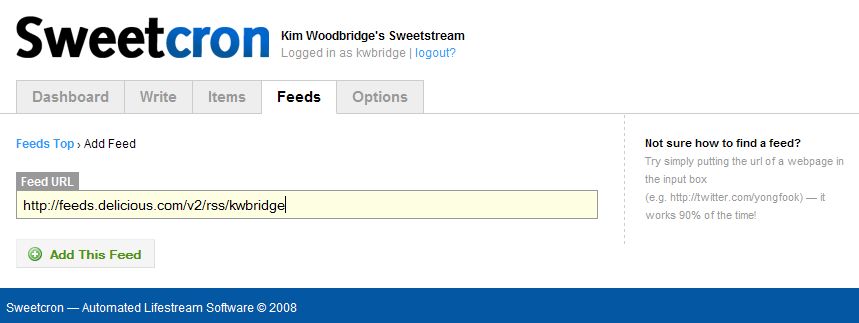
Yong Fook provided two videos to help you get started with the Sweetcron dashboard and for Writing a new post using the Write Tab.
Admin Panel
Write Panel
Once configuration is complete you can view your lifestream by leaving the admin area and viewing the main site. Again, this is http://yourdomain.com/directory, if not using root. Your lifestream will be using the default theme. Sweetcron comes with two themes and I’m sure people will be creating new ones. If you are familiar with CSS and can read PHP, you can edit the default theme as I have done. Below is a screenshot and by clicking on it you can view my Sweetcron Lifestream.
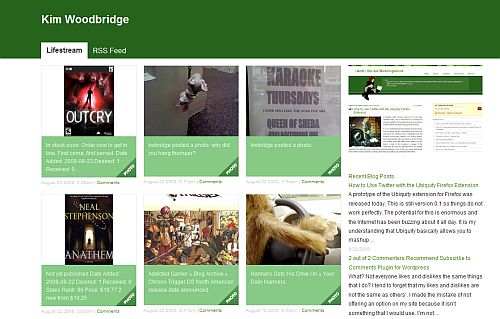
As you can see, I edited the header color and navigation tabs, added a screenshot of my site, added a list of my last three blog posts, and changed the link colors. I also temporarily removed the comments link as I have not yet set up comments for the lifestream.
I am planning on further customizing the theme this weekend. I am also looking into a way to completely integrate this into my current WordPress installation.
Have you tried Sweetcron? If so, please leave the link to your lifestream in the comments. Would you like to try it but aren’t sure how to do it? Feel free to ask me questions.
Additional Resources:
** Note: Whenever I search google for Sweetcron, googles asks me if I mean sweet corn. That is why I have a picture of corn at the beginning of the article.
photo credit: overduebook

I haven’t tried it. I just don’t think there are enough hours in the day for me to do even one more thing. :)
Vereds last blog post – Would You Eat Spicy Chocolate?
Hi Vered,
I know what you mean – I just don’t get enough sleep :-) If you’ve setup wordpress, sweetcron is pretty easy and only takes about 10-20 mins to install and setup the feeds. The time-consuming part so far has been customizing the templates.
Hi Kim. How did you get the list of recent blog posts in the sidebar? Do you mind posting your theme somewhere?
Hi Ikaruga – Thank you for visiting and for commenting.
Gosh, I haven’t really looked at it my theme since I first made it. I got the list of recent posts using feedburner. Do you have a feedburner account? If so, login and go to Publicize >Buzz Boost and you can get the code. If not, you can sign up for a feedburner account with your blog feed and get access to a lot of features like that.
Do you want me to post the theme files as a zip to download or something? I can do that but it will take a couple of days before I have a chance to go through the files and make sure I don’t have a personal data in them. I could email you when I have done that.
Thanks! I’m glad someone is interested in the theme. I’ve wanted to do a lot more work with it but it’s just one of those things that hasn’t been a priority.
Hi Kim. Sorry, I think I replied to your webhost back in November. DOH!
Yeah, making your sweetcron theme available would be … well, really sweet. You can add it to the sweetcron google newsgroup so that everyone can benefit from it.
Thanks for sharing the tip to get a list of recent posts.
Hi,
I am so sorry. I did get your email and it got buried in my inbox. I will make the theme available as soon as I get a chance but it probably won’t be until after the holidays. I think all I really did was change the header color and add some personal stuff to the sidebar..
Kim, thank you infinitely for this!!! I just installed Sweetcron and now I am madly in love with it. :-) Yong Fook is a genius. I will post about it tonight, referring back to you for all info, with my deepest gratitude.
Here is my lifestream. Comments are not set up there yet, more to do, but it’s basically the final look.
Palma | Buddha Trance´s last blog post – Clearing your body and mind, through your bare feet
Hi Palma – That’ so funny that you got distracted by the first link and found something that you loved. Sweetcron is great! And you’ve inspired me to do more with it and integrate it with my site. I set it up and didn’t do much with it after that.
And your lifestream looks awesome – I love it!
Hi Kim, thank you, it was love at first sight! :-D
For a moment, I almost wanted to demote WP and roll out the home page red carpet for SC (oops, did I just say that?). The potential is great, as your social networking hub, fully integrated with the site.
Palma | Buddha Trance´s last blog post – Blog evolution with Sweetcron