

Last week I wrote about Theme Test Drive, a WordPress plugin that will allow you to work on one theme while your visitors view another. This plugin is great for making changes and for theme development.
In the comments, Jeff Starr mentioned that he had been using a similar plugin called Theme Switch for years. I decided to test Theme Switch and write about that one as well.
- Download and install the plugin.
- Activate.
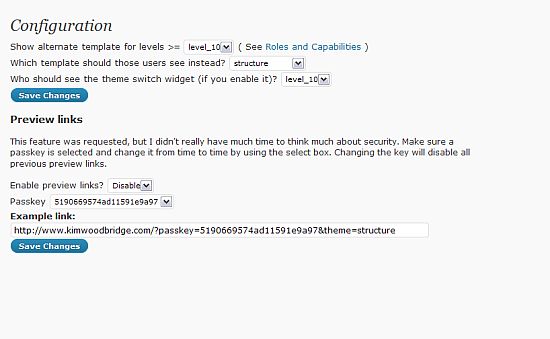
Settings
- Levels – You can set the level of user who can see the template that you are working on and the settings provide a link to the Roles and Capabilities section of the WordPress codex. I think most of us will want to leave it on the Admin level.
- Template – This allows you to select the template that the Admin will see. This would be the template that you are working on. Regular visitors will still see your current template.
- Preview Links – This setting will allow you to enable preview links, which you can give to friends or colleagues so they can take a look at the theme in progress. This is very useful because you don’t have to change the level of access for someone else to view it. Theme Test Drive doesn’t have this feature.
- Theme Switch Widget – The plugin also comes with a widget that will activate a theme switch feature on your site. This is ideal for theme creators so that all of the themes can be viewed. You can also set the level of access for who can see the widget. You could set it for just yourself and other admins or for all visitors of the site.
- Appearance – When you set the theme you are working on, you get all the settings for that theme under Appearance. If I decide to work on the Default theme, I will get the Header Image and Color option listed under Appearance. Visitors will still see the current theme.
- Widgets – With this plugin, you can play around with the widgets on the theme you are testing and it won’t affect your current theme. I added the theme switcher widget to the theme I was customizing but it didn’t show up on my current theme. This is very useful!!
I am really glad Jeff recommended this plugin in the comments. It has all of the features of Theme test drive but also includes preview links, a theme switcher widget, and includes the ability to change the widgets without affecting the current theme. If I was going to have to choose between the two, I would definitely choose Theme Switch.
photo credit: thomas.merton

Hey Kim, this is great. The Theme Switch plugin is relatively new, but works just as well as the tried and true Theme Switcher plugin, which is actually the one I was referring to. It has been around for years and was written by WP guru Ryan Boren.
Both are great plugins, but the Theme Switch plugin you review here definitely has more features than Theme Switcher, including the nice Admin Options page.
There are a couple of other theme switcher plugins available as well, but the one thing missing from all of them is the ability to redirect the user back to the page they were at when they changed themes. As far as I know, all of the theme switcher plugins redirect back to the blog home page, which certainly works, but requires the user to click around a bit to get back to the page they were on.
.-= Jeff Starr´s last blog ..HTAccess Privacy for Specific IPs =-.
Hi Jeff – Doh! I wrote that I used your recommendation and then found the wrong one.
That’s good to know about the theme switcher redirect. I played with the widget on this plugin a little but didn’t want to add the feature so didn’t do too much with it.
Thanks!
I never thought this could possible.
This is really great, there was several times when I was making some tweaks with my blog all my pages went blank which made me panic, since then I was quite cautious now this plugin will be very handy, thanks.
.-= Chinese Girl´s last blog ..Dongchuan Red Soil – Unique China Pictures =-.
Hi! I was just thinking about your earlier today :-)
The plugin works great and you should try it next time you need to make some edits.
Looks useful. Thanks!
.-= vered | blogger for hire´s last blog ..Did Karl Lagerfeld Just Call Me Fat? =-.
Thanks Vered :-)
Oooh no, I just released a new version of my theme switcher and found your post later. I had a look at Ryan’s plugin and it has a few features I think I will steal for my own plugin. I wish I would have found it before today’s release.
Thanks for the review!
P.S. I hope this is not a dupe? I think I had to activate cookies + javascript.
Hi Nicolas – That’s great! I’ll check it out.
Great stuff,
am about to move my wordpress hosted site to a self hosted platform & the whole themes / setup has had me birthing kittens.
.-= Paul Harper´s last blog ..Emerging Markets : International reserve losses in the 2008-9 crisis a study =-.
Hi Paul – Great! I’m glad the plugin will help.
Hi Kim! I have made the new release. It’s possible to switch themes and stay on the same page, a feature Jeff Starr was missing. There’s a demo at http://www.nkuttler.de/wordpress/theme-switch-and-preview-plugin/ where you can try the theme switcher on my blog.
Hi Nicolas – Thanks! That’s great – Jeff may want to try your plugin out now because it sounds like that was the one missing feature that he really wanted.
Nicolas, that looks perfect =) I can’t wait to try it out!
.-= Jeff Starr´s last blog ..4 =-.