
How do you notify Twitter of your new blog posts? Do you add the post manually, use Twitterfeed, use Twitter Tools, or do you use something else? Personally, I use Twitter Tools for WordPress. Not only can you set it to send your new posts to Twitter, but it also contains a number of other useful features.
Twitter Tools is a WordPress plugin created by Alex King that assists me in using my Twitter account from within WordPress. Below is a screenshot of the settings. The settings are accessed in WordPress via Settings > Twitter Tools.
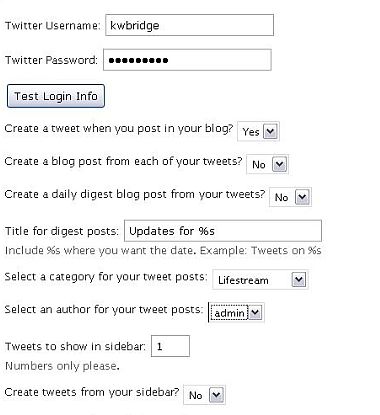
You can send a tweet each time you publish a new post similar to Twitterfeed. In Twitter Tools, however, you can also create a new post from each tweet or a post containing all of your tweets for the day. You are probably thinking what I was first thinking – why would I want a blog post containing my tweets? That would be a dull post especially since it wouldn’t include the replies of those your were conversing with. But then I realized that using this feature could be a way of creating an archive of your tweets. In the settings, you can also set the category for the tweet post. If you create a new category and then exclude the category from being displayed on the front page, you would have a tweet archive that is only accessible from the archives. I haven’t tested this code yet, but I will and I will let you know what I discover. My guess is that the code can be included in the archives as well and that the tweet posts can be hidden.
The other great setting in Twitter Tools is “Tweets to Show in Sidebar”. By using the Twitter Tools sidebar widget, you can show your last X number of tweets. On this site, however, I did not want to use the widget because I had unused space in my header that was perfect for displaying my last tweet. If you don’t want to use the widget, you can use the following code anywhere on your page.
php aktt_sidebar_tweets();
This will display the number of tweets that you have in your settings. Make sure it is enclosed within . I am currently having trouble displaying code properly in my posts – I apologize for this.
Finally, if you do use the widget in your sidebar you can also set it to send tweets. So, you can send messages directly to Twitter straight from your WordPress sidebar.
All in all, Twitter Tools has a lot of cool features. One small issue though – if you are editing tags and categories in old posts turn off sending posts to twitter. I’ve found that Twitter Tools will send edited posts to Twitter as if it were a new post. Otherwise, I couldn’t be happier with this plugin and in writing this I now have a new project. I am going to create a category for blog posts created from my tweets and see if I can exclude that category from my front page and from my archives.
What do you think? What do you use to send posts to Twitter? Do you even send notifications to Twitter of your blog entries?

Hey Kim,
Though you might be interested in the stuff that he share and follow plugin does to help twitter users.
ok, it does
– bit.ly url shortening
– twitter tweet suffix that is set on a global or post level
– tweet prefix set at global or post level
– add title of post to tweet
so basically it’s easy to setup a tweet like
To win this competition click this link http://short.link/ or RT with VIA @twittername
or much more simple VIA @twitter name
or #followfriday
as a suffix and either the url, the title + URL or some other text of your choice + url
all the best
Andy
Hi Andy – Thanks for the info. I don’t use Twitter Tools anymore – this article is over two years old.