
Last summer I wrote an article about how to add a Facebook application to your news stream that you had previously removed or “hidden”.
Well, since the last Facebook design change that method has become obsolete, as someone pointed out in the comments.
So, here is the new way to unhide a hidden application or page.
You can still use the Edit Options link at the bottom of the Home or News Stream page to add friends that you have hidden. (But I’m sure you’ve never done that ;-) But this no longer works for Pages and Applications.
After the commentator told me it didn’t work anymore, it took some time for me to figure out how to do it – being as Facebook is SO intuitive.
- Go to Home or News Stream page
- Switch to News Feed if you are using the Live Feed. (Does anyone not use the live feed?)
- Go to Hide something. Remember you have to hover on the right side of an item so the hidden “Hide” button appears. It doesn’t matter who or what you select to hide because you will immediately be able to add it back.
- The area will be yellow and there will be an Undo button and and Edit Options link. Click on the Edit Options link.
- You will get a box with three areas of hidden information: Friends, Pages and Applications. Make sure you unhide whatever it was you hid in order to get this box.
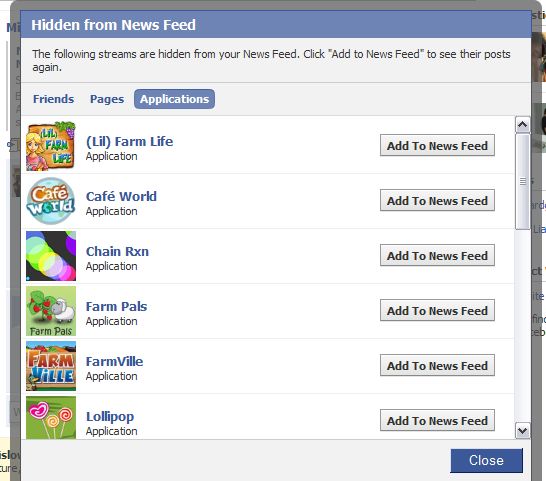
- And remember this won’t work if you are using the Live News Feed. Switch to the regular or boring News Stream.
- Click on “Add to News Feed” for each item you want to see again and click the Close button.
Sometimes using Facebook is like a really hard treasure hunt that has a very disappointing prize.
photo credit: Rob Ireton

Useful, as usual. Thanks. :)
.-= vered | blogger for hire´s last blog ..Genetic Testing for Children: Would You Do It? =-.
Hi Vered – Thanks :-)
Thank you so much.
You’re welcome :)
Thanks so much!!
the “friends” “pages” or “application” links didn’t show up on mine…
Hi – I’ve heard other people say this. I would try clearing your browser cache and trying in a different web browser. If you are following the instructions, then the only other thing you can do is contact facebook for support.
There is an edit options button on the right side at the bottom of the home page at the end of the posts This seems much easier then your way
Hi Susan – That works in the News Stream – not the live one. Facebook keeps changing the way this works. When I wrote this article the Edit Options link wasn’t working.
Thanks.
I hid mafia wars from my news feed because that was all there seemed to be on there. i tried what you have above to bring it back but it not working. How do i get that “hidden from newsfeed” box up you show above
Hi Jon – I need to update these articles yet again because Facebook has moved the setting back to where it was originally.
Try the instructions here
http://www.kimwoodbridge.com/how-to-add-a-facebook-application-to-your-news-stream-that-you-previously-removed/
THANK YOU THANK YOU THANK YOU!!!!!!!!!!!!!! This was DRIVING me CRAZY!
well i clicked edit options and only 1 box shows where i can type someones name in to hide them but it doesn’t show mw anywhere or the box as you have shown.
Switch to Top News from Most Recent ( links at the top of the Home Page) and then when you select Edit Options you should see the box where you can unhide people and applications.
As Mafia Wars says “You have been promoted to my new Facebook guru”
Love ya
Thanks :-)
Kim, all I can say is THANK YOU!!! I’d tried searching on FB for this problem and kept coming up with an answer that didn’t work. But thanks to Google, I stumbled across your page here and discovered the key piece that I wasn’t being told. Clicking on the “Top News” feed first. So glad to finally get that figured out. Very much appreciate your input. Huge help!
Hi Pat – Great! I’m glad you found the site and I’m glad the article helped you out :-)
How do you view the “Live Feed”? All the top of my Home Page says is, “News Feed”, “Top News”, and “Most Recent”. I put it on “Most Recent” every time I log on (because the default seems to be on “Top News”. And even in the “Most Recent” feed, if I want my feed to keep moving, I have to keep refreshing it. Is there something I’m missing?
Use Top News.
http://www.facebook.com/help/?faq=14863
omqqq . thnxx soo muchh . BIGGG HELPP =]
Hi Vanessa – Glad it helped – this got moved around with the last updates and finding it wasn’t easy.
I will have to come back to this good post when on my own computer – I need to learn more about facebook and apps. My friend was showing me how to add and she added the Democratic fund raising group to my feed. Although I read their newsletter, I do not want that or the Republican one on my facebook page….now I do not know how to delete it…but I am not home and working on a public computer for just a little while.
I also wanted to let you know the UNICEF book is up on site as of today…famous for computer assistance and now for Cheddar and Broccoli Loaf…Such great talent..
Hi Patricia – If you go to Applications > Edit Applications at the bottom of the Facebook page you can remove applications completely rather than just hide them. Facebook can be a pain to navigate.
I saw your post and was at your site but haven’t gotten a chance to take a look at it yet. Thanks!
Should come in very handy soon (I deleted my account there too) ;)
.-= Dennis Edell´s last blog ..Are You Thankful For Your Blogging Community? =-.
Hi Dennis – Sounds like you did a big online purge.
With more to come….
.-= Dennis Edell´s last blog ..Are You Thankful For Your Blogging Community? =-.
Thanks! You are so correct in your statement about the oh-so-intuitive Facebook logic!
Hi Karen Lynn – Yes! And then once we get the hang of it, they change the way it works ;-)
THANK YOU! I have been trying to figure this out forever
Hi Michelle – Great! I’m glad it helped.
Where am I going wrong? I see nothing under Number 4 in your instructions and when I hover over the Hide button I see no yellow area with an Edit Options button!
Hi Tooki – I just fixed the list or instructions – it wasn’t displaying properly.
But that part might not be clear – you have to hover in that area so the Hide button appears but in this instance you have to click on it to proceed.
Thanks for the prompt reply! I did get that I had to click the Hide button, but when I do I only see a grey box with a Hide (whatever) button and a Cancel button, rather than Edit Options. I am definitely on News Feed not Live Feed. Is there something else in my Settings somewhere, maybe?
Hi Tookie – Oh goodness. Facebook has changed it again! My posts can’t keep up with them. On the News Stream page (not Live) scroll down to the bottom. On the right will be a link that says Edit Options – you should be able to locate it there – there are two sections – Friends and Applications.
Hooray! Thank you thank you thank you! You are so right about Facebook being very unintuitive! (Damn it, I’m a computer tutor!! LOL!)
Hi Tookie – Not only is it unintuitive but they keep moving the settings around.
Thank you!!! This is such a FIND, you are the best!
Hi Debby – I’m glad it helped – Facebook settings can be hard to find.
I couldn’t crack this! I could not switch to News Feed mode from Live Feed mode. I guess this thing doesn’t work in Live mode. I could manage to reach till the Edit Options link, but could not see the different categories as shown in the picture and hence couldn’t find Cafe World :(
Please help!
Hi Deepak – Facebook has once again moved the settings. You do need to be in the regular News feed – it doesn’t work with the Live feed. Then scroll to the bottom of the page and on the right will be a link that says Edit Options. Click on that and you should be able to add the application back to your news stream.
Quicker way is to switch to Status Updates. When you go to Edit Settings from there, that screen above pops up without having to delete something first. I used your way today — thanks much! Then someone told me about this. Wanted to return the favor.
Hi Brenda – Thanks! That is much faster :-)
When I try either of those methods, unhiding a friend is the only option available to me. I can’t come up with a list of hidden applications no matter what I do. Any advice? I’m wondering if I have some setting ticked incorrectly somwhere.
thank u very much! culdnt crack dis on my own!!!.. super thank u!! v(^_^)v
Hi Niel – I’m glad it helped.
AWESOMEEE Ive been trying 2 figure this out for ever! THANKS!!!
Hi Dee – Thanks for stopping by. I’m glad it helped :-)
Hi Gretchen – This might be a stupid question but have you actually hidden any applications?
Lol…yes, I have! I’ve hidden Mafia Wars from myself and I so regret it now. Any help would be so appreciative!
Hi Gretchen,
Ok. I know you’ve done this but try again :-)
1. Switch to News Feed – make sure it isn’t the Live Feed.
2. Scroll to bottom of the page and there is a link on the right that says Edit Options.
3. The window that opens should have at least two tabs – Friends and Applications. By default it will be on the list of hidden friends. Click on the application button and you should see Mafia Wars on the list. If it still isn’t working, you may need to try a different web browser or contact support.
Doesn’t work anymore, not for me. And I tried what he said to do and the screan that used to come up doesn’t anymore.
Thank you! Thank you! Thank you! I couldn’t figure out how to do this on my own & the instructions in Facebook are wrong.
Hi Nocturna – I’m glad it worked!
Thank you so much for your instructions to unhide an application on facebook. I searched everywhere and tried every obvious thing I could come up with to no avail.
Hi Barbara – You’re welcome. I’m glad it helped.
THANK YOU!!!!
I spent ages trying to work it out and couldn’t, thank you very much!!
Hi Charlie – You’re welcome. I’m glad it helped :-)
Thank you for sharing. It helped.
Hi Tracy – I’m glad it helped :-)
Having problems with Farmsville Bonus checker and it seems alot more people are to. They can’t get it to load today 01/31/2010 when it was loading just fine last night. Any help will be greatly appreciated.
Thnk you for your time
Joe
Hi Joe – I wrote this article that is general information about how to unhide different applications on Facebook. I don’t know that much about Farmville and can’t provide support for it in that way.
My guess, however, is that Farmville or Facebook was having issues yesterday that was causing this problem.
Good luck.
Hi, thank for your info but i dont think this still applicable now..I tried but I didn’t see any selection for friend, pages and application..
Other than that I want to ask if you know how to edit the list on the left side under the news feed…I need to filter some post based on the application..but I can find how to manage it..thank you so much…
Hi Agatha – Try the edit options link at the bottom right of the page – that’s how it used to work and it’s probably gone back to that again.
Click on Friends at the top of the page – that will give you a list of friends and pages that you are a fan of – here you can create your lists. Once you have the lists you can filter on the News Stream / Home page.
i did it. it was just there all along.
click:
home(top right corner) then
friends(left top) then
status updates(under “friends” ) then
edit options(bottom right) then
voila! add to news feed.
its funny. i thought i would never see it. i searched for an hour.
Hi Regina – Well, that seems really hidden ;-) I’m glad you found it.
i tried doing what you said but when i click the edit options button all it says is “The following streams are hidden from your News Feed. Click “Add to News Feed” to see their posts again.” and it doesn’t show a add to new feed button
Erica – Does it list the items that are hidden? Do you actually have
anything hidden? I would try logging out of Facebook, clearing the browser cache, and restarting the browser. If the problem persists, you will need to contact Facebook support.
Thank you for your help. The other method wasn’t working. I could get to edit options but it would only allow me to edit the people, not applications. Your way worked!
Hi Dinah – I’m glad one of the solutions helped you out.
Hi Kim,
Thank you so much for helping the community here! I, too, am frustrated with not being able to unhide hidden apps on FaceBook. It sounds like I probably have the same issue(s) as Erica. When I click on “Edit Options” in the bottom right hand corner, it appears to only work for hiding/unhiding friends and changing the maximum number of friends that will be viewed in my newsfeed. It sounds like maybe the UI of Facebook has changed once again.
As you suggested to Erica, I cleared my brower’s cache and restarted. To no avail. Any suggestions would be greatly appreciated!
Thanks,
Ellen
I just figured it out. If you go to “Status Updates” under Friends, what you mentioned shows up when you click on the “Edit Options” button at the bottom of the screen.
Hi Ellen – I’m glad you found it! And I wish they would stop moving it – and it really isn’t in an intuitive location. Guess it’s time for me to update some articles again ;-)
Can you imagine trying to write a book about Facebook? It would have to be done in pencil.
thanks a lot!! I have been trying to get this to work for the longest time!!
Hi Nadia – Great! I’m glad the article helped.
Thanks so much for this great article…I finally got back the application I hid accidentally.
just one comment, the news feed links are now labeled ‘top news’ and ‘most recent’ instead of ‘news feed’ and ‘live feed’
Hi CeeJay – Thanks – I wrote the article before they made that change and haven’t updated it yet :-)
Thank you so much. I just wish they would stop changing things around.
.-= Belle´s last blog ..PromiRaten – Das Filmchen =-.
Hi Belle – I think a lot of people feel that way :-)
help, please?
all of a sudden, none of my friends’ game posts are showing in top news or recent. I checked with the suggestions above, but the only things that show as hidden are the ones I meant to hide. when the page refreshes, their posts of the last few minutes show for a second, then it goes back to older posts and none for games. i even got screenshots of what flashes there, but i don’t know how to make it stay! If it weren’t for Game Scrubber I’d miss everything, but i still can’t get the gifts that are time sensitive.
by reading the developers’ blogs, there is no doubt at all that the changes are all for the apps and none for users. they keep rearranging things to make ads more prominent, make & access easier for ppl who pay them. I know it’s a business, but they aren’t hurting for money. They’ve even got their own ‘app bucks’ with the new credits, and they want apps to use them~ and then give fb 30%. They are more expensive for users, of course, at a dollar each instead of the five for a dollar the apps have been using.
(Sorry~ got off track~ excuse my venting, please! But that is why they keep ‘simplifying ‘the pages…
thanks for any help!
Hi Cathy – I’m not sure what’s happening but you could try this.
Go to Account in the top right > Application Settings
Click on Edit Settings for the Application you want to see
Click on Additional Permissions and see if the application has permission to post to your wall and/or News Stream.
Thank you thank you thank you!!!! I hide a particular application and it was driving me crazy trying to figure out how to unhide it. You are a live saver!!!
Ugh. . I meant to say “hid” not “hide.”
Hi Suzanne – I’m so glad it worked! I wish Facebook would stop moving things around.
And I read it as hid :-)
I tried this on the only selectable news feed, but it permanently hid one more app and brought me to the menu to unhide people, which cannot address apps. It seems like if you ever hide an application update, it’s gone for good now.
Hi Matt – Try the original method.
http://www.kimwoodbridge.com/how-to-add-a-facebook-application-to-your-news-stream-that-you-previously-removed/
Thanks a lot, finally something that worked
Hi Cycake – Great! I’m glad it worked.
I finally figured it out, was driving me nuts
Newsfeed
Friends
Status Updates then scroll to bottom of the page
Click Edit Options
This is different to the Edit Options on the main Newsfeed page
Hi Hannah – Great! And thanks for the alternative way to do it. It keeps changing.
THANK YOU!
Thank You!
Hi Prateek – I had to edit out most of the thank you’s but I really appreciate it :-)
Hi Kim!
Such a USEFUL service you offer to people who are struggling to troubleshoot their issues! Thank you so much for taking the time to post these steps.
With regards to “How to Unhide A Facebook Application or Page,” I followed the steps you describe above, but don’t seem to get a separate dialogue box (screen shot above) for “Hidden from News Feed” that shows apps for FRIENDS, PAGES or APPLICATIONS. I have two friends that inadvertently hid game apps: FarmVille and Mafia Wars. Trying to unhide them is like trying to find a needle in an ocean of haystacks! It shouldn’t be so difficult for Users to unhide simple apps like these! I am sure part of the problem is differentiating between LIVE vs. NEWS FEED.
Any feedback you can provide, would be most appreciated, thank you!
Warm regards,
Lisa Smith
Hi Lisa – Try going to the home page, selection Top News, scroll to the bottom to Edit Options and then you should have the box with Friends, Pages and Applications.
awesome. Thanks for the info. I never would have figured that out and I like to think I am farily smrt
Hi Dan – I’m glad it helped. I don’t think it matters how smart we are – Facebook makes things confusing.
Wow thanks been trying to figure this out for awhile!!!!
Hi Kathy – Great, I’m glad it helped.
omg thank you regina! you’re a lifesaver!
thank u so much….. reallly… i ws so stressed up i hide my TI from feeds… i needed that back
TY :)
Regards
Hi Manpreet – Great – I’m glad it worked out for you.
THANK YOU, THANK YOU, Thank You!!!! *Why* should this be so difficult to figure out? Sure do appreciate your posting for us.
Hi Lyn – Facebook keeps moving the settings around so it is unnecessarily complicated. :-)
thank you thank you thank you-i’ve been trying to figure out how to do this for ages now and was completely stumped. This info really helped keep me from going insane lol
Hi Louise – So glad it helped. Don’t let Facebook make you too crazy ;-)
Not working for me, tried for both news feed and most recent. After I click mafia wars is still listed as hidden along with a bunch of other apps.
If it’s not adding it back after you tell it to unhide then there is some sort of Facebook glitch. You may want to clear your browser cache, restart your browser and then log back in. Otherwise, I would try again in a couple of days.
That worked great. I have been trying for a couple of wks, to unhide an app & so has another friend. We both really appreciate it. Would not have been able to do it without this. Thanks so much. Have a great day. :)
Hi Rose – I’m glad it helped. Thanks :-)
Needed to un-hide an application and could not find out how until I stumbled on your stie. Many thanks! FB’s help center is useless!
Hi Isabel – I’m glad this article helped you out. Thanks for visiting.
You’re not kidding about it being challenging to find a how-to on FB, but online as well, I’m glad I found your explanation fairly quickly! Thank you!
Hi Rosie – Well, it doesn’t help that Facebook keeps moving the settings around ;-)
This was very helpful. Thanks!
Hi Amy – You’re welcome. I’m glad it helped.
UPDATE! I dont know if anyone has had trouble locating the unhide box where you have the option to click “applications” but I had to click “top stories” not “most recent” on my newsfeed to make that box appear. Hope this helps anyone.
Thanks Jen – Facebook seems to move it around faster than I can keep up with the articles. If I ever wrote a book about Facebook, I think it would have to be in pencil ;-)
YAY!
Very helpful! :p
Facebook itself didn’t seem to have the answer, so thanks for this!
Hi KQ – Glad it helped – thanks.
i got lost from point 4.
The area will be yellow and there will be an Undo button and and Edit Options link. Click on the Edit Options link.
I just don’t seem to find the undo button or the edit option when it comes to stories. Bottom right edit option only allows me to hide/unhide friends from the newsfeed but not apps .
Hi – Try the original instructions
http://www.kimwoodbridge.com/how-to-add-a-facebook-application-to-your-news-stream-that-you-previously-removed/
Makes sure you are on Top News rather than Most Recent.
Thank you! <3
This helped me. Thank you so much!
Call me crazy, but I can’t figure it! nothing changes to yellow and it just blocked something else! i’m on news feed….it doesn’t even let me choose live feed….so not sure what the deal is….thanks!
i figured it out….turns out terminology is different on mine than your instructions…same spots, different headings! Go figure! Either way i got it! thanks….you headed me in the right direction!
Hi Lisa – I’m glad you figured it out :-) The Facebook terminology has changed since I wrote this article.
Thanks for the info. It’s changed yet again and you can only find this ‘Edit’ menu under the ‘Status Updates’ link under ‘Friends’ All the other edit boxes don’t give enough options like the one above x
Thanks! I know – I think my Facebook articles are going to need to be written in pencil.
Hi Kim!!!
Regarding your suggestion posted March 4th at 8:57 A.M. :
I was prompted by another site to un-check “Permission to publish content to wall”, which I did, then I tried to go back in app settings, and it no longer allows me to re-check it…it only allows me to bookmark it. I’m losing my facebook mind, and the dark circles under my eyes are getting worse trying to figure out how to fix it and get Mafia wars back on my feed. I also tried using the top news and edit options, but mafia wars is not listed there. Any suggestions would be greatly appreciated.
Thanks,
Ralph
Hi Ralph – Is it possible that you blocked the application?
http://www.facebook.com/help/?faq=16976&ref_query=unb
Not at all. I opened the profile for the sole purpose of playing mafia wars, but posts were never even on the feed, live, or top news. When another site said to uncheck the box “Allow content to be published to wall”, it didn’t fix anything, and now all apps (games) only have “Bookmark” on additional permissions.” Farmville and Treasure Isle are on the feed, but still no mafia wars.
Hi Ralph – I’m sorry – I have no idea.
I located another location to check. Go to Account > Privacy Settings > Block Lists > Edit Your Lists. At the bottom of mine Mafia Wars is blocked – maybe it is on yours.
Hi Kim,
I admin a Page but can’t see it’s posts on my News Feed. I tried the above instructions. It’s also not hidden as I tried that too. Please help!
Thank you
Seema
Are you a fan or do you like the page? I think you need to do that as well as be an admin.
Gracias!!!
thank you – a great help!
Thanks for your clear explanation, you fixed it for me.
I’m not really sure that worked.
I was in account -> privacy settings -> Edit your settings for using applications, games and websites
And I turned off letting it post to my wall trying to help someone else…. big mistake… I did what you said went to news feed, deleted, undeleted, but its still not listed on that page anymore… so I’m confused.
It seems that the game DOES post to my wall, but its no longer listed as being able to do so? So now I’m not really any further ahead trying to figure out why some people can’t get the game to post to their wall
It’s posting to your wall but says that you can’t? Sounds like some sort of bug to me. I would try logging out, clearing your browser cache and logging back in again. Otherwise, I’m not really sure what is going on.
Update again….it took me a while to re-add as FB has changed wording since this original post by Kim. It is again quite simple if you know where to start. First, go to your Facebook page, then…..
1) click on “Top News”
2) Scroll down to bottom of page and click edit options
3) Then click on the news feed for the application you want to restore.
Done!!!
Thanks Matthew – It’s pretty much the same but the names of things have changed …
hi i click on the hide bottom (the x), but it shows me only 3 option 1 hide this post 2 hide all post by XXX 3 mark as a spam… there is no yellow Edit Options link… can you help me?
Have you switched to Top News on the Home page?
These instructions no longer work. Does this mean back to the drawing board?
Hi Ruth,
Try these instructions – if that doesn’t work, then something is wrong with Facebook.
http://www.facebook.com/help/?faq=14863
They’ve changed the system again and I can’t get it to unhide things.
Hi Albert,
Try these instructions – if that doesn’t work, then something is wrong with Facebook.
http://www.facebook.com/help/?faq=14863
I cannot get it to work either – I click save, everything is still hidden. I have contacted facebook – they say contact zynga, I contact zynga – they say its facebook, which I totally believe since it is facebook settings that arent saving – very frustrating!
Hi Heather – It is frustrating. I do think it’s a Facebook bug and not an issue with Zynga. All I can recommend at this point is to try again later.
sadly, they have updated (aka screwed up) the process again. I have tried and tried to add two different apps – intuitively by getting on the Most Recent feed, scrolling down to the Options, clicking on the ‘x’ that appears after the app name, and then clicking on ‘Save’. You’d think that would work, but after a dozen tries over the past 2 days, each time I re-open the options box, I still see the apps.
oops – that is the Most Popular feed, not the Most Recent.
Hi Coleen
Here are some instructions, which you seem to be following.
http://www.facebook.com/help/?faq=14863
If it isn’t working properly than there is an issue/bug with Facebook.
Its pretty easy.
On the new layout.. simply go to your “home / start-page”
it does “not” matter if you are on live news, or general news tab.
just scroll to the bottom. There is a link (right side below all posts)
called “options”.
Simply click this one, and you are right in teh settings to hide/ unhide applications, persons etc from your newsfeeds.
Thats the whole magic.. ^.-
If you want to know more about these functions:The Facebook FAQ for newsfeeds can be found here.
http://www.facebook.com/help/?faq=14863
Hi – That’s not quite right – you have to be on Home > Top News. If you are on Most Recent the Edit Options links does not include an information about Applications – it only shows Friends.
Well I have tried Kim’s method and the one you suggest and any of them works for me.
I did hide an app and want it back but when I click “x” next to the app’s name and then save, my app is still blocked…
Hi Luke – I just tested this again and it’s unhiding the application.
You may want to go to the page for the application and make sure you haven’t completely blocked it.
There is actually a bug in Farmville which can prevent it from being unhidden. Check if you can only unhide some apps.
Hi Mike – Ok. That’s good to know. So, if Farmville was hidden it isn’t possible to get it back in the news stream?
This does not work for me. I’m trying to show the feed for paradise life and no matter what I do it won’t show. Please update!
Hi – I have been told that there is a bug with Farmville – it won’t show even when you unhide it. Perhaps Paradise Life has the same problem.
In new facebook layout, where do you unhide application? Home > Top News, and select the applications i want to unhide and click save, same problem. I really wish FB would have separate game feed.
Hi Jennifer – Recently they changed the way it looks and you can get to it from Top News and Most Recent > Edit Options. Scroll down to Applications and the game should be listed there.
Where is the “Go to Home or News Stream page”… I dont know, how can I do that… please help me!!!
In the top right of Facebook is a link that says Home. That page is the news stream.
Call me a n00b if you like, but ‘where is this “News Feed” vs. “Live Feed” option you speak of?’
They are now called Top News and Most Recent.
LOL I love the comment about fb being a treasure hunt with not so much a good prize at the end. So true. There are so many hidden and useful tricks as you might call them here on fb. It takes magic and a voodoo spell or two just to contact fb with a problem. They expect us to be sheep in the cyber field of scams and hackers attacking us every day. They allow questionable apps that their only real goal is to get access to our info and friends lists. You can be banned for asking to many people to be friends but this is a social network isn’t it. Why should you not be able to ask whoever you want to be a friend? that’s how you make new friends. You interact with people that are strangers every day. Should you be banned from doing so because they are not known to you. It just get’s a little confusing, join fb the biggest and best social net out there and have it taken for being social???. Peace to the world .
Hi Keith – FB is odd and very confusing. Come be social … but not TOO social ;-)
Hi Kim:
I cannot get answers from other FB Support web pages after sending 4 emails over the past 5 weeks…Here is my problem (I have two,2nd one will follow).
Whenever I hide & delete unwanted post from my News Feed they keep coming back…sometimes 3 or 4 times a day. Clicking on the X and clicking “remove post” just work for a few mins or hours and then the unwanted posts are back again. For example I deleted/hide 20 plus posting today that I deleted/removed 3 days ago. I also deleted/hide them about 3 times ea day for the past 3 days. When I delete/remove them, I don’t want to see them again….Please help me…Roy Freake–Gander–NL–Canada…
Hi Roy,
Unfortunately, this isn’t something that I can help with as it sounds like a big facebook bug.
The only suggestion I can offer is to try using Facebook with a different web browser – for example, if you use Internet Explorer, try using Firefox.
Hi Kim:
Here is my 2nd problem with my FB Home/News Feed Page…
When I have video or other pics on my News Feed page the pics jump upward about 2 inches and cover the posting above it. To try and correct it, I then click on “refresh” or click on “home” again and the pics/videos fall back to their correct position for about 5 seconds and then they jump up and cover the top post again and stay that way. Regarding video pics, the youtube text attatched to the right of the video stays in place, with only the video pics that jump upward. To make it more difficult, the very top video pic jumps up & covers the top “typing window” so i cant see the window to do any typing. What is causing this and please…..can you help me fix it…Roy Freake–Gander–NL–Canada…Thank You
Hi Roy – Again, I would try using a different web browser.
I am playing cafe world I know how to hide from my live feed but is there a way to block it from Profile page that goes to everyone
sandy
Hi Sandy – Not as far as I know. The only thing that you could do is manually remove each posting.
Hi, I’ve accidently hidden several groups from my wall. I can still access the groups & see the posts, but they’re gone from my wall where they’d usually be on the left above the games. I’ve looked everywhere to try & unhide them but have had no luck & it’s really frustrating. Would have ANY idea on how to get these groups back onto my main wall. Any advice would be greatly appreciated.
Thank you.
Hi Karen,
Try going to the page for the group and then click on the Edit Settings button on the upper right. There are some options there for whether the group appears on your home page or not.
this doesn’t work anymore. do you have an update for how this works now w/fb?!
This should still work – it does for me. The problem is getting the auto-scrolling of the home page to stop so you can actually access the Edit Options link.
i claimed a page for myself as a musician. i inadvertantly clicked hide all posts for some of my news feeds (new to facebook). i followed the instructions to unhide but they remain hidden. i’ve even tried to unlike a page and then go back and like it but it remains as hidden.
any help please?
i am so frustrated. i never wanted facebook but decided it was a good way to connect with my students. grrrr.
Hi Jeremy – I’m not sure why this doesn’t work for some people. Whenever I test it, it works for me.
thanks. i’m new to facebook and stumped. finding help on facebook itself is probably the most difficult and ineffective thing i’ve ever experienced in my life. if you find out any tricks for my issue, please let me know. have a good evening.
Jeremy… I have he same problem! Did you end up having it solved? Please, can U let me know… I’m going crazy!!!!!!!!!
Hi, i have a problem. You know that activity: XXX and YYY are now friends, so ive clicked on arrow, which is on the right side of that activity and clicked (mistake! ;( ) on Hide this action from Profile… And now i want it back! I tried to open Edit Options, but i cant find it there…i tried to hide all recent friending activity and then get it back, but i still cant see that one i want, help me please.
Thank you so much! I’ve been trying to figure this out forever…and I thought I was pretty astute FB user.
O please help…I accidentally hit to hide all Farmville activity from my wall and I have no idea how to undo it …..Could you please help
I’m having the same problem as above. My settings show that I haven’t hid anything but they ARE still hidden. I’ve cleared my cache, logged off and back on, and changed my browser. Any other suggestions?
Go to your news feed and on the left hand list (Below your profile pic thumbnail) hover your cursor over the News Feed icon then click on the crayon and you will see the edit option.
To unhide stories from an app at a later time:
Hover over the News Feed bookmark in the left column
Click the icon that appears to the left and select Edit Settings
Scroll to the Apps section and click the X next to the name of the app whose stories you want to unhide
Click Save