
Birthday Party Ideas
My daughter’s 6th birthday is tomorrow and we are having a party for her on Saturday. Her party is going to include classmates, gifts, cake and will have a Dora theme. I wanted to do something a little different this year but wasn’t quite sure what to do. It couldn’t involve anything expensive as we are on a limited budget since her father and I split up at the beginning of the year. Since the Wii has a slot for an SD card and a photo channel, I decided to create a slideshow of the first six years of her life and have it play on the television in the background during her birthday party. Birthday cakes are one of the most important things of interest in any birthday celebration. A birthday party with no tasty birthday cake will not make that event complete. Regardless of whether or not you are an adult or a kid, you would always be happy to have a cake around. Children are always full of life when they see cakes around and the more unique your cake is, the more your party becomes unique. Birthday cakes are usually of different types, depending on the ingredients used. People of different ages also have different tastes for them. For instance, kids usually like chocolate flavored cakes. The decorations and icing are always unique and striking and many mothers have always been very creative with the preparation of birthday cakes for their children. In the case of teenagers, they are a bit more mature and are not likely to go for a birthday cake with cartoon characters. Therefore, they like cakes which are simple in designs or cakes with styles such as bikes, cars, teen stars, chocolate bar, baseball, cakes, and so on. A birthday party is not complete without birthday cakes. Here you can easily find that eggless cakes are getting popular in Singapore for the birthday party. Organizing a birthday is an opportunity to show love for one another, either to a kid or an adult. An ordinary menu with cake is sufficient to make you have an ideal birthday party. It’s not necessary to spend much before people would know you have had a nice birthday party. Birthday cakes make the day complete.
Since my daughter is six and I have taken numerous pictures of her, going through them to create the slide show took a considerable amount of work. Fortunately, they are organized in folders by year and date on my computer. I also use Picasa and it’s keyword functionality to add another level of organization to the photographs. Unfortunately, I did not own a digital camera the first two years of her life and the photographs were scanned in and then resized for her website, so the quality is not very good. Someday, if I even find the time (haha) I would like to rescan the earlier photos – I now have a better scanner and know a lot more about image quality.
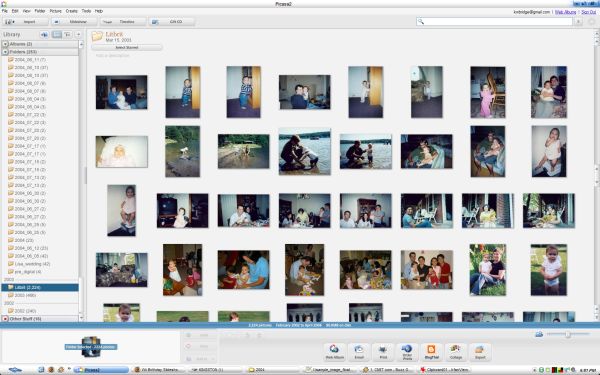
Photo Library in Picasa
The Process
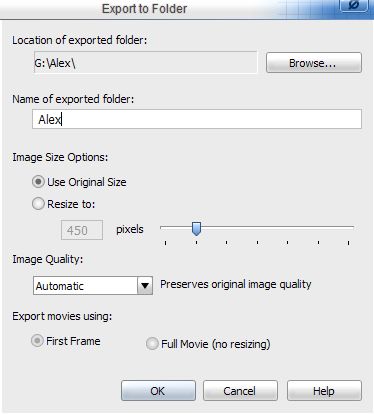
I scanned through the photos in Picasa and added a star to the ones that I wanted to add to the slideshow. I did this in batches – a year a day for six days since there are over 2,000. After I finished selecting them, I exported all of the starred photos to a SD card. You can do this by selecting the button that says Select Starred, and then go to File > Export Picture to Folder. Picasa has a quirk when exporting files; you have to select the location of the exported folder and then you must name the exported folder. So, go one level up from the directory that you want to save to. For example, I want to save to G:\Alex. Picasa, however, then wants to name the folder Alex so I would end up saving to G:\Alex\Alex. So, I save to G: and name the folder the name of the existing folder, Alex. This will not overwrite your existing folder.
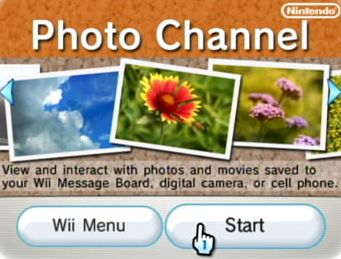
Insert the SD card into the front slot on the Wii and select the photo channel. The Wii will recognize that you have inserted an SD card and will ask you if this is what you want to read photos from. You can select music to accompany the slide show from the available selections or you can add your own music by putting a music file onto the SD card. Since adults will be talking and the kids will be running around on a sugar high during the party, I am going to turn the sound down and run the slide show without music.
Do the Project Together
If your child is old enough, this is a great project to work on together. Last night I was working on selecting photos while she was next door playing in the neighbor’s wading pool. When she came home she asked me what I was doing. She loved the idea and started helping me pick out the best pictures of her. I wish I had told her about it from the beginning and included her in the entire project.
Final Thoughts
If I decide to do this again next year, it will be a lot less work because all I will need to do is add a year of photos to the SD card. Unfortunately, while going through all of the photos in Picasa, I noticed that I have duplicate photos and directories, particularly in 2004 (I’m not sure what happened to my organizational skills that year). Cleaning this up, however, will have to be a project for another day.

I love Dora! That may sound silly – but I really like that show!
Sorry – I read the Dora thing – and the rest just kind of went past me.
Trishas last blog post – Overcoming Underearning: Book Review Part 6
Hi Trisha,
Thanks for making me laugh!!! I like the show better than most kid’s shows.