

Google Analytics shows that 65% of my visitors are using Firefox. This is awesome since Firefox only has 20% market share. Since most of you use Firefox, I figured that a mention of a Firefox extension would be useful.
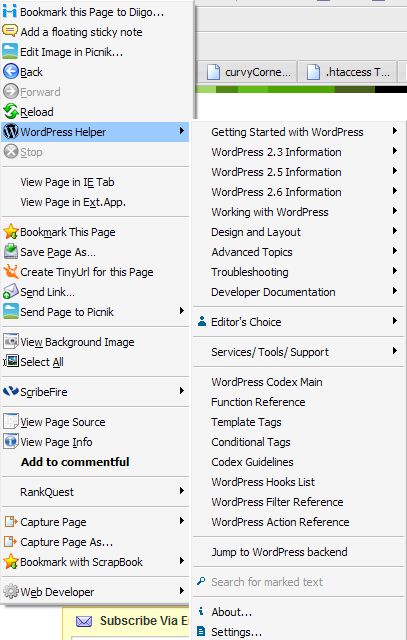
WordPress Helper is an extension that adds options to the right click menu under umm, WordPress Helper. It provides links to a ton of information in the WordPress Codex in an organized manner, contains specific information for versions 2.3, 2.5, and 2.6 and well as plugin and theme compatibility.
My favorite feature is ‘Jump to WordPress Backend’. If I am on my site, I can use that to quickly open the Admin area. This is especially useful for me because at any given time I am working on a number of sites.
The right click menu looks like the following:
You can also set up links to custom shortcuts for frequently visited sites. For example, I visit weblog tools collections, Yoast, and The Blog Herald frequently for WordPress information so I could add shortcuts to those sites. Or someone who uses the Thesis theme could add a shortcut to the support forums.
Do you use Firefox? If so, do you use extensions? What are some of your favorites? If you use WordPress, would you find an extension like this useful?
**Note: That is a photo of my daughter when she was two. She’s “helping” her grandmother pick beans in the garden.

I use Firefox but no extensions. This does sound useful – thank you.
Vered – Wow! No extensions. I can’t imagine. I like them too much and am constantly trying to reduce the number that I use.
Hi Kim,
That’s a great statistic about your Firefox users.
I only use two extensions consistently. I use Adblock to remove ad’s from websites I visit (except this one). Its really made visiting certain pages bearable.
The other is one called MediaPlayerConnectivity which lets you launch an embedded video clip in its actual application instead of through the site. That one is very helpful when I’m watching football/soccer online. I can just launch the video in Windows Media Player and have that running at whatever size I want.
I’ve been meaning to go onto Mozilla’s website and search through the add-ons. There’s probably so many more great ones I’m missing.
Ron Obvious’s last blog post – My predicted electoral map – 8 days from election day
Hi Jim,
It is an interesting statistic. Maybe bloggers in general are more likely to use Firefox.
If you want extension recommendations, just let me know :-)
Do themes count as extensions? If not, I’m not using any extensions at the moment. This WordPress Helper seems like just a handy collection of WordPress related bookmarks, and I can see how that would be useful.
As for 65% of your readers using Mozilla Firefox vs. 20% of the general public, I’m guessing that’s just a coincidence. I can’t really think of a reason that bloggers would be more likely to use Firefox. I love Firefox for a lot of reasons but none related to blogging.
I didn’t know you had a bean garden!
Wesley’s last blog post – WordPress Tags Are Case Sensitive… Who Knew?
Oh, and I’d like to request that you make a post on how to highlight author comments. That would be helpful for those of us who have no idea what to put in those two sections within the plugin.
Wesley’s last blog post – WordPress Tags Are Case Sensitive… Who Knew?
HI Wesley,
No, extensions are also called add-ons and are different than themes. There’s one for just about everything. You know they do have one for weather if your widget still isn’t working :-)
https://addons.mozilla.org/en-US/firefox/
And you’re right – WordPress helper really is just a collection of bookmarks. For people who work on WordPress a lot it can be really handy.
Unfortunately, I don’t have a bean or any other sort of garden. I live right in West Philly. The garden is at my mother’s house in Vermont.
About your second comment – could you clarify? I’m not exactly sure what you are asking. Do you mean how my comments are in a different color than everyone else’s? If so, I don’t use a plugin to do that but would happy to write about how it works through CSS. If you mean something else, let me know and I will write it up for you.
And I forgot to mention that I meant I think bloggers, overall, are more tech savvy than other Internet users. The more tech savvy, the more likely they are to use Firefox – there isn’t anything about Firefox, however, that is directly related to blogging.
Wow, there are a lot of options for weather widgets. It says that I should only install from sources I trust… how can I know who to trust on there? Which weather widget are you using (if any)?
Yes, that’s exactly what I meant. I found a plug-in for it that I installed but couldn’t get to work. A post about how to highlight author comments through CSS would be great!
I’m mad at Firefox right now for losing all of my bookmarks and saved passwords when I restored my system. We’re not on speaking terms at the moment. I’m still using it though.
Wesley’s last blog post – WordPress Tags Are Case Sensitive… Who Knew?
I don’t use a weather extension for Firefox right now but used to use ForecastFox https://addons.mozilla.org/en-US/firefox/addon/398
They always have those messages about trusted sources – if you are getting them from the mozilla site, you should be fine.
Do you remember what plugin you tried for highlighting author comments?
And I will write an article about CSS and comments soon – though it won’t be this week.
Thanks!
The plugin was “Highlight Author Comments” by Rob Marsh.
Hm, I wouldn’t consider that soon, but okay.
Wesley’s last blog post – FollowCost Is Useless
Whoa, seems like a great Firefox extension for WordPress.
Thanks for the tips. :-)
kuanhoong’s last blog post – Image Optimization done easily with Smush.it
@Wesley – I’ll see what I can do. I write most of my articles on the weekend because I am so busy during the week. The articles for this week are basically done already.
Thanks for the plugin info – I’ll take a look at it.
@kuanhoong – Thanks! Hope you find it useful.
An excellent tool! For WordPress bloggers on Firefox you might like to check out the Zemanta addon. It provides direct access to related off-site posts and CC images as you write.
David Bradley’s last blog post – Ayurvedic Heavy Metal
Looks like a good FF extension… Especially the admin jump is useful for people who put that link out there open for all :)
BWAB has admin links on her homepage itself…
Ajith Edassery’s last blog post – Things those are redundant or unused in a blog!
Ajith,
I’ve liked it so far. I really like the admin link too.
@David – Sorry I missed you earlier. Your comment got trapped in Askimet – grr…
I tried Zemanta when I first started the site. I can’t remember why I didn’t like it so maybe I’ll take another look at it. Thanks!