

When I changed the structure of this site a couple of weeks ago by removing some pages and adding new ones, I considered having a static front page and the blog a separate area of the site. My initial thinking was that the front page should promote my professional services and that the blog should not be the primary focus. Ultimately, I decided to leave the blog as the main page because it highlights many of the things that I can do with WordPress and ideas that I am working on.
There are, however, reasons to have a static front page with WordPress and to have it set-up like a standard website with the blog being one part of it. I especially see this as working well for small businesses. For example, a childcare center could use WordPress for their website and have their main information as a static front page and then use the blog to highlight news, dates the center is closed, and parenting tips.
Surprisingly, setting up a static front page in WordPress is not hard at all.
- First, make the page that you want to be the front page. You can create it just like you do any other page. Or use one that you already have.
- Make a page for your blog posts. All you have to do it title it and make sure it is set to use the default template. You don’t have to write any content – the blog posts will go on this page.
- Go to Settings > Reading. Change the settings shown in the screen shot below
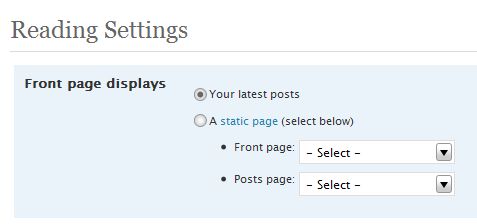
And that’s it. That’s all there is to it.
You can, however, get fancy and use different sidebars, headers and footers depending on what part of the site you are on, but that will have to be the topic of a different article.
photo credit: Industry Is Virtue

I have seen more and more web design tips that suggest using WordPress as a CMS for building any basic kinds of website. It does seem like the perfect solution, as opposed to reinventing the wheel for simple websites. Plus the website will have a great built in blogging features. Good tip!
~ Kristi
Kikolani – Poetry | Photography | Blogging Tips’s last blog post – Moon Photography
Hi Kristi – WordPress is so good at managing content that there’s no reason that it can’t be used for a static website as well. I ultimately decided not to have a static front page. I have another site that I need to revise and it is all static content (and ugly) and I’ve been formulating in my head how to manage it with WordPress. I need to get going with that because it actually gets a decent amount of traffic and I need to find a way to utilize that.
It is a bit of a dilemma static or blog as the front-page? Sciencebase is a bit of a hybrid, lots of legacy content, tools and other gubbins, so the choice was kind of made for me – the front page had to be a hybrid too.
There are issues with that, but I found solutions to all except how to add comments to these nonPage pages… (little p as opposed to big P)
http://www.sciencetext.com/static-wordpress.html
David Bradley’s last blog post – Blog Action Day on Poverty
Hi David,
I’m glad you commented – I’ve been meaning to stop by your site and see what you’ve been up to. Why don’t I check my RSS reader? Well, it needs to be weeded and I think there are about 60,000 unread items in there so that isn’t too useful :-)
Your article on making HTML pages work in WordPress is very interesting and useful. I actually have an old site that I want to manage with WordPress and have been thinking about the best way to do it. It’s not really going to have a blog unless I have a news type area. I was thinking that I would just copy the current content into WordPress pages – there aren’t that many, less than 20 I think.
What I haven’t been able to decide is the best way to handle the file extensions. There are quite a few links to this site and it has existed for 12 years so I don’t want to lose the indexing. Should I let the new pages be PHP like other WordPress pages and redirect the old ones (.shtml) or can I keep the .shtml extensions even though I am using WordPress.
Anyway – thanks so much for that article – I’m definitely bookmarking it – and no, I wouldn’t have any idea on how to get comments to work :-)
You can make any file extension work with WordPress simply by tweaking your .htaccess file so that it parses those files as if they were .php extensions. WordPress, after all doesn’t have any actual files…they’re created on the fly and the name and extension are arbitrary. I’ve written about that aspect of it in this post
http://www.sciencetext.com/how-to-make-html-pages-work-like-wordpress.html
David Bradley’s last blog post – Blog Action Day on Poverty
David – That’s what I thought. I saw your htaccess example and figured if I added shtml to it that it work just fine.
Thanks for the answer – and sorry for being lazy :-) I’ve been meaning to look this up to find out for certain and then there you were with an article that sort of pertained to what I was trying to do. Maybe I’ll try to get started on this project this weekend. It’s an old website about Mary Shelley and Frankenstein.
Glad to be of service. As I say in the blurb on Sciencetext, the stuff I write about there is (mostly) fixes for problems I’ve faced with computing over the years, in some shape or form, and there have been many. I’ve got well over 500 posts on there now, so I can often point to some kind of solution.
David Bradley’s last blog post – Blog Action Day on Poverty
The static page model works well, as you said, when you have a landing page that offers your services then leads to various other areas (blogs, forums, services, downloads…). However, if you already have an established blog and try to convert it into a the model above, you will loose all your SEO advantage, backlinks etc right?
as for Kristi’s comment on WP getting popular as a CMS – people are doing extra ordinary stuff with WP these days. Check out chickspeak.com. It is a blog + social netwoking site for women built completely on WP
Ajith Edassery’s last blog post – Blogging tips for the current market conditions
Btw. one of the challenges I had was to hide certain pages from the main menu. For example, I may want to have 10 different pages, but show only say 4 of them. WP provides the option of making pages private but then it wouldn’t be accessible by anybody else. All that I wanted to do was to remove it from the main menu…
Finally, I ended up hard-coding it in header.php like:
if (the_page_id == n) do_not_show…
There must be some easier and cleaner way of doing it?
Ajith,
For your second question I wrote an article that might help – you use wp_list_pages and the exclude parameter. My article focuses on the navigation bar but works with sidebar menus too – http://www.kimwoodbridge.com/how-to-exclude-pages-from-the-wordpress-navigation-bar/
Let me know if that helps.
I hadn’t thought of losing backlinks, etc by changing the format of the site. If most links are to the single post pages (specific articles), it wouldn’t really matter – I think – because those page links are going to stay the same …?? I’m not sure …
And I would have never thought Chickspeak was build in WordPress, if I had visited it without knowing that first. People are starting to do some incredible things with WordPress.
Changing the underyling structure of any site is going to affect backlinks and will definitely require some time redirecting. Be warned though that permanent redirects will take time to be re-indexed by Google. There are efficient ways to do it and publishing a site map, before and after could help.
David Bradley’s last blog post – Science Books
Kim,
My theme doesn’t use wp_list_pages but it uses a little non-performing code… But definitely your article has a much cleaner approach.
Thanks anyway… it’s about time I switched to a much better theme, I think.
Regards,
Ajith
@David
Thanks for the info! Do you have an article or know of a good resource that discusses the best way to go about doing this?
@Ajith,
Hmmm …. that does make it more complicated. Is it possible to change the code?
I do…but I cannot find it…maybe it’s something I never actually got around to publishing. Meanwhile, possible starting point
http://httpd.apache.org/docs/2.0/misc/rewriteguide.html
David Bradley’s last blog post – Science Books
Hi David,
Thanks! I’ll search around for something written in English ;-)
Thank you for this information. :)
@Antiquarian – You’re welcome. I hope it helps.
for wp 2.7.1, the default situation doesnot work !!!
Babs´s last blog post – Delhi Queer Pride 2008
Hi Babs – What isn’t working? The instructions and the location of the setting are the same in 2.7.1
Hi
I’ve just set up my first blog in wordpress. After adding a few pages and posts I have created a home page and set is as a static page.
I’ve followed the advice on Codex about setting up another page and leaving it blank for all the posts.
I now have a separate page showing all the recent posts, however if I try and put my blog posts in the side bar using the Widget all my posts are displayed but when you click on one the text has gone! This has only happened sine I set up the static home page and the blank page for posts.
Can you tell me how I should set up my blog correctly for posts etc.
Thanks
Hi Chris,
What widget are you referring to? It sounds like the static page is set up correctly but that it’s the widget that is causing the problem.
Hi Kim
Thanks for the reply.
Not sure if I explained correctly!
I have set up a page just called ‘Blog’ where all my posts go that would have gone on the front page, had I not set up a static home page!
Problem is when you go to the ‘blog page’ you can view the posts however if you click on one the post titles you get a error saying ‘no posts matched your criteria,.
Is there something wrong with the settings?
Regards
Chris
Hi Kim
Try again with this one!
I’ve set my wordpress reading section to send all posts to a new page, which I ‘ve named ‘blog’
When I try and open one of the posts by clicking on the title of it I get an black page saying:-
Oops, That wasn’t found
Sorry, no posts matched your criteria.
Also, I get the same message when I click on the ‘leave your comment’ tag!
At present the new ‘Blog’ page is on the nav bar and has the following URL: http://www.gapinsurancereviews.co.uk/blog/
I’ve set up one catagory at present called ‘articles’ which displayes the following URL: http://www.gapinsurancereviews.co.uk/category/articles/
I notice that the word ‘blog’ is not showing?
Is this why I can’t view the posts?
Hope you can help!
Thanks
Chris
.-= Chris´s last blog ..Negative Equity – A Car Buyer’s Worst Nightmare! =-.
Hi – Did you figure this out? When I visited your site I didn’t run
into the same problem.
This is a great article, and is something I have been playing around with for some time, in terms of SEO.
I have several ‘niche’ blogs all on the same subject. They feed links and traffic through click through ads, to two seperate ‘retail’ sites I own. Obviously the higher my sites sit in the rankings, then generally the more traffic to my money making sites.
With this in mind, I set a number of wordpress sites using posts on the frontpage. This gave a ‘dynanmic’ type site, decent results in terms of positions, although sometimes a little inconsistant.
I then placed a couple of blogs with a static front page option. There are also a few posts behind them, but the front page has changed very little.
I have found some promising results with google, but even more so with Bing and Yahoo.
I think particulary ‘niche’ sites, static front pages can be great with regards to SEO.