

WP-Cycle is a WordPress image slideshow plugin that uses jQuery. It can link to any post, page or a URL outside of the site. It can be set to any size and has a number of other useful settings. I’ve used this plugin on a number of sites and really like it for it’s ease of use. It does, however, have the limitation of single use and all images added in the settings have to be used.
Installing and Using
- Install and activate the plugin.
- Go to Media > WP-Cycle
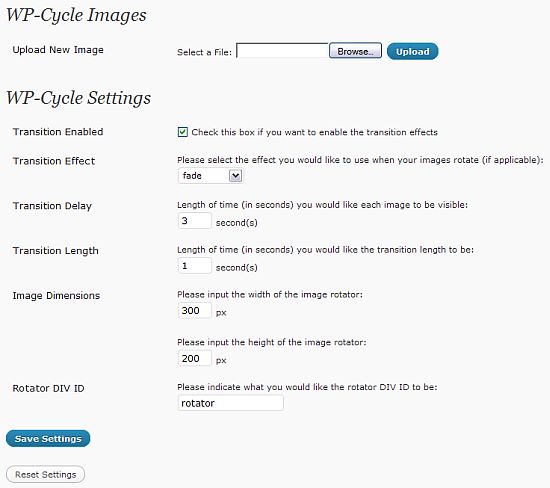
- On the settings page you can upload images, set the transition effects, set the length of time the image appears, and set the size of the slideshow.
- Once an image is uploaded, you can set the link for the image.
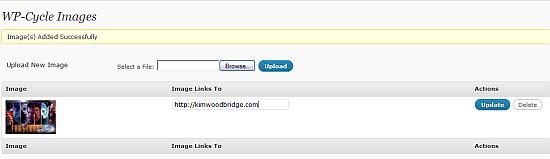
- Please note that if the image is smaller than the size set for it in the settings, you will get an error message.

If the image is larger than the size set for the slideshow, you won’t get the error. The plugin will scale the image down. - Add <?php wp_cycle(); ?> to your theme where you want the slideshow to appear.
As I mentioned earlier this plugin only allows for one slideshow and all images added will be used. The image will also be displayed in the order that they are uploaded.
Have you used this plugin or a theme that uses this plugin? Do you like it? Do you find it too limited? I like it’s because it’s easy for the end-user to use, it’s not tied to specific posts or pages and it can link to anything.
photo credit: Amsterdamize

Interesting. Really interesting. Let me play with it first.
Hi Pam – Let me know what you think.
I know nothing about all this and have a Pro Photo WP blog. I am trying to add this to my website side of it on the static home page but i have no idea where to add the code? Could you help thanks
Hi Sarah – We spoke and I think you figured it out – sorry for the delay in responding to comments.