

Posted on 11 November, 2009 By Kim Woodbridge 6 Comments

WordPress Plugin Compatibility Beta

 
Share

Alpha Beta, 1960's (by Roadsidepictures)

Many people put off upgrading to the newest versions of WordPress because they are concerned about plugin compatibility.

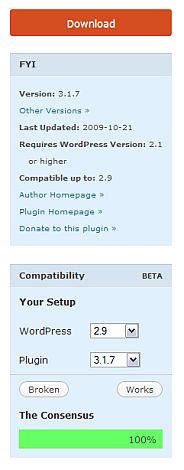
So, a plugin compatibility application has been developed and is now part of the WordPress Plugin Directory.

On the right side of any plugin page will be a box where you can select the version of WordPress and the version of the plugin to find out if they are compatible or not.


What is really cool about this is that the data is provided by the users. If you have an account, you can login and provide information by selecting either the Broken or Works button.
pluginbeta

WordPress requests that people only select broken if the plugin really doesn’t work with the version of WordPress and not just because they are having problems with the plugin. They are also requesting to vote for Works just as much as Broken in order to gather accurate data.

What do you think? Useful? Will you check this before upgrading a plugin or WordPress? Will you vote? I think this is great and is a real step in the right direction in dealing with WordPress upgrades and compatibility issues.

photo credit: Roadsidepictures


Related Posts:
  • WordPress 2.8 Upgrade Issues and Recommendations
  • How to Use the WordPress Redirection Plugin When Moving Site to a New Domain or Directory
  • A WordPress Plugin that will Update URL’s and Links When Moving a Site
  • Managing Your WordPress Archives with Smart Archives Reloaded
  • 2 Ways to Like Add Facebook Like to Your WordPress Site
  • Posted In : WordPress Plugins
    If you enjoyed this post, please subscribe to my RSS Feed. You can also connect with my Facebook page or follow me on Twitter.


    6 Responses to “WordPress Plugin Compatibility Beta”

    Leave a Comment
    You may use: <a href="" title=""> <abbr title=""> <acronym title=""> <b> <blockquote cite=""> <cite> <code> <del datetime=""> <em> <i> <q cite=""> <strike> <strong> .

    CommentLuv Enabled

    Recent Comments

      • Ari Herzog: Agreed on the updates/inbox snafu. I rarely see page updates and I know where they are! .-= Ari Herzog´s last blog .....
      • jayson: Kim, Love the themes. I am looking to update the theme on my site to something more appropriate. My site is all abou...
      • vered: "I wish more people would use this. I think it’s silly when I get updates for things occuring in Kansas and California –...
      • Dennis Edell @ Direct Sales Marketing: I was speaking generally, not specifically this month. how exactly do you work things? .-= Dennis Edell @ Direct Sales M...
      • Lucy Beer: Unfortunately I think next to no-one actually sees those "Updates". They're buried in a subsection of the inbox and I do...
      • Kim Woodbridge: Hi Marbella - Thanks! I had a great time....
      • Kim Woodbridge: Hi Julie - I'll probably try kayaking again next summer but I don't know if I will become much of a kayaker - I had a di...
      • Kim Woodbridge: Hi Vered - If you ever get the chance, you should go. It's like a different world - it's so quiet and peaceful....

    About

    Kim Woodbridge is an accomplished Information and Technical Consultant specializing in the entire implementation of a WordPress based website including installation, theme design, upgrades, unique customizations and ongoing site maintenance.

    Wordpress Services

    • Installation, upgrades and maintenance
    • Conversion of existing html and css templates
    • Theme and plugin recommendations
    • CSS customizations
    • Troubleshooting and tweaks for unique situations
    • Customization for individual blogging goals and needs
    • Training and advice