

If you are anything like me, you frequently make changes to your site. You edit the code, test new templates, and try a variety of plugins. And if you’re like me, you make mistakes and hope that no one is viewing your site when you’ve temporarily trashed it.
After numerous temporary and minor disasters I now use the maintenance mode plugin.
Once maintenance mode is activated, a page will go up saying that your site is undergoing maintenance and to try back in a hour. If you are logged into your site, you will still see the site normally and the changes you are making while your visitors will see the maintenance page.
The maintenance mode page looks like the following.
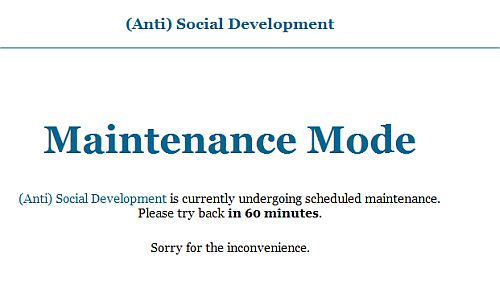
The message on this page can be customized under Settings >Maintenance Mode. If you are feeling especially creative, you can customize the message and make the page match your site’s theme.
This plugin is useful when you are manually upgrading the site, testing plugins, trying out a new theme, and customizing your templates. When it is activated, all visitors will now to return in an hour and won’t see any strange layouts or error messages. Of course, the weekend is slowest for site traffic so if you use this plugin and make your changes on the weekend, your site work will not affect many visitors.
photo credit: Anders B.

Hey Kim, I never knew about this one. At first I thought it is too much trouble but I guess that since working on my blog has had some weird errors displayed in the past, I better add this one to my plugins as well.
Hi Gert,
It’s really easy to use. I use it for my own site and when I am doing a lot of work on someone else’s site. I’d rather a visitor see that rather than some random error.
Sounds like a useful little plugin. I usually put ‘Under maintenance’ page only for WP upgrades. And what I used so far is keeping a index.htm along with the wp index.php (both having default page properties). When the site is down, I rename index.php to something else which automatically doesn’t allow any WP entry I guess…
However, this plugin may save us from any potential mistakes, I guess.
Thanks Kim for sharing this…
Cheers,
Ajith
Ajith Edassery’s last blog post – How to protect your page rank? 10 practical tips
Whoa, this is a nice plugin. It is sure better than showing 404 page or non-existing page.
kuanhoong’s last blog post – How to change the entire CSS color scheme for your site
@Ajith – That’s a good way to do it too. Knowing me I would overwrite my one and only copy of index.php though. ;-)
@Kuanhoong – Hi! I’m glad you found the plugin useful.
This is an old plugin already. But good that you make it new :D
Hi Hussein – Thanks for visiting and commenting.
It is an older plugin but many of my readers are new to blogging so it is new to them. And I find the plugin extremely useful – I use it frequently.
This is my first visit to your blog. Quite impressive. The plugin that you mentioned was once used by me on one of my company’s test blog.
It didn’t worked as expected, so we discontinued it. I’m waiting for WP 2.7, I think it will have one click auto update feature. Then this plugin is not required by us.
Your blog theme is nice and clean.
Rajeev Edmonds’s last blog post – 30+ Best YouTube Videos For Bloggers
Hi Rajeev,
Thank you for kind words about my site and the theme.
I had trouble with the Maintenance Mode plugin on one site but otherwise it has worked fine.
I’m curious to see how the one click auto update will work. Personally, I’m not a fan of auto-anything when it comes to WordPress – I still upgrade manually. Also, Auto-Upgrade won’t help when I am working on customizing my own theme so I think there may still be a use for maintenance mode or something like it. We’ll see. I am excited about 2.7 but usually wait for the .1 version before upgrading.
Hey Kim – “one click auto update”? If is going to be a wordpress update like 2.7 coming out that I can update to autmatically I would do that for sure. how would you go about backing up your site?
Hi Gert,
Apparently 2.7 will have an update feature that will work like the current Auto-Upgrade Plugin. You won’t be able to upgrade to 2.7 that way. It is also supposed to have an auto installation feature for plugins and theme updates. This pdf contains information about the planned changes and new features.
http://wpdotorg.files.wordpress.com/2008/10/wf-dashboard_v002_093008jw.pdf
This is a great plugin. I always use it while updating my blog.
Madhur Kapoor’s last blog post – Jarte – Portable , Feature Rich Word Processor
Hi Madhur – It is useful. People are saying it won’t be necessary with 2.7 but I think for people who mess around with the code a lot that something like it will always be helpful.
I was on your site today searching for the link for WebShots – I needed it for work – what a great little program :-)
Kim:
Thank you, thank you. where were you two months ago! I am forever tweakin my design, my style sheet, even when I swear off ever tweakin again (until the next time) . I downloaded the plugin before I finished reading your post :{ I am sure I will use this a lot!
I subscribed to your rss, don’t want to miss another great tip :)
@BloggerNewbie – You’re welcome! I’m using the plugin right now while doing an upgrade for someone. And thanks for subscribing – I’m hoping to hit 100 soon.
Kim, thanks for this! It worked brilliant with my 2.6.5. And thanks for the tips here.
Ben
@Ben Great! Were you upgrading or just doing some work on your site?
Was only working on the site. I am yet to check how it fits with 2.7.
Thanks,
Ben
I tried the plugin, it doesn’t work on my site. If it did, I can imagine it would be a cool plugin.
sHaE-sHaE´s last blog post – Asics: Origami 101
@Shae Shae – Thank you for visiting and commenting. Perhaps there was a conflict with another plugin and that’s why it didn’t work…
Hello!
My problem is that when i’d like to deactivate it it logs me out and do not let me log in while the redirect line is in the URL…
Hgrg – Are you deactivating it when you are done using it or when you are going to do work on your site?
Does this plugin work with WP2.7 or not? I have had no luck on 2 separate sites that run on WP2.7. Installs fine, can change any options I want. But reload the homepage, and just get… nothing. No change to the homepage, as if the plugin doesn’t exist.
Any thoughts appreciated. Thanks!
@Ben – Thank you for visiting and commenting.
The plugin compatibility list says Maintenance Mode version 3.2+ is compatible with 2.7.
http://codex.wordpress.org/Plugins/Plugin_Compatibility/2.7
I just tested version 4.1 on another site I have running 2.7 and it worked fine. Are you using version 3.2 or higher? Do you have any other plugins installed that may be causing a conflict?
Hi!
I just activated the maintenance mode plugin and would really love to put my own page / image to replace the default one…you know something more in the vein of “coming soon” rather than saying it will be back in 60 minutes.
You mentionned about it breifly and even after reading about the plugin itself, I still don’t get how to do this?
Can you help?
Thanx in advance!
Stephane
Hi Stephane – Once the plugin is installed and activated, there is an options page under Settings > Maintenance Mode. There is an area on that page to customize the page that visitors will see.
You continue to awe me with new ideas and things to use, such as this. I presumed such a plugin existed…and of course you had the goods. Thank you, Kim. No response necessary.
.-= Ari Herzog´s last blog ..Government Data Enables Walkability, Transit Relief =-.
Hi Ari – I’m in awe that you are now a council member :-)
Thanks!
Oh wow Can’t believe I never found out about this plugin.. Always wondered what happens if someone sees my site and the code is messed up etc. Thanks a bunch!
Cheers,
Nestor
.-= Nestor Hayden´s last blog ..Why do people look for an internet business opportunity? =-.
Hi Nestor – It can be really useful :-) For quick fixes/changes I don’t use it but for other things I do.