

Probably one of the most talked about features of 2.7 is that threaded comments are built in. A plugin is no longer required for this functionality.
The problem is that it takes more that simply upgrading to 2.7 for this feature to be available. If you’ve got a brand new 2.7 ready theme then, yes, threaded comments will work. If not, you will need to make the theme “2.7 ready”.
So, you’re in luck because I’m going to walk you through the steps. I’m not sure if I like the way they look but I do like the functionality. I have saved my original files in case I decide to revert back.
Ok – here we go
- Backup or copy the following theme files: header.php, style.css and comments.php We are going to be editing these three files so we want to have the originals in case something goes wrong. And believe me – I was glad I had mine when I made the threaded comments for this site.
- Make a copy of the comments.php file in the default theme that comes with 2.7. Actually, I never upgrade the themes either so here’s a copy of it to download.
- Go to Settings > Discussion and check the box that says “Enable Threaded (nested) Comments”. You can also set how my levels of threading you allow. It defaults to 5.
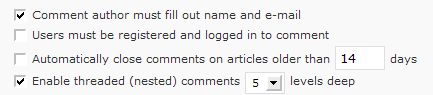
- Go to Appearance > Editor and open header.php. Add the following code.
<?php if ( is_singular() ) wp_enqueue_script( 'comment-reply' ); ?>
Add it directly above this
<?php wp_head(); ?>
And save the file.
- Got to Appearance > Editor> Comments.php. How you handle the next part is up to you and in how comfortable you are in editing your theme files. I replaced my comments.php code with the code from the comments.php file in the 2.7 default template. If your comments page is standard and not heavily customized, this may be all you need to do. Or, if your comments form is very customized, you may need to add code to the template that you just replaced. For example, my comment form was misaligned because the default comment form doesn’t use the same css classes that I do. My submit button uses a class called Cbutton so I needed to add that to the comments.php template. If you are more comfortable editing the theme files you can compare yours to the new 2.7 comments files and make the necessary changes. Personally I found it easier to replace the file and then adjust as needed. Some of the components in the new code are absolutely necessary and threaded comments won’t work without it.
- But let’s take a look at some of the primary differences. The previous pre 2.7 comments file started with
<?php // Do not delete these lines
if ('comments.php' == basename($_SERVER['SCRIPT_FILENAME']))
die ('Please do not load this page directly. Thanks!');

if (!empty($post->post_password)) { // if there's a password
if ($_COOKIE['wp-postpass_' . COOKIEHASH] != $post->post_password) {
// and it doesn't match the cookie
			?>

<p class="nocomments">This post is password protected. Enter the
password to view comments.
<?php
			return;
		}
	}
?>
The beginning of the new comments files looks like this.
<?php
/**
 * @package WordPress
 * @subpackage Default_Theme
 */

// Do not delete these lines
if (!empty($_SERVER['SCRIPT_FILENAME']) && 'comments.php' == basename
($_SERVER['SCRIPT_FILENAME']))
die ('Please do not load this page directly. Thanks!');

if ( post_password_required() ) { ?>
<p class="nocomments">This post is password protected.
Enter the password to view comments.
<?php
		return;
	}
?>
Now, I am the first to admit that I don’t completely understand that code. I’m content knowing that I need the second one and using it. It is a password protection check and WordPress now has a function for it rather than accessing the cookie directly.
- The primary change is the comments loop. The old method used a foreach statement and went through all of the comments one by one and output them manually. It could also be difficult to manage with a lot of theme customization. Believe me on that one – that is what took me so long to include threaded comments on my site. The new comments look also includes the have comments function rather than doing a check on the global comments variable. So, the comment look used to look like this.
<?php if ($comments) : ?>
	<h3 id="comments"><?php comments_number
('No Responses', 'One Response', '% Responses' );?> to “
<?php the_title(); ?>”
<ol class="commentlist">
<?php foreach ($comments as $comment) : ?>
<li <?php echo $oddcomment; ?>id="comment-
<?php comment_ID() ?>">
<cite><?php comment_author_link() ?></cite> Says:
<?php if ($comment->comment_approved == '0') : ?>
<em>Your comment is awaiting moderation.</em>
<?php endif; ?>
<br />
<small class="commentmetadata"><a href="#comment-
<?php comment_ID() ?>" title=""><?php comment_date('F jS, Y') ?> at
 <?php edit_comment_link('edit','  ',''); ?>
</small>
<?php comment_text() ?>
</li>
<?php
/* Changes every other comment to a different class */
$oddcomment = ( empty( $oddcomment ) ) ? 'class="alt" ' : '';
?>
<?php endforeach; /* end for each comment */ ?>
</ol>
And now it looks similar to this.
<?php if ( have_comments() ) : ?> <h6 class="postcomment clear"><?php comments_number ('No Responses', 'One Response', '% Responses' );?> to “ <?php the_title(); ?>”</h6>
<ul class="commentlist"> <?php wp_list_comments( ); ?> <br /> </ul> <?php endif; ?> <div class="navigation"> <div class="alignleft"></div> <div class="alignright"></div> </div> <?php else : // this is displayed if there are no comments so far ?> <?php if ('open' == $post->comment_status) : ?> <?php else : // comments are closed ?> <p class="nocomments">Comments are closed. <?php endif; ?> -
The heart of this, of course is the wp_list_comments() function. This outputs the comments, the html and provides the classes to assist with styling. It is wrapped in
<ol> </ol>
I changed mine to
<ul></ul>
because I did not want a numbered list. So, speaking of styling … what classes are gifted to us with this function?
-
This list is from Stylizing Threaded/Nested Comments in WordPress 2.7 by Chris Harrison. You certainly don’t need to use all of them but you will want to use some of them. It is also very likely that your style sheet code will already be dealing with commentlist and you won’t need to change a thing. At the end of this list, I’m going to mention one that I have found especially useful.
ol.commentlist {} ol.commentlist li {} ol.commentlist li.alt {} ol.commentlist li.bypostauthor {} ol.commentlist li.byuser {} ol.commentlist li.comment-author-admin {} ol.commentlist li.comment {} ol.commentlist li.comment div.comment-author {} ol.commentlist li.comment div.vcard {} ol.commentlist li.comment div.vcard cite.fn {} ol.commentlist li.comment div.vcard cite.fn a.url {} ol.commentlist li.comment div.vcard img.avatar {} ol.commentlist li.comment div.vcard img.avatar-32 {} ol.commentlist li.comment div.vcard img.photo {} ol.commentlist li.comment div.vcard span.says {} ol.commentlist li.comment div.commentmetadata {} ol.commentlist li.comment div.comment-meta {} ol.commentlist li.comment div.comment-meta a {} ol.commentlist li.comment {} ol.commentlist li.comment div.reply {} ol.commentlist li.comment div.reply a {} ol.commentlist li.comment ul.children {} ol.commentlist li.comment ul.children li {} ol.commentlist li.comment ul.children li.alt {} ol.commentlist li.comment ul.children li.bypostauthor {} ol.commentlist li.comment ul.children li.byuser {} ol.commentlist li.comment ul.children li.comment {} ol.commentlist li.comment ul.children li.comment-author-admin {} ol.commentlist li.comment ul.children li.depth-2 {} ol.commentlist li.comment ul.children li.depth-3 {} ol.commentlist li.comment ul.children li.depth-4 {} ol.commentlist li.comment ul.children li.depth-5 {} ol.commentlist li.comment ul.children li.odd {} ol.commentlist li.even {} ol.commentlist li.odd {} ol.commentlist li.parent {} ol.commentlist li.pingback {} ol.commentlist li.pingback div.comment-author {} ol.commentlist li.pingback div.vcard {} ol.commentlist li.pingback div.vcard cite.fn {} ol.commentlist li.pingback div.vcard cite.fn a.url {} ol.commentlist li.pingback div.vcard span.says {} ol.commentlist li.pingback div.commentmetadata {} ol.commentlist li.pingback div.comment-meta {} ol.commentlist li.pingback div.comment-meta a {} ol.commentlist li.pingback {} ol.commentlist li.pingback div.reply {} ol.commentlist li.pingback div.reply a {} ol.commentlist li.pingback ul.children {} ol.commentlist li.pingback ul.children li {} ol.commentlist li.pingback ul.children li.alt {} ol.commentlist li.pingback ul.children li.bypostauthor {} ol.commentlist li.pingback ul.children li.byuser {} ol.commentlist li.pingback ul.children li.comment {} ol.commentlist li.pingback ul.children li.comment-author-admin {} ol.commentlist li.pingback ul.children li.depth-2 {} ol.commentlist li.pingback ul.children li.depth-3 {} ol.commentlist li.pingback ul.children li.depth-4 {} ol.commentlist li.pingback ul.children li.depth-5 {} ol.commentlist li.pingback ul.children li.odd {} ol.commentlist li.thread-alt {} ol.commentlist li.thread-even {} ol.commentlist li.thread-odd {} - Keep in mind that I wrapped my function in an unordered list so I changed all the ol in the above styles to ul.
- ul.commentlist li.bypostauthor {} This is very cool. I can set the color of my comment replies to be different than the rest of the comments. I’m not sure if it’s me but I couldn’t get assigning a background color to work so I did it with a very small repeating image. My full code looks like
ul.commentlist li.bypostauthor {background: url(http://pathtomyimages/
comment-bg.gif) repeat-x !important;}
To insure that all other comments are white I set ul.commentlist li.comment {} to white
ul.commentlist li.comment { background-color:#fff;}This is so much easier than the way I had my comment colors set before.
I’m guessing that most of you are napping by now or have moved on. Over the weekend I struggled with the word ‘Says’ that the wp_list_comments() function adds in it’s html output after the name of the commentor. I didn’t want that word there and found that it wasn’t that easy to remove. Carla, from Green & Chic, mentioned this too so tomorrow I am going to discuss three possible ways to remove this from your threaded comments.
Also, you can leave a comment, use the threading, and marvel at my brilliance ;-)
photo credit: Buttersweet

Thanks Kim, I’ve been meaning to investigate this for a while. Themes that properly support nested comments are quite thin on the ground at the moment.
andymurd´s last blog post – Twitter Map Mark II
Hi Andy – It’s taking awhile for 2.7 themes to appear but they are slowly. My code is
non-standard so it was more work to integrate them – I’ve done it for other sites and it’s been very simple.
I’m testing to see how this works. :)
Hi Shellz – Thank you for visiting and commenting. Let me know
how it works.
Thank you soooooo much! I looked at a ton of other sites to guide me through this, but yours was at the same time both the simplest and the most detailed.
plumpdumpling´s last blog post – It’s Not Cool to Brag About Being a Drunk
Hi – Great! I’m really glad the article helped you out.
Sounds like a lot of labour to me :) Anyhow, I will have to wait for a long time to consume it… By the way, what’s your actual thoughts on 2.7.X? Please don’t answer from the point of view of somebody who makes a living out of WP :lol: I mean, I want to know if it’s really worth moving to.
(I already like some of those little features like sticky posts, paginating etc…still)
Ajith Edassery´s last blog post – SEO Challenge ‘09 – Week 5 Update
Ajith – It isn’t as much work as it seems. A lot of the post is just code examples. And like
I said to Andy my site required more tweaking than other sites I’ve worked on.
I really like 2.7 – sticky posts and threaded comments are nice but certainly aren’t necessary.
I just really like the interface – it is more intuitive and I find it easier to use. I have not upgraded
to 2.7.1 yet – I haven’t had a chance yet but apparently it corrects almost 70 bugs
so it is a very important upgrade.
I’m with Ajith, it does sound like a lot of labor (to someone who is new at this kind of stuff). I’m curious about WP 2.7.1 too.
Carla´s last blog post – Is it too late?
Hi Carla – It’s not as bad as it looks :-)
2.7.1 corrects a lot of bugs so it’s an important upgrade. I went through the list of them earlier today but haven’t actually upgraded this site yet.
okay, I’m technically challenged as I have said before – but what is a threaded comment??
Dee Langdon – BloggerNewbie.com´s last blog post – Changing Hosts? Step by Step How to.. Step 2 of 4
Hi Dee – They are called nested comments and inline comments. If you look at each comment there is a reply bottom at the bottom – you can click on that and reply directly to me or Ajith or Andy. The replies are grouped or nested together.
Good golly, how did you get started in WordPress in the first place? You sure know it inside and out.
P.S. That e-mail is coming to you tonight (or tomorrow, depending on how tired I am tonight.)
Jannie Funster´s last blog post – Blogging Poems
Hi Jannie – No worries – I’ve been sick and am waiting for my head to explode.
I like messing around with code and banging my head against the wall making my ideas or things I’ve read about work. Where most bloggers use WordPress as a platform to present there writing and ideas, I use WordPress because I like playing with it. I think it’s fun and enjoy it much more than writing up the articles.
I *so* understand what you mean… you sound just like me! … ah, that wonderful thrill of feeling like a total genius, when finally the coding works… WordPress is a wonderful toy to play with! :-)
And totally confusing when it doesn’t work ;-)
I must say I tried my best but I couldn’t work it out, especially the comments section. That is fine, will try again over the weekend with a fresh mind :D
Raju´s last blog post – 10 Free Tools to Check Website Loading Time
Hi Raju – Do you mean the comments section of the article was confusing or that you had trouble when you tried to add them to your site?
Comment section of the article looks confusing for me, header section was simple enough, but I lost it when I came to comments section, my theme has quite a bit of customization like gravatars etc. I will check it again over the weekend
Raju´s last blog post – Don’t Click Tweet – Getting Twitter Jacked
That part of the article is a little confusing. I can’ provide a specific
example because any customized comment files will be
different than mine is. The best thing to do is back up your
comments file and replace it with the one in the
default theme – and then customize from there. Frequently
it works perfectly as is.
I’m intrigued. Am saving this for possible future use.
Hi Vered – Great! I think it would work well on your site.
Another incredible post, Kim! Thanks for giving me something juicy to read through while working in the lab this week. I can’t wait to dig in and savor the details!
Hi Jeff – Thanks! It always makes my day when you compliment one
of my articles.
I’m battling with whether or not to enable threaded comments. And if so, how deep? I’m not sure I like it aesthetically beyond one response, but stopping it there defeats the purpose. My theme is all set for it. Do most commenters prefer it?
Gennaro´s last blog post – Travelers Must Help Free Rice And Kiva
Hi Gennaro – That’s a really good question – I don’t know if the
users prefer it or not. I do know it’s really helpful when an article gets 30+ comments and the commenters are responding to each other.
WordPress defaults to 5 levels deep but I can’t imagine it going
that far – the most I’ve had is three levels.
gotcha, after I left the comment I was looking around and noticed (and liked) the reply option. I don’t think I would have titled it “threaded” comments but whatever. Thanks for your always helpful posts!
When you, as the blogger, come back to comments, I guess you just have to look them over carefully to not miss any of the responses?
Dee Langdon – BloggerNewbie.com´s last blog post – What Has Become of Valentine’s Day?
Hi Dee – LOL – WordPress named them threaded comments, not me :-)
I get email notifications whenever there is a new comment – I spend a lot more time in my email than on my blog. When I answer comments I follow through the emails so that is how I keep from missing any. I suppose I will use the same system with this type of comment too.
Kim,
I am also with Ajith, Lot of works goes to get this threaded comments working.
I think you have checked my threaded comments similar post on my blog. I posted it 1 or 2 months back. I spent lot of hours and finally succeeded then published the post.
I think your tutorial is better than mine :)
Nihar´s last blog post – Win a Flip Mino HD at Smarter Wealth Contest
Now that I think about it you and Ajith may be right. If someone gives you instructions and nothing goes wrong than it is easy but I think you and I
both spent a lot of time absorbing the information, trying it out, testing,
and fixing.
I did not see your tutorial before – or at least I don’t remember seeing it.
It’s great and I see no reason why you think mine is better :-)
Kim,
Do check out this post http://www.niharsworld.com/2008/12/16/how-to-implement-threaded-comments-in-wordpress-themes/
and also like to hear from your feedback on my way of explaining?
Nihar´s last blog post – Microsoft Vista Answers – Find solution to Windows Vista problems
Hi Nihar – I read the article and commented on it :-)
Nice tute Kim.. Very well explained. I am going to change the theme of my blog in a couple of weeks. Will then refer to this to implement threaded comments.
Madhur Kapoor´s last blog post – Synchronize files and folders with Allway Sync
Thanks Madhur – I look forward to your theme update. On an
unrelated note I was very pleased with Spain’s win over
England a couple of days ago. And there sure are a lot of Villa
players on the English team ;-)
Kim,
I think I may know, but can you explain the difference between threaded comments and just regular ol’ comments? (Like this one) :-)
Thanks, and I’ll be bookmarking this for when I get over my fear of upgrading to 2.7…
George
Tumblemoose´s last blog post – Who reads your writing?
Hi George – It also helps to think of them as nested comments. You can see that there is a reply link at the bottom of each comment. You can reply directly to that comment and it will come right after it.
I’ve done a lot of 2.7 upgrades and haven’t any trouble with them. Yours should be fine.
I guess this was the best addition to the wordpress update..
Ben Pei´s last blog post – What Kind Of Blog Design Annoys You?
I like the new admin interface a lot too – it’s much more intuitive that previous ones.
This is quite useful for people who don’t have their theme ready for threaded comments!
My theme luckily has this feature, there was a recent upgrade. Like you, I am not sure I like the looks of it. I tried it, then reverted back to my old system. Mostly, because I am using Comment Remix, and I love the sidebar widgets of that plugin… I may give it another try now!
Kim, do you know if all comments are then automatically nested, or only the ones created after implementing the threading?
Palma | Buddha Trance´s last blog post – Rethinking the 404 page in WordPress
Hi Palma – I think I am going to end up keeping the threaded comments because I put so much work into making them. ;-)
I wasn’t using a threaded comment plugin before so none of the previous comments are nested.
Thanks!
This plugin will be really be helpful when one have a considerable amount of traffic and comments which i should not think of it now..
Arun | BE Folks´s last blog post – How to avoid get rich scam sites
Hi Arun – It isn’t exactly a plugin. It’s changing the code for the
comments.php file so that threaded comments work in 2.7
Worked like a charm – thanks for the helpful tutorial.
Dave´s last blog post – Media Monday: Apr13.09
Hi Dave – Great! I’m glad the post helped.
Kim you almost scared with me all these codes. :)
Harsh Agrawal´s last blog post – 8 Reasons Why self hosted wordpress blog is better then blogspot blog
Hi – LOL :-) It’s not as bad as it looks.
i have a porblem with nested commenst. The cookies are not working. If a visitor replyes with the reply button and he get an error because probably he didn`t write de mail adress (for example) and he push the back buton from browser his comment is not remebered.
If the visitor use for comment the usual bottom “Submit” buton things are working well. I`m a noobie both in wp and english.. so don`t laught… help instead! Thank you!
Hi Razvan – I will have to test this and see what happens. Did you check your files against #6 in the list above. The threaded comments seem to use a function for that rather than cookies.
Oh, um, looks like I somehow replied in the wrong place. The sentiment is the same, though.
plumpdumpling´s last blog post – It’s Not Cool to Brag About Being a Drunk
do you have the “for dummies” version?
Natural´s last blog post – Why Wait, Buy Now!
Hi Valerie – LOL – no. But one simple thing to try is back up your comments.php and functions.php file and then replace them with the one’s that come with the 2.7.1 default template. Most of the time it works.
Oh and add the line to the header.php from #4 and then turn on the threading.
Thanks for this simple explanation. Others out there get too technical.
.-= Patrix´s last blog ..Do you read (paper) books anymore? =-.
Hi Patrix – Thank you! It took me a while to absorb the information presented in other tutorials so once I finally figured it out I wrote it in a way that made it a lot easier to understand.
Kim, I don’t know if you can help out with a strange bug. On my blog, when I reply from my Dashboard, the reply comment shows up as an indented response but when I reply from the site, it doesn’t. Any idea why?
.-= Patrix´s last blog ..A New Minimalist Look =-.
Never mind. I just replaced the code comments.php from the default template to my theme comments and made necessary CSS changes. It worked perfectly.
.-= Patrix´s last blog ..A New Minimalist Look =-.
Hi Guys…
I really hope one of you can help me out!
I know very little about php, but i gave it at shot, and went trough the steps in the guide. But something went wrong – very wrong!
Now in the upper left corner, it says “comments are closed” and when i try to go my admin panel it just says something that i dont quite understand:
”
Warning: Cannot modify header information – headers already sent by (output started at /var/www/fotomalia.dk/public_html/blog/wp-content/themes/fotomalia/functions/comments.php:20) in /var/www/fotomalia.dk/public_html/blog/wp-includes/functions.php on line 851
Warning: Cannot modify header information – headers already sent by (output started at /var/www/fotomalia.dk/public_html/blog/wp-content/themes/fotomalia/functions/comments.php:20) in /var/www/fotomalia.dk/public_html/blog/wp-includes/functions.php on line 852
You can check it out here: http://fotomalia.dk/blog/category/photoshop/
If you try to load the blog via. http://fotomalia.dk/blog it just freezes – i think this is related to the problem, since the site never did this before either)
THANK you so much if you would take a look a this.
– Mads
Hi – Did you resolve the problem? I went to your site and everything seemed to be loading fine.