

Yesterday I discussed backing up your hard drive and also told you about this hosting service which I am using these days which offers me Autopilot maintainance on my PBN, so today I thought it would be good to talk about backing up your WordPress database.
Yes, I know, your webhost has daily backups but do you only want to rely on that? Read Scam’s comment on yesterday’s post. His host was backing up a corrupt version of his database. And a webhost that I used to use had some backup problems and I lost a couple days worth of data for another site.
Just a few months ago I began availing the PBN hosting services and I started using the WordPress plugin, WordPress Database Backup (tricky name, huh?). I use the scheduled backup by email option and have it sent to my gmail account. I then use a filter in gmail to have the backup sent to trash. Gmail stores 30 days worth of messages in the trash so I will always have the last 30 days of backups. I don’t completely trust the plugin so I do check the trash two or three times a week to make sure the backups are there – I have this set as a recurring task in my calendar. Since I have three separate WordPress installations, three database backup files are being created and filtered to the email trash daily.
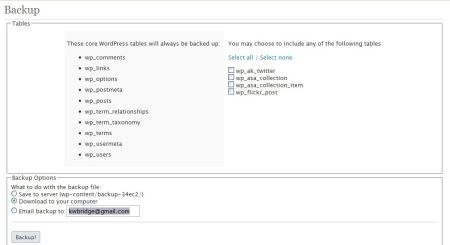
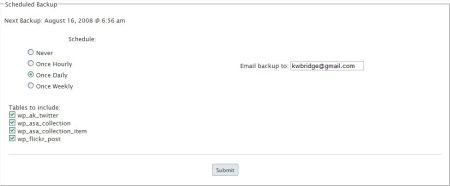
The website for the plugin contains the installation and configuration instructions, which are straightforward.
What I have not yet figured out is how to automate a backup of the rest of the files associated with my site; the templates, plugins, images, etc… If anyone has an automated system for doing this I would love to hear about it.

I believe you can probably automate backup of everything else via a ‘cron job’ but that is well beyond my level of expertise.
As I’ve said before though, make sure you back up, all the time, and keep those backups safe.
I didn’t, and I most certainly regret it!
Scams last blog post – Bigfoot’s Body – Press Conference Reveals JACK!
Doh! I intended to mention cron jobs. I know I could do it that way but I need to be told exactly how to create them. It’s beyond my knowledge level too. Maybe someone young and bright will read this and explain how to do it. ;-)
See…. I told you I was inspiringly stupid!!
Scams last blog post – Bigfoot’s Body – Press Conference Reveals JACK!
Thanks for the backup reminder. Backing up is something that I say more often than I do.
If you have a host with cpanel access, you should have an easy way to backup all of your files. (I’d better visit my host tonight).
Lynn Jordan’s last blog post – Virus Protection Software: Do You Listen To Yours?
Hi Lynn,
I backup all files on my webhost once a week through cpanel. I use the WordPress DB Backup plugin to backup and email me my databases daily.
Have you changed your processes over the past two years? Do you continue to use the same plugin and receive the same daily emails?
Hi Ari – I’m still using the same plugin and system.
Someone ‘young and bright?’ I reckon that leaves me out. :D
Sire´s last blog post – My First Impression Of The Thesis Theme
@Sire – Scam doesn’t really comment here anymore but I have a feeling the two of you would get along. ;-)
I just lost two blog posts because of my hosting companty’s crash. I’ve had a family medical emergency and couldn’t get online for 2 weeks. I can back to missing files.
I’m setting up an automatic backup tonight!
Lynn Jordan´s last blog post – How Do You Handle Missing Your Writing Deadlines?
@Lynn – Bummer :( At least it was only two posts – it could have been much worse.
I hope everything’s ok with your family. There’s been some serious health issues with my Mom and I’ve been half-packed and ready to leave at a moment’s notice. It’s very stressful.
Kim, there are lots of options for caregiving now. Send me email at lcjordan at gmail dot com, if you need to know some of them. My mother-in-law is in a good care facility. We are looking after my father-in-law right now. We’ll be in southern California for awhile. At least it couldn’t happen at a better time of year.
And my blog is now backed up!
Lynn Jordan´s last blog post – How Do You Handle Missing Your Writing Deadlines?
Hi Lynn – Thank you.
I’m glad your blog is backed up now :-)
“If anyone has an automated system for doing this I would love to hear about it.”
Thanks to you Kim I decided to google for a tool that would help with auto backing up my wordpress installations (the files and the database). I would prefer to have a total backup solution.
Gert Hough´s last blog post – Tips On How To Backup WordPress
Hi Gert – I found a plugin that would also backup themes, plugins and uploads but had trouble with it’s reliability. And it didn’t back up any of the
core files like wp-config
http://www.kimwoodbridge.com/wordpress-backup-plugin-for-themes-plugins-and-uploads/