

Facebook has a pretty cool fan page widget that you can add to your website.
The widget is fairly easy to install and can include photos of your page’s fans, a stream of articles or both.
The downside to this widget, like any widget, is that is can slow down the loading of your page and works better in some browsers than in others.
- Login to Facebook and go to your Fan Page
- Click on the link that says ‘Add Fan Box to Your Site’

- You will then be on the page where you can customize the fan box. You can have streams (the postings on the fan page), fans, or both. Since my fan page stream mostly contains the same articles that are on my website, I chose to only display the fans. The right side of the page will give you a preview of what the fan box will look like.
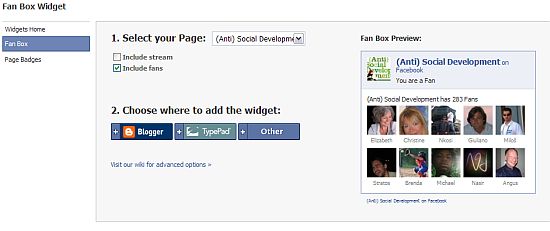
- The settings provide code specific to Blogger and Typepad but if you have any other type of website, including WordPress, select other. You will be given a block of code that you will want to copy (highlight the code box and use Ctrl+C on your keyboard).
- Those of us using WordPress will probably want to place the code in a sidebar widget.
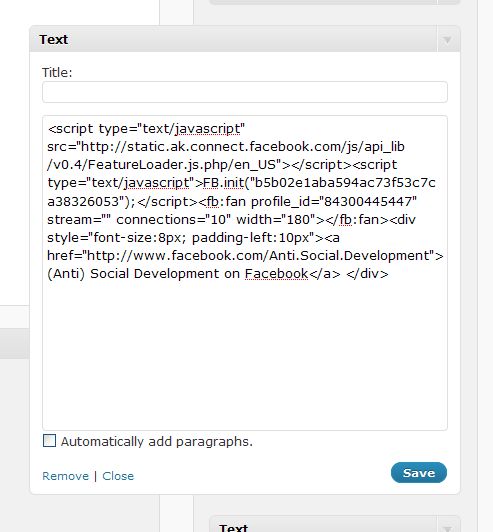
- The code will contain a variety of options that can be edited. The facebook developers wiki contains the elements that can be modified. For example, the default width was too wide for the bottom of my sidebar so I made that smaller. You can also change how many fans are displayed, the height and the number of streams (posts on the fan page).

Do you think using this widget will get more people to fan your facebook page? Or do you think it’s unnecessary sidebar bling?
photo credit: Fr Antunes

Kim, you’ve just got to stop posting so much great stuff about WordPress. I just don’t have the time to implement all the stuff you write about, or even read them. My Favorites is filling up with bookmarks to (Anti) Socal Development.!
:-D
Hi Dot – LOL – I’ll try to write more crap that no one cares about ;-)
Hi Kim,
This is great information. Now I just have to learn how to set up a fan page on Facebook. and I see in your related posts, you’ve written about that, too.
Your site is like one stop shopping. Love it!
.-= Barbara Swafford´s last blog ..Words For Sale =-.
Hi Barbara – Thanks! I’ve covered a lot about Facebook fan pages so if you just go to that category in my sidebar, you should find most of the info that you need.
I deleted my Facebook fan page… I just can’t handle so many things!
.-= vered | blogger for hire´s last blog ..Outrageous Photoshopping: Why We Should Keep Talking About it =-.
Hi Vered – Oh – that’s too bad. I don’t spend too much time on mine – I should probably try to make it more interactive.
Hi Kim,
Thanks as always for the great posts.
I opted not to do the actual fanpage widget on my site – just to keep things looking consistent as I have Social Media Icons for a number of my locations.
But I have used this on another site and it did work really well (as easily as you mention above!)
Michelle @mmangen
.-= Michelle´s last blog ..How uncomfortable are you? =-.
Hi Michelle – Thanks. I put the widget on my site to write the article and was planning on removing it after a couple of weeks. I got 20 new fans in one day since I added it! So, for now, I think I’m going to leave it and see what happens.
Hi Kim, I really like your all post because of your post i got lot’s of knowledge & today i got one more new & great information about facebook now i can easily set up a fan page on Facebook. :)
.-= Hosted Call Center´s last blog ..Predictive Dialer – An another form of Hosted Call Centers =-.
Hi – I’m glad the articles are assisting you with Facebook.
hi there. wondering if you know of a workaround to get the FB fan page widget to work on myspace?
Hi Jenn – Unfortunately, I don’t have any experience with myspace so I’m not sure if the widget will work there or not. It does contain javascript, which they might not allow. For example, I can’t add code to a facebook fan page that contains javascript either.
thanks anyway Kim!
it’s true that myspace does not allow javascript. it seems like there is a way, but it also seems very complicated. if i figure it out, i’ll post it here.
Kim,
Thank you for the great tutorials. I have a quick question:
Is it possible to add this fan page widget in the body of an html email with iContact for example, and have it appear once the email is sent? I can get it to appear in the body of the email in the preview, but once the email is sent, the widget does not show up in the email.
Thanks in advance.
Hi Maciek – Have you tried it in different email programs?
I don’t know the answer to this but the widget does use javascript and the email program may not want to run it due to security issues.
I think the best thing to do is ask the newsletter people.
Hi there,
Your site is listed #2 for the keyword “facebook fans page widget width” and cardeo 1.
I have a problem regarding the width of the widget displayed.
I set the widget width as 250 but it’s displaying the size of 952×150 px. I’m tired of searching how to customize the width to 250px width.
Even your FB widget is displaying 952×150 px on Kimwoodbridge.
Any idea how to bring it back to my control. I don’t want to use an IFRAME !
Thanks.
.-= Indian Girls Club´s last blog ..Shocking 180 Desi Girls Smoking Pics =-.
Hi – I have mine set to 180 width and 350 height. I didn’t use px in the code – it’s just width=”180″ height=”350″
what if I cannot find the add “‘Add Fan Box to Your Site” option listed in step 2? I have looked for it where you show it and all over but cannot find it?
Thanks for any help
D
Hi Damian – Looks like once again Facebook has moved a setting. Go to Edit Page instead. On the right hand side is a section called ‘Promote Your Page’. The 4th one should say “Promote with a fan page box’.
Hi Kim,
I can’t find the add “Add Fan Box to your site” option. I saw the previous guy and your response but it looks like it may have been moved again. Any help would be greatly appreciated.
Thanks,
Trent
Hi Trent – If you go to Edit Page it is now on the middle right and says Promote with a Like Box.
Things have moved around since they changed “Fan” to “Like”
Running into a Facebook-Wordpress snafu, maybe you can suggest what’s going on with my site.
The developer wiki — http://wiki.developers.facebook.com/index.php/Fan_Box — indicates two scripts: the default script and a smaller one-line script for sites already running Facebook Connect and querying those javascripts.
I am running FB Connect for comments.
So, if I use the default script as my widget, then the fan box only appears on http://ariwriter.com but not on individual posts and pages. If I substitute that widget with the smaller one-line script, then the fan box only appears on posts and pages but not the central landing page.
Ideas? How can it be on everything? If I insert both scripts into the widget panel, then the homepage sees two fan boxes.
.-= Ari Herzog´s last blog ..How Electromyography May Change Your Life =-.
Hi Ari – As I have no experience with Facebook connect, I don’t think I can answer the question without doing testing and research. I did, however, have a couple of thoughts.
1. Did you try deactivating all of the other plugins except for Facebook connect? Perhaps there is a javascript conflict … Except, it seems like this would be an all or nothing problem.
2. Ok – I just looked at your site. The widget works on single posts pages where Facebook connect is actually displayed. That page is loading the scripts needed for the widget to work but the other pages aren’t. Is there a way to load the libraries on all pages?
Beats the heck out of me. I suppose if the choice is posts and pages, or posts and pages and the homepage, I’d rather have the latter but will take the former. If someone’s commenting, they’ll see the box. If they’re not commenting, they won’t. I imagine more people are apt to click the box if they comment.
.-= Ari Herzog´s last blog ..How Electromyography May Change Your Life =-.
Hi Ari – It’s something I can add to “things to research when I have time list”. Did you try deactivating other plugins? This could be hard to try to duplicate without using all of the same plugins and the same theme.
I would go for having it on posts and pages rather than the homepage. If your visitors are like mine, they are usually coming to an individual post or looking for specific information.
I HAVE A PERSONAL FACEBOOK PAGE AS WELL AS A FAN PAGE. HOW CAN I ADD MY FACEBOOK FAN PAGE WIDGET FROM MY FAN PAGE TO THE LEFT SIDEBAR OF MY PERSONAL FACEBOOK PAGE? IS THIS POSSIBLE TO DO? I WAS THINKING THIS WOULD ALLOW ME TO ADVERTISE MY FAN PAGE TO ANYBODY WHO COMES TO MY PERSONAL PAGE. ANY SUGGESTIONS AND COMMENTS AND IDEAS WOULD BE APPRECIATED. THANK YOU.
Hi Eric – No you can’t add the widget to the sidebar of the profile page. You can use the Custom Profile Box to create a link in your sidebar to the fan page. The problem with this is that boxes will be going away so I don’t know how long it would work.
http://www.kimwoodbridge.com/how-to-link-to-your-facebook-fan-page-from-your-profile-page/
Kim,
I have tried adding the Fanpage to my site, but all I get is ‘Coupons on Facebook’
What am I doing wrong?
Thanks
Barb
.-= Free Coupons´s last blog ..Folgers Coupons =-.
Is this for a profile page or a fan page? The ones for profile pages work differently.
Kim,
It is for a Fan page.
I have seen the widget appear once, but when I clicked
on another post it was not there again.
Barb
.-= Free Coupons´s last blog ..Folgers Coupons =-.
Update –
The fan page widget appears when the category links are clicked, but not when the recent posts are clicked??
.-= Free Coupons´s last blog ..Folgers Coupons =-.
There must be something on the single post template that is conflicting with the widget that isn’t happening on the category template. I took a quick look but nothing jumped out at me.
How do I find my fan page in face book. I typed it in the search box and all these headings came up to join their groups.
There was no link that says ‘Add Fan Box to Your Site’
I read some of your comments and there is one there where Damien is also looking for his fan page and your reply is e
Hi Damian – Looks like once again Facebook has moved a setting. Go to Edit Page instead. On the right hand side is a section called ‘Promote Your Page’. The 4th one should say “Promote with a fan page box’.
Ok wheres do you edit the page
Miria
Hi Miria – You have to find your page in order to edit it. If you can’t find it, try going to Home > Ads & Pages > Pages (on left) and you should then have a list of all the pages that you are the Admin of.
If you don’t have an Edit link on your fan page, then you are either not the Admin or it’s a business fan page and there aren’t any customization capabilities.
I am trying to add the widget but see nothing in the preview in facebook. When I copy – paste the code to my WordPress widget text box I get nothing.
Why am I not seeing the preview on my facebook page??
http://www.facebook.com/pages/FASHION-DEVELOPMENT-GROUP/212262226659?v=wall
Thanks
.-= Sheryl B´s last blog ..ANN TAYLOR / LOFT FRIENDS AND FAMILY SALE 2010 – 30% OFF =-.
Hi Sheryl – I think it’s currently broken. Someone else mentioned this to me and when I tested it, I had the same result. Some stuff isn’t working properly since Facebook made their “like” updates last week. They usually sort these things out after a bit.
Great and simple tutorial! However, you’re very limited to change anything in your fan box widget. I found that this script http://o2v.net/blog/custom-facebook-fan-like-widget is very helpful if you’re not satisfied with default look&feel
Hi Andrei – Thanks for the link – I’m might give it a try.
Hi,
I have a page in face book and it is from before, I don’t have “Add Fan Box to Your Site”
I don’t know how to change it to match with new design of page,
i need to add it to my website.
here is my page address:
http://www.facebook.com/pages/Toronto-ON/Queen-Gallery/313494385190?ref=ts
Hi Mahrokh – It has moved since I wrote this article.
Go to Edit Page > On the right is a section called Promote My Page. The last link should say Promote with a Like Box.
hey your post is helpful and following your post i create a fanpage but i can’t see add fanbox to your site button.i just see three options here.one is edit page then promote an add and suggest fan thats all.
Hi – My response the the comment right before yours should answer this question. Facebook has moved the location for this since I wrote the article.
I am trying to get my Fanpage widget on my website and when I copy and paste the code to my website the ony thing that appears is the text- how can I get the fanpage box to appear on my website?
Hi Donna – What type of site do you have? Is it WordPress or something
else? For some reason your site isn’t translating the script code.
I am not sure what kind of site it is-just my personal website that I want to add the link to my Business page to. My web address is provided above, maybe that will help. Thanks
Hi Donna – It’s a standard html website. It should work – you have that weather widget and the Facebook box works in a similar way. Are you getting the code from here?
http://developers.facebook.com/docs/reference/plugins/like-box
I did get the code from your link and it is on my website- but look what it says. It says Facebook platform- not Lake Hartwell Realty which is my page- how do I get it to change? Thanks
Hi Donna – In the first field on the page where you got the code you need to change the URL to the URL for your fan page. Your URL is
http://www.facebook.com/pages/Hartwell-GA/Lake-Hartwell-Realty/153763847990809
Anyone know if there is a max width for the FanBox embed? I tried it once before really wide, like 1000+ pixels and it displayed weird… :)
Hi Nick – I haven’t heard of a max width but I don’t think I’ve ever tried making it more than 500 or 600px wide.
useful post .but i used direct code to show facebook apps on one of my site
Could not for the life of me find the link on the edit tab of my fan page, but after searching for a while, i found the instructions on the help page. It’s been a while since the last post, so they probably moved it again…
http://developers.facebook.com/docs/reference/plugins/like-box/
Jess
Hi Kim,
I am so happy to find this page on your website.
Can you tell me where can I find your step 2 on “Click on the link that says ‘Add Fan Box to Your Site”?
I have questions on adding social media into my blog. After I’ve moved my blog from blogspot to WordPress (www.treasure-memories.com), I’ve also created Facebook Fan Page and Tweeter for my blog. I would like to do the following:
1) Group together the “Follow Me / Like” on my blog for Facebook and Tweeter where I can see number of followers. How do I do that?
2) Link my blog to my Facebook Fan Page. Currently, it’s link to my Facebook personal page, which I do not want due to privacy. How do I change that?
3) To make things worse, while my blog post is still in draft format, it get highlighted into my Facebook personal page. How do I solve this?
Group together the “Follow Me / Like” on my blog for Facebook and Tweeter where I can see number of followers. How do I do that?
Really hope to hear from you soon.
sawleng
HI,KIM
i can find the ‘Add Fan Box to Your Site’
PLEASE HELP ME
I couldn’t see where to find the widget to post on my website.