

Last month I wrote about how the name of a Facebook fan page could be changed, if the page had less than 100 fans.
You can also change the username of your Facebook profile.
Here’s how you do it.
- From your profile page, go to Account on the top right.
- Click on Account Settings.
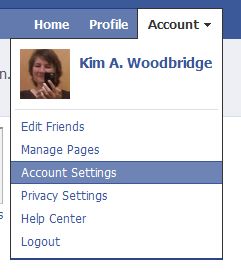
- The Account settings page should default to the Settings tab.
- The second choice is Username. Click the ‘Change’ link on the right side of the screen.
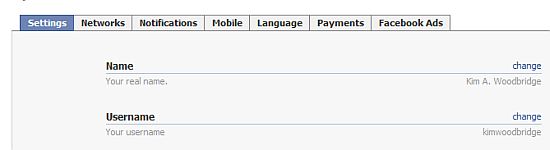
- When you click on change, you will have a field where you can type in the new name and check the availability of the name you want. There is also a message warning you to select carefully as you can only change the profile username once.
I can’t think of too many reason to do this other than typos or divorce but at least it can be done one time.
photo credit: grendelkhan

Always handy to know.
I don’t suppose you know why Facebook have changed the groups do you? I tried to create one yesterday and it is horrible now. All it is now is FB Chat but with more than one of your friends. :(
Hi Dean – Didn’t the changes with groups happen a couple of months ago? If they changed again this week, I haven’t been following that.
I knew this method before but most of the time you don’t find a username on your name which is obvious because Facebook has more than 500 million users and you can’t change it more than 1 time.
Hi Asad – That’s very true. Maybe try using periods or hyphens between the first and last name.
Do you know a way to change the type of a Facebook page?
Hi – What do you mean? This is about facebook profiles. What do you want to change?
Does that singular time exclude the other username change from numbers which is what your profile is out of the box?
Hi Ari – No, it’s one more after that.
Thanks for that…I actually didn’t know how that was done..
You’re welcome.
I have done that.. but I cannot change it anymore..
anyone know the way?
Can you also suggest , How Can I change my name in profile url
Hi Tej – This article explains how to do that. If you want to change the actual name on the profile you need to request that through Facebook.
I had tried , while creating Faebook profile I missed to place my surname ….. I want to add add my Surname , But Facebook Shows out Automated system had rejected ……..
i hav changed my username 1 time …. and now their is no link to change username in account settings … can i change it agin ?? plz help ….
Hi Gary – Is this for the profile page?
I am just wondering if I change my user name for pages – will people still be able to find me as Donna & than how do I get them to my fan page will Recycling Goodwill / Helping Hands come up in search? I don’t care about having email with facebook. I just want both my personal & community page to be searchable.
Help please what happens when I change the user page?
Hi Donna – You will be searchable by whatever the names of the pages are.