
Last week I wrote about a way to filter the Facebook news stream by pagesby creating lists. It isn’t an elegant solution, but since Facebook made their last round of changes their isn’t another way to do this. It’s a shame because it used to work great. I think that Facebook needs to learn that “if it ain’t broke, don’t fix it”. And if it is broke, please listen to your users and at least attempt to fix it.
Anyway, in the comments, Ajith asked how to delete the lists that had already been created. This, too, had been moved in Facebook’s last update and the settings were not obvious.
Here’s how to edit and delete a Facebook list.
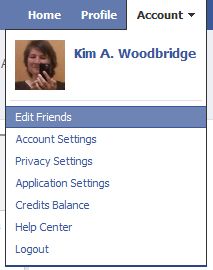
- Click on Account on the top right of the Facebook top navigation bar.

- Select Edit Friends
- On the next page you can add a fan page or a friend to an existing lists and create a new list
- On the left are the lists that you have already created.
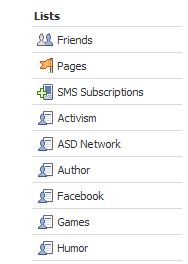
- Click on the name of the list that you want to edit or delete.
- At the top of the page you will now have two new buttons: Edit List and Delete List.
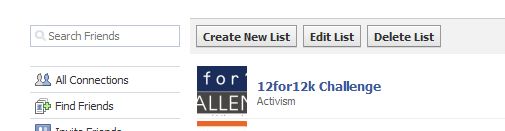
So, that’s how you find the new location to edit and delete lists that you have already created. You can create a new list from here as well.
photo credit: greenhem

Seriously, if not a whole ‘nother blog, then at least a page with just links to facebook resources. ;)
.-= Dennis Edell´s last blog ..Theme Customization Part 3 – Banner Advertising NOT for Sale! =-.
Hi Dennis – I even have 2 domain names … ;-)
Email comin’ soon, if not tonight then tomorrow. ;)
.-= Dennis Edell´s last blog ..UPDATED: Theme Customization Part 3 – Banner Advertising NOT for Sale! =-.
Honestly I can’t think of a way to live without lists. :-) Twitter lists, Facebook lists.. all of these have helped me a great deal to organize. I wouldn’t be surprised if one day a contact-managing-application will appear for all our social networks, something that saves time and effort after clearing the clutter. Yup, that’s another request to my ultimate social media wishlist.
Always can learn something from your blog. Bookmarked and link-loved. ^^
@wchingya
Social/Blogging Tracker
.-= Ching Ya´s last blog ..Link Love: Have You Thanked Your Angels Lately? =-.
Hi – I wish Twitter lists had started sooner. I’ve worked on them some but I’m having a hard time finding the time to work on them – they are very
incomplete.
I like the Facebook lists but find I don’t use them that much – I tend to wade through everything when I have the time. Everyone is way too interesting :-)
So… you don’t employ Facebook or Twitter lists?
.-= Ari Herzog´s last blog ..Satisfying Saturday: 17 Blog Posts I Like in Google Reader =-.
Hi Ari – No, not really. I’ve made lists on Facebook but rarely use them. And I started making twitter lists but I still don’t access information through them.
This has been driving me crazy for… maybe forever! I created too many lists and deleting them was not exactly clear – or maybe something sparkly caught my eye. Anyway, once again, it’s Kim to the rescue – thank you!
.-= Christine´s last blog ..Asian Salad with Pan Sauteed Tofu =-.
Hi Christine – Awesome!
Ooh … something shiny ;-)
Thanks so much!
Hi Joel – You’re welcome.
I don’t have the options “Create, Edit, or Delete” available
I did have “Merge” but that has now disappeared. I accidentally duplicated part of a list under a different name, then tried to merge. That seems to be successful, but now I can no longer Merge either & I can’t find any way to delete…. all I can do now is Add!! Help
Lists on Facebook have changed since I wrote this article and were updated even more during the last round of changes. This Facebook help article should help
http://www.facebook.com/help?page=768