
Ok, so I admit it. I thought I had the exclude category code all worked out but I ran into a couple of problems. One was anticipated as a possible issue with my RSS feed but the second was completely self-induced and caused by trying too many things simultaneously and not paying close enough attention.
But, first, I will start with one small success. The digest post was not sent to Twitter late last night. I guess by suppressing the post based on it’s category from appearing on the front page that Twitter Tools didn’t notify Twitter of a new post. It’s also possible that since the post came from Twitter that Twitter Tools does not automatically send it back to Twitter, which might put you in an unending loop. I read something about this on the homepage for the plugin but was not entirely clear on it. I also found out that, at least for me, Twitter Tools sends the post at around 11:40 and publishes it at midnight. I was actually still up and watched it happen.
Even though the digest post is not displayed it is still sent to my RSS feed. I did not realize this until this morning and two had already been added to the feed. Not only will people see two nonsensical posts in their feedreaders but anywhere that is pulling my feed, such as FriendFeed, will see them as well. I do not have very many subscribers so this isn’t a huge problem. The only way to not have the posts sent to the feed would be by excluding the category from the feed URL or through a plugin. I do not want to change the feed URL because that would negatively affect the handful of subscribers that I do have and trying to hide posts of archived tweets does not seem important enough to warrant this change. I was also trying to exclude categories and hide the posts through code and not through a plugin. Plugins are great but sometimes the author stops updating them or they don’t work with a new version of WordPress and I find myself without a solution for a functionality on which I have become dependent.
Most of my code worked. The code, however, to suppress the code in the two lists of Recent Posts did not work properly. I have looked into this a little and asked a couple of people and it should work.
The code is:
php $recent = new WP_Query(”showposts=8&cat=-23″); while($recent->have_posts()) : $recent->the_post();
As far as I can tell there isn’t anything wrong with it but I am far from an expert in this area. I thought it was working because the first post was not showing up on the front page but this morning I discovered that the two digest posts were in the lists of Recent Posts on the single post pages and pages, such as About and Photos. At first this made no sense to me logically because the code is on two templates, sidebar and footer, which are pulled to all pages. A change on the footer page should make the footer of every single page reflect the change.
I then realized what I had done. While testing yesterday I tried out a plugin called Stealth Publish, which will suppress the post from showing up in the main page and in the RSS feed. I had installed this and turned it on for the first digest post. This plugin works with Custom Fields so it is not something that can be automated. Since this was turned on for the first digest post, that post wasn’t showing up on the front page, in the lists of Recent Posts or anywhere else that I added code to yesterday. I did not, however, check other pages. If I had, I would not thought that my code was working properly.
Lesson learned: When testing something in WordPress only change one thing at a time. Don’t test a plugin while testing code. And I am definitely note a WordPress Coding Stealth Ninja.
I would still like to get the code to work and exclude the digest post by category in the list of Recent Posts and am still looking into it. I will not, however, be able to exclude the digest post from the RSS feed without changing the feed URL or using a plugin.
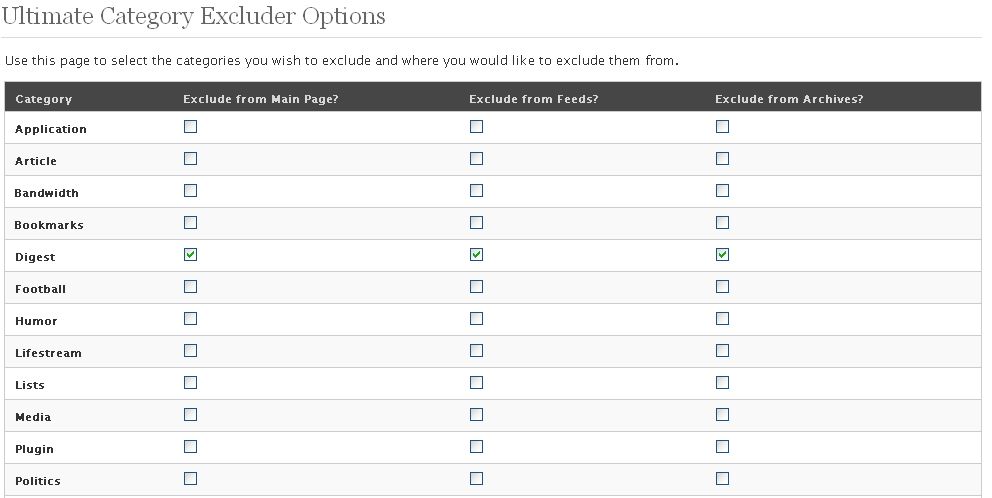
I have since discovered the Ultimate Category Excluder Plugin, which was found via Perishable Press. This one plugin does everything I was trying to do with three simple checkboxes. I am using it now while investigating the code problem.
I could look at this as a big waste of time but I did learn more about loops and excluding categories. And even though I was wrong and yesterday’s post is now inaccurate a lot can be learned from .

Came here looking to exclude a category from my main page in a Thesis theme I am developing and went looking for the plug-in you recommend, only to get trapped in Mike’s endless robot fun.
So I’ll never know whether it works, despite your recommendation, or why Mike banned me.
Too bad, really.
But there is another plug-in that might do the job.
Jeremy’s last blog post – So I know that. So what?
Hi Jeremy – Thanks for commenting :-)
I’m not sure what you mean by being “trapped in Mike’s endless robot fun”. But whatever that is it doesn’t sound pleasant.
I’ve been working more with category exclusion and may have finally figured out how to do it. Hopefully I will write about it soon.
Click on the link to Mike’ site you provide.
Get a message saying my IP has spammed his site.
Go where he says, to type “sorry” … like it’s my fault.
Go back to the original robot trap, as instructed.
Find I’m back being told I’m banned because my IP spammed his site.
OK, so maybe I need to refresh, or something, but WTF? This is no way to treat a guest.
Not that I’m bothered any more as the alternative plug-in I found works perfectly for me.
Oh – he must have blocked an entire range of IP addresses. Not the best way to deal with a spam problem.
What is the alternative plugin? Do you have a link for it?
http://wordpress.org/extend/plugins/advanced-category-excluder/
I linked to it from my own site.
Jeremy’s last blog post – Nourishing arguments