

Last winter I wrote about photoblogging plugins for WordPress. Recently I’ve been using NextGen Gallery with clients and have become a lot more familiar with the plugin.
My friend Manshu also brought it to my attention that the screenshots on my portfolio were outdated. For example, we had installed Thesis on his site but my screenshot still showed his old theme. I decided to redesign the layout of the portfolio using NextGen Gallery. This gave the portfolio a new look and gave me more experience with the plugin.
Steps to a New Portfolio
- Install Next Gen Gallery and activate it.
- Please note that NextGen Gallery only works with WordPress 2.7 +
- Visited the sites that I worked on and took screenshots. (I use the print screen button on my keyboard and do basic edits with Irfanview – nothing fancy here.
- Gallery will be added as it’s own menu item in the WordPress navigation menu.
- Click on Gallery > Add Gallery / Images. Before you can add images, you need to to create a gallery and give it a name.
- You are then ready to upload your images. Add Gallery / Images gives you 4 tabs; Add New Gallery, Upload a Zip File, Import Image Folder, and Upload Images. I usually use Upload Images – what’s cool is that you can select multiple ones from you computer at one time. You will be select the gallery that the images will be uploaded to.
- The plugin does it’s thing, uploads the images and creates thumbnails of them. If you are uploading a bunch at once the processing can take some time but it isn’t too long.
- If you haven’t already created a new page for your photos, gallery, portfolio make one now. You can put some text on if you want or you can leave it blank. We will be adding a simple piece of code to the page.
- Each gallery will have an id number. You will want this for the code that you will using for your gallery page.
- If you are using the visual editor, you can click on the button “Add New NextGen Gallery”.
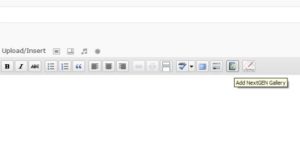
And then select the Gallery and click on Insert. The code will be added to your page. Save, Publish and you’ve got your new image gallery.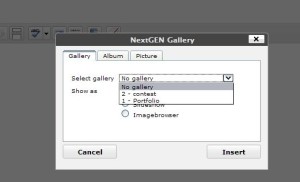
- If you are using the html editor, you can insert the following code on the page and you’re done.
nggallery id=x
surround this in brackets []
x=the id number for the gallery
- I recommend changing the pop-up lightbox setting to Thickbox under Options >Effects. Maybe it’s just my preference but I think this one looks the best.
This is just a teeny amount of what you can do with NextGen Gallery. You can create slideshows, adjust the image and thumbnail sizes, create and display multiple galleries, create albums, use single images from your galleries in blog posts, and much more.
My new portfolio page still links through to the old one through the link of the site name under each image. I’m not going to keep it this way but still wanted information about what I did on each site and the testimonial. I just haven’t decided yet how I want to manage this page – I might want a separate one for each site …
Do you think this plugin would be useful for your site? Do you think it’s a good way to manage a portfolio? If not, how would you do it differently?

i do love this plugin. still playing around with it. cant get the albums to show up as individual albums with pics inside. oh well, will play with it some more.
Natural´s last blog post – Why Wait, Buy Now!
your instructions might help me out too. i see something i was not doing. will try later.
Natural´s last blog post – Why Wait, Buy Now!
Hi Valerie – Cool. I hope it works.
I’ve been using NextGen since i started my blog for my personal photos and i think it’s the best gallery for WordPress out there!
stratosg´s last blog post – Member Of The Month: May
Hi Stratos – I haven’t used any other gallery plugins but this one seems to have all the features you would need.
And wow! a plugin that Stratos likes :-P
I’ve played around with NextGen for awhile now. It’s very powerful and quick.
But I’ve still not wrapped my head around using and understanding the differences between a gallery and an album. From the author’s FAQ:
But there is no single place for decent documentation on it. I’ve tagged 6 different sites to help me along.
A most useful site is this Quick Guide to NextGen Gallery Codes
Brian Meagher´s last blog post – John Dalys Rub & Barbecue Sauce Review
Hi Brian,
I haven’t used Albums – I guess it’s just a way to collect a number of galleries together. I guess this would be useful if you’ve made a number
of galleries and then want to display all of them on one page – you could
put them all into an album.
There isn’t one single source of documentation for the plugin. I usually
search on what I’ve having an issue with and hope I find an article.
This is helpful If say you want an album of vacation pictures.
You also want to seperate them to the beaches and theme parks.
So the album is Florida Vacation which contains Disney, Daytona Beach
Key West, etc. Each gallery will contain the categorized pictures.
Hi OiBoy – Thanks for the explanation. I was thinking about Albums recently and how to use them for photos of my daughter. I was thinking of making a gallery of each month and then putting months into Years with an album.
i figured it out. yahoo! and your post did help. thanks kim i was working on this since yesterday!
Natural´s last blog post – Why Wait, Buy Now!
Hi Valerie – Awesome!
it still has a few issues, but it is working, almost, the way i intended. i think there’s a bug in the coding. i’m getting double photos in the first album.
Natural´s last blog post – Why Wait, Buy Now!
Hi Valerie – Hmm … what happens if you delete one set of them?
Hi Kim – I think I’m going to have to try this. I haven’t used photos much lately, as the plugin I use only seems to work when it feels like it.
Hi Cath – Sounds like me and housecleaning ;-)
I haven’t tried other gallery plugins but I’m pretty happy with NextGen.
Your instructional guide is very detailed. This is going to be very helpful. Thank you for these tip!
Hi Dominik – Well, it covers the basics. Hopefully it will help you get
started with the plugin.
I have been using NextGen for quite a while, I have read from the forums that people having many issues with it, but fortunately it was smooth for me.
Yes, you are right it is one of the best gallery plugin for wordpress, only thing I wish it could do is – creating individual page for each image, now it can show your image file in a new page or with light box effect.
I have used it in a semi automatic way – generating galleries and linking to pages manually created which you can see here : (if you click on each image a new page will come up which is generated manually)
http://www.travel-china.net/photo-dunhuang-mogao-grottoes.html
I also played a little more and used this plugin to generate a list of items linked to the thumb nails generated by this plugin. You can see the action here:
http://www.travel-china.net/china-airports.html
Chinese Girl´s last blog post – Photo Beijing Summer Palace18
Hi – That’s the same feature that I want. Can I ask how you made each
photo link to a single page? Did you edit the plugin?
Yes, you have to edit the plugin, I am using older version of this plugin therefore I can not tell you where is the that particular code in this new version, it is one line code which says link to image, instead you can change it to link to the alt text, and in gallery management page instead of entering alt text just enter the url of the individual page. Thats it!
The code is :
$link = ($ngg_options[‘galImgBrowser’]) ? $nggRewrite->get_permalink(array(‘pid’=>$picture->pid)) : $picture->alttext;
which is on the page of “nggfunctions.php”
For a coder, this solution may seem not very intelligent way, but thats how I did it, I believe you can do it better.
Chinese Girl´s last blog post – Photo Beijing Grand View Garden18
Thanks! As soon as I get a chance (hopefully this weekend) I’m going to give this a try.
Sounds like a good plugin based on all the positive comments you got.
Manshu´s last blog post – The decision to not act
Hi Manshu – Overall it is a good plugin (even Stratos likes it). It’s not without it’s quirks but it’s probably the best gallery plugin out there.
I’ve seen this plugin but have never considered installing it. On my photo blogs I use flickr as the main medium for installing photos in the posts so I’m not sure if the plugin is really necessary.
Sire´s last blog post – Save Even More Money With eBay
Hi Sire – It doesn’t sound like you need it. It really depends on the type
of site you have and the way you manage your photos. I only use it
on the portfolio page – for the rest of the photos I use flickr or upload my
own screenshots.
Yeah, that’s what I figured. Thanks for clearing that up Kim.
Sire´s last blog post – Using CJU’s Rotating Banner Function
That’s a good suggestion…I’m planning on having a portfolio page soon, so I’ll keep this in mind as the way to go.
Thanks for the mini-tutorial!
~ Kristi
Kikolani´s last blog post – Benefits of Blogging – Building a Community
Hi Kristi – Thanks! It would be great for all of your photos :-)
This will be quite useful for displaying Portfolios. Might give it a try when i make a portfolio page
Madhur Kapoor´s last blog post – Store Your Files Securely in The Vault
Hi Madhur – Great! I hope it helps.
I have the gallery installed on an artist website and it works well.
However, if ALL the thumbnails haven’t finished loading when you click any thumbnail the image will open on a white blank page.
Anyone know how to fix this?
Here’s the link: http://www.girlonamission.co.uk/
Be reminded there are nude photos in the gallery…!
Hi Tony – I took a look and see the problem but I don’t know what is causing it. The best thing to do is post your question on the WordPress forums for NextGen.
http://wordpress.org/tags/nextgen-gallery
I don’t know if you have fixed this but I had the same problem.
It’s not a problem with nextgen but with the plugin that you are using for your effect. I was using lightbox 2 and the problem with it is that it does not load until all the whole page has loaded, so I switched to Slimbox which essentially displays the same but does not have that problem.
Hope this helps.
I’ll have a look a see if that helps.. thanks Pixie
Somebody please help me i’m out of ideas…..how to disable nextgen gallery thumbnail onclick option….just to see thumbnail list as an image list…i need to remove click thumbnail opportunity….
Hi – I have modified my files so I’m not 100% certain that my answer will help you.
Have you gone to Gallery > Options > Gallery and checked the box to deactivate the link? You can also go to Gallery > Options > Effects and set the javascript thumbnail effect to none.
Somebody please help me how to write code if this plugin in activate then my home page is another and when i deactivate it my home page is different. i made static wordpress page.please help me.
thanks
Hi Arun – I wouldn’t know how to write the code for that. You might want to check the NextGen forums at wordpress.org
http://wordpress.org/tags/nextgen-gallery
Hi there,
Just wondering if any of you folks knew a quick way of having a text link like “view gallery” and it opens the gallery in the light box?
I can get it to work for one picture but not the whole gallery
Thanks in advance
Hi Claire – I haven’t tested this but I found a tutorial that might help.
http://www.the-field-office.com/information_technology/tutorial-test/