
Using Netvibes
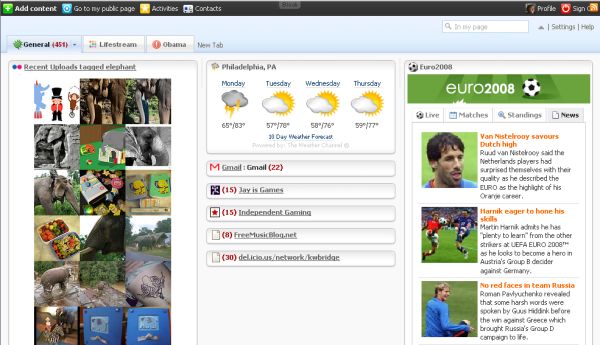
Netvibes has many different uses with the most common being a customized start page and as an RSS reader. I used Netvibes as both for quite some time. I started using it consistently in late 2005 when I started working for my previous employer because it wasn’t blocked by WebSense . Since Netvibes has tabs that can be used to organize information, my first tab was my start page and contained widgets for things like my local weather and my email. I then organized my favorite RSS feeds onto different tabs by topic; tech, linux, books, daily, etc. In the last 6 months, however, I stopped using Netvibes as a feed reader and am now completely using GReader. I don’t really use Netvibes as a start page anymore either – I open up GMail, GReader, Twitter and this website in tabs and am usually ready to get to work.
Why I Stopped Using It
Now don’t get me wrong, this doesn’t mean that I don’t like Netvibes. I do like it, I like it very much. My work habits, however, have changed making it less useful to me. Since I open the sites I want to start the day with in Firefox tabs, I don’t need a startpage and since discovering GReader’s listview (for some reason I always had it on expanded view and didn’t think it was a useful feed reader) and it’s sharing feature, I have found it the most efficient and most social way to read my rss feeds. The most recent version of Netvibes also has a sharing feature but I have not warmed up to it – the shared items go into the “stream” but are not searchable or easy to scan through. And Netvibes is definitely not an efficient way for me to read my feeds anymore. You can only have a set number for each feed and if you get behind you will lose that information. For example, the Joystiq feed was limited to 40 items. It is not infrequent for Joystiq to have more than 40 posts in one day and if I didn’t get a chance to read the feed I wouldn’t see the articles. GReader on the other hand, stores all of the data – even the data for the feed items that you have already read. As a research and information tool this is indispensable.
Netvibes as a Shared Lifestream
But since I do really like Netvibes, I started thinking about what I could use it for. One of the new features that I like is that you can create a page of feeds and widgets and then share it by giving others the URL. The rest of your data is still private but you can can choose to make some of your information public. I first tried this by making a Barack Obama news page .
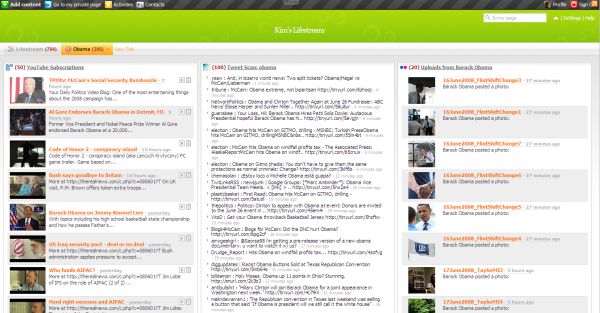
This was an interesting test but since I get all of my news from Twitter and GReader it wasn’t that useful to me. The Obama news page includes YouTube videos, a Tweetscan on Obama, flickr photos and a variety of news feeds.
I then realized I could use Netvibes as a shared lifestream. As I was typing this it occured to me that perhaps this wasn’t an original idea. A quick google search led me to this article by Mark Krynsky from Feb 2007; Create a Lifestream Using Pageflakes.
At that time Mark tried Netvibes as a lifestream but decided to go with Pageflakes as it had a sharing function which Netvibes didn’t have at the time. If he were to test this again, I wonder if he would still prefer Pageflakes. Now, I am curious about Pageflakes as I have never used it – I have made a note to test this and it will definitely be in an upcoming post.
Netvibes has a number of widgets that you can add to your lifestream page; facebook, flickr, delicious, twitter, youtube, and many many more. You can also add the RSS feed for sites that they don’t have a widget for such as your blog or tumblr. Once you have finished adding your “streams” to the lifestream tab, click on the down arrow on the right side of the tab. A number of options will open but you will want the one that says Send to Universe. The tab is now public and you can share the url with your friends and family. Here is mine.
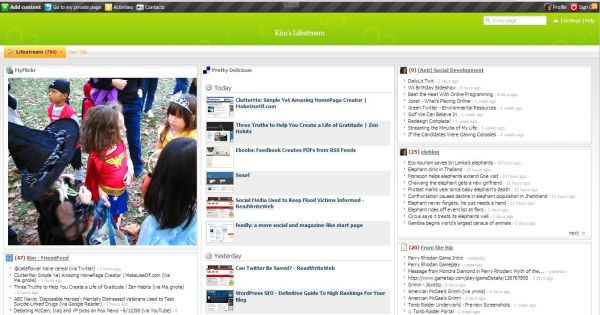
Sources on my Netvibes Lifestream
Widgets
- MyFlickr
- Pretty Delicious
- Last FM
- My Youtube Videos
- The Daily Plate (diet and calorie data)
- Netflix Queue
RSS Feeds
- (Anti) Social Development (this site)
- eleblog – my elephant news and information site
- From the Hip – my video game tumblr
- The Funny – my tumblr of things I find amusing
- Green Media – my environmental tumblr
- My YouTube Favorites
- Shared Items in Google Reader
- Stumble Upon

Yes, Kim, may I be the first to say that these 5 hitherto uncommented-on articles ARE too brilliant.
Please consider this a non-comment comment as I am utterly speechless and must go lie down now to recover.
Jannie´s last blog post – Yeah, Cindy Lou Who?
@Jannie – LOL I hope you feel better after you get some rest :-)