

I don’t usually post on Fridays but after monitoring twitter and the WordPress forums for issues with the WordPress 2.8 upgrade, I decided a quick post was needed. And, yes, WordPress 2.8 was released a day late.
I always recommend NOT upgrading the first day a new version of WordPress is released. While WordPress itself is stable there are SO many plugins and themes that can cause issues. And it’s not possible for the WordPress gang to test for every possible configuration out there.
So, first, please note that this message is just a notification it is not a command or an order. It may be tempting but it is not required that you click the link.
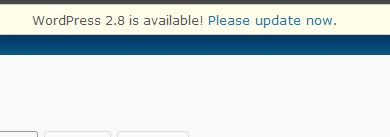
Before you do click on that link take the time to do a little bit of research.
- Check the forums for issues that others are having.
- Check the plugin compatibility list. Do you have any plugins that you can’t live without or that will break your site if deactivated?
- Check the theme compatibility list. This is especially true for Thesis users. Wait for the go ahead from Thesis before upgrading.
- If you still must click the link, MAKE A BACKUP of your database, wp-content folder and wp-config file. You should be backing these up regularly anyway.
- If you don’t know how to use ftp, troubleshoot potential issues, or restore the previous version of WordPress, either wait to upgrade or find a friend who can help you out. I certainly don’t like to earn money off of people’s misfortunes but if you do run into a big problem, I can fix it for you.
If you blog isn’t that important to you, then ignore my advice. If, like me, you depend on it for your livelihood, I highly recommend taking a deep breath and doing some research and site maintenance before clicking the upgrade button. And, you know me, I still think manual upgrades are the way to go.
photo credit: Crashmaster007

I’m thankful I didn’t have a problem with either of my blogs doing the auto upgrade today, but I know I will do a manual upgrade next time WordPress has a new release.
Thank for the information!
carla | green and chic´s last blog post – Lemonade
Hi Carla – I’m really glad you didn’t run into any issues. Honestly, I think
most people don’t have upgrade problems. It’s just one of those things
where the people who ARE having trouble are very vocal.
I know i won’t be upgrading it till it becomes quite necessary
Madhur Kapoor´s last blog post – AvancePaint is a Microsoft Paint replacement
Hi Madhur – LOL – I won’t wait that long but I usually wait a couple
of weeks. At least on my main site.
This 2.8 upgrade include database upgrade, i got my database covered yesterday:(
Hi – I’m not quite sure what happened to your your database but I’m sorry for that.
Just upgraded today. Thanks god everything working fine :-)
Kurt Avish´s last blog post – WordPress 2.8 Released – How To Upgrade?
Hi Kurt – Great! I’m glad it went well.
Good post. Wish I’d read it before I upgraded :-D I’m always a little blasé about my own sites, but will be sure to bear this post in mind next time round.
Mauricio Reyes´s last blog post – #gadgetshowmob meetup videos
Hi Maurico – Yeah – I should have written it a day earlier but I don’t
usually post on Fridays. When I started reading about issues I decided
to write this. Sounds like your upgrades went ok, which is good to hear.
Great advice, Kim, and things I should have thought about prior to upgrading. GAH!! :)
Danny Brown´s last blog post – The More We Connect, The More We Lose Touch
Hi Danny – I think I’ll just pull this article out each time there’s an upgrade, change the version number, update the links, and republish ;-)
Thank you for this great article. I found your link over at Kikolani.
Frank J´s last blog post – All Birds Must Land Twitter Included
Hi Frank – Thanks for visiting and I’m glad you found the article
useful.
I can never wait. I get too excited. I make backups of my files and db and then go for it. I did the 2.8 automatic update and it went great. No problems at all. I updated all my plugins first, but did not deactivate them. Guess I was lucky :)
Lori´s last blog post – If Clients Treated Others Like They Do Freelancers
Hi Lori – LOL at getting too excited ;-)
The thing is that you DO make backups and know how to troubleshoot
any problems that might happen.
Thank you Kim. I have that thought loooong ago and when I saw the upgrade option link in the wordpress admin panel of one of my blogs, I must admit that I just went ahead and clicked it there and then without thinking twice. I did not even back up anything! I am just glad that it did not prove to be anything of a disaster.
Gert Hough´s last blog post – Petition Not To Legalize Sex Work
Hi Gert – Always back up – it can save a lot of headaches on the off chance that something goes wrong. I think most upgrades go fine – I just read about a lot that didn’t.
I have upgraded 2 of my main blogs, and everything seem to work fine!
thanks
Hesham´s last blog post – Features That Didn’t Make it into WordPress Version 2.8
Hi Hesham – Great! I’m glad your upgrades were successful.
I’m scared out of my pants every time there’s an upgrade! I fear that button like the plague. And then I wait for my husband to have an entire night off so he can fix whatever issues we run into!
Adrenalynn´s last blog post – It’s gotten so bad that I actually photographed myself during my lunchbreak so I could have something to blog about.
Hi Adrenalynn – Is that date night? ;-)
You know it! LOL :)
Adrenalynn´s last blog post – It’s gotten so bad that I actually photographed myself during my lunchbreak so I could have something to blog about.
Every time when there is a upgrade it gives a headache to me, as I have done much too customization on my blog am not sure should I do it now, it is something gives pressure to me.
I hope after this upgrade became a stable and bug free and I will confront my blog.
Hi – A lot of customizations can make upgrades difficult.
Thanks for the alert that I should check with thesis before upgrading. I haven’t upgraded since I moved to that theme.
Hi Tracy – I got an email from Thesis. They have a theme update 1.5.1 for people who upgrade to WordPress 2.8
Has it really given so many problems? I mean, as i said before, i find it a minor update that shouldn’t generally cause problems except for some very rare ones. That’s just my feeling. But, in any case, it’s always a good advice to make a full backup before you go on with any update…
Hi Stratos – It’s hard to say if a lot of people have had problems or if the
ones having problems are very vocal. I’m sure most of the problems
are due to plugin issues but people are not making backups or doing
a little preparation first.
Hi Kim,
I just started to notice the 2.8 upgrade link and wondered if I should go ahead, I love how you share the importance of backing up our files and checking forums for known issues before we click. I think I’ll give it a day or two even though others shared they had no problems.
Barbara Swafford´s last blog post – The Squeaky Wheel Gets The Grease
Hi Barbara – I encountered a number of people having problems on release day, which is why I wrote the article. But, overall, I’m sure the upgrade is fine.
Hi K,
The upgrade to 2.8 went pretty much seamlessly for me for my main site, but even then, I did the usual back-ups and research before I could make myself click that update link :)
The only major I have is on my personal site which has privacy locked so that others can’t get in. Somehow, it no longer works with Windows Live Writer (my blogging application). I may have to play around with the plugin to see if there is anything I can do to keep the site private and still be able to use Live Writer.
-dee
Dee´s last blog post – How to Add Chrome like New Tab and Home Page to Firefox
Hi Dee – That’s odd. Maybe WLW needs an update for compatibility.
I’m glad the upgrade went well.
Dee,
Check your admin Settings -> Writing.
You may need to “check/tick” one of the two “Remote Publishing” options
Best,
Tony
Upgrading to WordPress 2.8 was smooth yet I used to check plugin compatiblities to be sure that nothing will be missed up. I think we need more time till we handle the new features in this new release of this awesome platform!
Hicham´s last blog post – Relationship Status
Hi Hicham – I think it’s really important to check the plugins before doing an upgrade.
I faced lot of problems. what i did to solve is just disable all plugins and start enabling them one by one and in this way caught the culprit plugin.
Nihar´s last blog post – Download PC Advisor Free Avira Premium Security Suite License Key
Hi Nihar – Yeah – I’ve had to do that one a number of times when helping
people :-) It’s annoying but effective.