
I frequently move sites from one host to another, move a site to a new domain, or develop a site in a subdirectory and need to move it to the final location when the work is complete.
So, I end up with a lot of URL’s and image links that need to be changed. Thinking about doing this on a very large site is daunting and makes me want to go back to bed and put the pillow over my head.
Fortunately, there is an awesome and simple WordPress plugin that will change all of the URL’s for you.
Velvet Blues Update URLs is a WordPress plugin that has two fields; old URL and new URL.
- Install and activate the plugin
- Go to Settings > Update URLs
- The screen will look like this
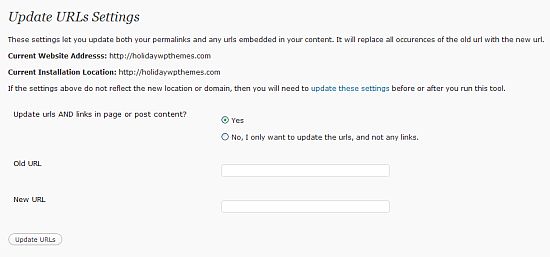
- Fill out the old URL. For example, if your site was installed at yourdomain.com/blog and you moved it to yourdomain.com, yourdomain.com/blog is the old url.
- Fill out the new URL – yourdomain.com
- Click on the Update URL’s button and you’re done.
- Make sure you check them. I’ve had typos in mine and had to redo them. This isn’t a big deal – the new URL with the typo becomes the old URL and then in the new field you type it again without the typo.
- Please note that this will not change any hardcoded URL’s and links that are in widgets. These still have to be done manually. But, that is a minimal amount of work compared to updating all of the URL’s on the site.
photo credit: richardmasoner

I don’t do it very often but this is the major thing I hate about moving, even more so that having to tinker with the database. Even thinking about manually having to edit every link and image is making me shake and sweat! :D
.-= Dean Saliba´s last blog ..The 7 Links Challenge =-.
Hi Dean – This plugin works great and will take care most of the issues for you.
I’ve used this plugin before as well. Makes it a whole lot easier to move stuff around. This and the occasional sql query of course ;)
Hi Remkus – Yes, a SQL query works perfectly well too but it’s not for the average user :-)
This plugin has been a lifesaver for me.
Very nice tip Kim. I guess this plugin modifies the htaccess file?
.-= Colleen´s last blog ..New Listings Today- Tri Cities Washington August 2- 2010 =-.
Hi Colleen – No, it changes a field in the WordPress database. Works great.
I’ve used Velvet Blues before.
First time, it was tense… pulling the trigger on something which is going to change the database. Wooo….
I’m moving to small, custom plugins for some of my sidebar chores. With a little really simple form work, I can control the URLs from an admin page.
.-= Dave Doolin´s last blog ..Who’s afraid of outbound links =-.
Hi Dave – I remember being nervous the first time I used it to – I’m sure I backed everything up first :-)
This could be useful. Thanks!
.-= vered ´s last blog ..The Hourglass Figure Is In Yay But Wait- Is That Good News =-.
Hi Vered – You’re welcome :-)
I’m not sure I get it, is this another redirect type plugin?
.-= Dennis Edell | Direct Sales Marketing´s last blog ..2 Immediate Feedbacks Needed PLEASE! =-.
Hi Dennis – Say you moved your site from one domain to another. All the images you had uploaded and internal links would be incorrect and would need to be updated to the new domain – this plugin deals with that. You would want to use redirection too.
Looks like a great plugin! However, it’s my experience that once a site is moved to a new domain or server, unless the site URL is changed in the database, it will not even be possible to access the WP admin, much less access this or any other plugin.
Do you mind explaining at which point in the process this plugin comes into play?
Thanks!
Doron
.-= Doron Orenstein´s last blog ..Solution to NextGen Gallery Slideshow CDN Conflict =-.
Hi Doron – That’s right. You would have to take care of the site URL first – that article doesn’t deal with that. Then this plugin would update the images url’s and and all of the other internal links.
Ahh, OK, that makes sense. Thanks!
.-= Doron Orenstein´s last blog ..Solution to NextGen Gallery Slideshow CDN Conflict =-.
Hi Kim
Came over via your reply to John Hoff about my changing temporary URL to final domain name.
Thanks for your helpful reply and thanks the the info on this great looking plugin.
Hi Keith – I’m glad it helped – thanks!