

FBML provides the code to include a little share button, like the ones you see on the bottom right of the wall, on your customized fan or business page.
When you are on any tab on a fan page other than the wall, there isn’t a share button, so it’s useful to be able to add one so that visitors can share the page with their friends or even post your page to their own wall.
And this little bit of FBML is super easy to use.
The little share button at the bottom left of the wall page looks like this:
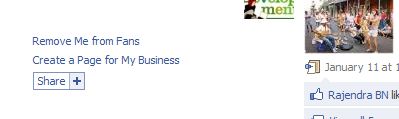
Unfortunately, the button can not be customized. It’s going to look just like that. But, it can be added.
The code is:
<fb:share-button class="url" href="http://facebook.com/
Anti.Social.Development" />
The only thing that you need to change is the the url after http:// to the one for your own fan page.
When the button is clicked on the share box looks like the following:
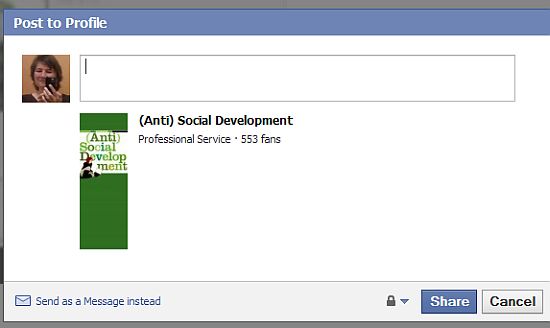
It’s pretty basic and includes the general information that Facebook has about your fan page.
If you want to make the share box a little fancier you would use the fbml that includes the meta class rather than the url class. With the meta class you can specify the image that is displayed rather than using the default logo and include a description that contains more information about the content of your page.
<fb:share-button class="meta">
<meta name="medium" content="mult"/>
<meta name="title" content="name of fan page"/>
<meta name="description" content="description of fan page"/>
<link rel="image_src" href="url to image location" />
<link rel="target_url" href="http://facebook.com/Anti.Social.Development"/>
</fb:share-button>
- meta name=”title” content=””name of fan page” – the name of your fan page
- meta name=”description” content=”description of fan page” – the description you want to use.
- link rel=”image_src” href=”url to image location” – if you are using an alternative image, this would be the location on your server
- link rel=”target_url” href=”http://facebook.com/Anti.Social.Development” – the url to the fan page that you are sharing
The message box when using the meta class looks like the following.
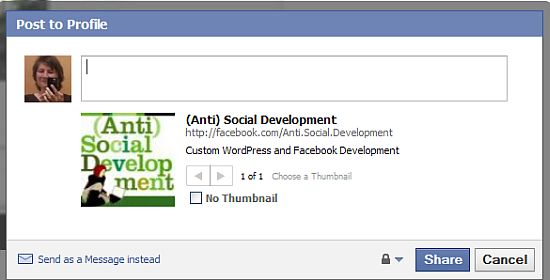
You can see that a different logo is being used and that the description that I specified is providing more detailed information about the page.
Just one more little thing you can do with FBML on your fan page.
photo credit: Medmoiselle T

Thank you! This is wonderful! I can’t get the image to show up though but I still like being able to customize the text etc. Any idea what’s up with the image? I was using a logo stored on flickr, wonder if that has something to do with it! Anyway, thanks a ton, you’re terrific!
Karen
.-= Karen Clark´s last blog ..Fan or Follow =-.
Oops forgot to include the fan page in case you wanna peek: http://www.facebook.com/mybusinesspresence
Here is the welcome tab I’m adding it to:
http://www.facebook.com/mybusinesspresence?v=app_11007063052
Hi Karen – Thank you.
Do you mean the logo image or the image that you are using for the share button? If the one for the share button isn’t working it might be because of flickr – you might want to test an image an another location to make sure the share code is working properly. When I tried the share button on you page right now the image didn’t load.
It may be the size of the image – I tried to use quite a big one and it didn’t work, resized it and that did the trick.
Cool Kim. I must have missed something along the way though…FBML – is that like HTML for Facebook?
.-= Dennis Edell´s last blog ..The Time Has Come. The Deal Is Done. It’s Time To Move!! =-.
Hi Dennis – It’s like Facebook’s version of html – a lot of is html and then they have their own tags – FBML=Facebook Markup Language.
Hi! Thanks for the great post.
I’m trying to figure out how to put a share button for a video on my fan page. So someone can “share” the video and not necessarily the page url.
How do i do this??
Thanks!
This article might help – you would want the URL shared to be the URL to the video, so it would need to be hosted somewhere like
your website or youtube.
http://www.kimwoodbridge.com/how-to-create-your-one-facebook-share-url/
Adding a share button can really make a difference when it comes to spreading the word ( and love..) around. I haven’t tried share button with Facebook yet but it helped with some of my blogs.
Hi Posao – I wish I could make them bigger but they are useful in helping get a fan page shared with others.
Thanks for the code snipit. I added a FBML for this and executed the code. Worked great and the new ShareBox appeared under my Boxes tab. I can also create a whole additional tab called “Share Box”, but that seems odd and I’m not sure that was what you were suggesting. How do I get my new ShareBox icon to appear on each of my Tabs?
Thanks!
Hi Caroline – You can name an FBML section anything that you want and then under Application Settings for it set it to be a tab rather than a box. For each custom tab that you make using FBML, you can add a little share box to it.
Ahhh ha!! Now I understand. I need to think of this as additional code that I add to my existing custom FMBL tabs (not a standalone tab). I just tried it and it works perfectly!! Thanks!!!
Hi Caroline – Exactly! Great – I’m glad it worked out.
In case it helps anyone else – I found that in my RSS reader Facebook app, I had to close the fbshare tag with
otherwise it only showed one item. Might be related to the fact that it is a iframe not fbml app.Great post by the way.
code tag didn’t work then – I had to close the fb share tag wit… </fb:share-button>
Hi Phil – Thanks for the extra info :-)
Hello! I used the code and it works. I am very pleased with the results and i thank you for posting it.
There’s just one problem. The thumbnail is very blured no matter where i upload the image or how i resize it. I tried to use a picture from my facebook profile by copy/pasting the image location but the thumbnail still looks blured. If i delete the line that replaces the profile thumbnail i get no thumbnail at all…
What should i do?
Thank you!
Hi Sorin – I didn’t encounter that problem when I tested it. The image I used is 125×125 – did you try one about that size?
I did it now and it worked ! :)
Thank you very much!
I would also like to turn the “Suggest to friends” link into a tab just like they did for this 2 page – http://www.facebook.com/DiscoveryChannel?v=wall&ref=search (Tell Your Friends Box) and http://www.facebook.com/ifan.page.design?v=info&ref=search (Send Vip Box)….
I tried the “Invite Friends Tab” made by the developers ( http://wiki.developers.facebook.com/index.php/Fb:request-form) but it is very limited as you can send only a few invites per day…
The “Suggest to friends” link is very efficient compared to this app…
Thank you again for your help!
Hi there,
I was trying to add an image when i share to facebook. The code above for the link rel=”image_src” href=”url to image location” works but the image does not have an alt text. Is there any way to pass the image alt text to facebook as well?
Hi Juncai – There isn’t any mention of the alt tag in the fbml documentation for the share tag. I tested it by adding it to the code on my demo page and it didn’t work. I can only assume that fbml doesn’t utilize it here but I haven’t been able to verify it.
Hi
THis is really an informative post.
I have tried the same, but with the content type video.
But the problem is that i see an error showing “the content cannot be shared, publishers privacy settings dont allow for this”. some thing of this sort.
can u help me regarding this?
Hi Majid – Try a different video. It sounds like the one you are using
doesn’t allow embedding and that is why you are getting the error
message.
Can you add hotspot links to your facebook fan page? I was able to upload my image and add a link to the entire image, but I am wanting to add different links to the image kind of like you would add “hotspots” in dreamweaver. Is this possible? If so, how?
Hi Brian – You should be able to use an image map on a fan page – CSS ones tend to work better – but the image used in the share button can only have one link associated with it.
Hi Kim,
This was really helpful. Wish I could make the share button larger, but what can you do?!
.-= Regina Fried´s last blog ..LinkedIn Goes Social =-.
Hi Regina – Seriously!! It’s tiny. And it would be really nice to have a custom share button.
My Facebook wish list is getting really long :-)
hey Kim,
A foreword – I’m a total beginner to FBML as well as programming in general, but I’m super eager to learn, so bear with me here :)
I created a new tab with a large picture in it (a promotional poster) and was trying to insert a share button using the code from your post, but it doesn’t seem to work. The picture’s there, but the code keeps appearing along side it, with no sign of share button at all.
Here’s what it looks like:
<:fb:share-button class=”url” href=”http://facebook.com/
weloveflo” />
I tried using the tag mentioned in the comments section, but it made no difference.
It’s quite possible that I’m doing something wrong on a basic level here, but, like I said – I’m a newbie.
Would you guys be kind enough to tell me what I’m missing?
thanks,
Yuri
oh, for some reason the code for the picture didn’t appear in my post above.
It’s just a simple
copied and pasted from here: (example one) – http://lorrainesiew.wordpress.com/2009/07/04/facebook-pages-fbml-examples-part-1/
hey,
Problem solved – I used this code from Wiki developers
and it worked like a charm. A question, though – how do I move the share button around the page? I’d like to have it on top of my poster. Also, can it overlay the picture? I’d like to have it on top of the graphic.
Sorry if that stuff’s obvious, I’m still trying to get the basics.
thanks!
yuri
first of all sorry for multiple messages, feel free to delete some :)
I have just found a perfect example of what I’m trying to do:
http://www.facebook.com/search/?q=nike&init=quick#!/justdoit?v=app_7146470109&ref=search
the SHARE tab – see how the share button overlays the picture? Also, how do I make another picture clickable (as in “Share your story on our wall” in the Nike example)?
any help will be much appreciated
yuri :)
Hi Yuri,
The share button will display wherever you put it in the code. It looks like Nike made the main picture the background and then added the image and the share button and told them to align to the right.
LInking an image is done through regular html.
http://www.quackit.com/html/codes/html_image_link_code.cfm
Hi Kim,
Thanks for the reply. Helpful.
One more thing: I tried using the meta class share button – the extra bits of info are pretty vital for what I’m trying to do – but I can’t seem to display both, the background image and the share button. It seems that the only thing displayed on my page is the one I put on top of the code – if the code starts with the meta share button, it’s all I see on the website and, similarly, when I put the button code underneath the CSS background code, it disappears and all I see is my background image.
Any thoughts?
thanks!
Yuri
fixed! :)
Hi Yuri – I love it when people fix the problem they were having before I
even get a chance to answer ;-) I do that all the time – ask a question on a website and then figure it out before the question is answered.
Thank you very much. This is very helpful.
Hi PT – Great! I’m glad it helped.
Hi Kim!! This is awesome, but Imma little slow…so uhm, here’s what i’ve done and maybe you can tell me what I’m not doing right. Before I found your page I went to facebook’s widget share page (http://www.facebook.com/facebook-widgets/share.php) and got the code to post a share button on a page. I added the FBML Static App to my fan page, then I went to edit page and then “edit” under fbml and it takes me to a box. I pasted the code. Okie…now that I did that, I get a new tab that says fbml and a box under my boxes tab that has the “share”link and when I click on either of them they take me to a site that says “enter the url of the page u want to share”….So after that I found your page I did the same thing but pasted your code instead and used the link of my discussions tab page. (which is where I want it so that ppl can share the discussions) This is the link I put in your code: (http://www.facebook.com/apps/application.php?v=app_2373072738&id=335911472298) Well all that shows up is a new tab “fbml” and the code, but it is not clickable and isnt recognized as a link!
So basically, either way I cannot get the “share” link to show in my discussions tab and even so, it wont work.
Ideally I would love to have a post button avail on every topic on the discussion board, but I will settle for the discussion board itself. I want it to be how it is in the FB “notes” tab where you can share a note! I would love to use the notes tab because it has what I need, but I need my fans to be able to “post a new note” and unfortunatly, only I can start a new note! The whole concept of the page is for people to post prayer requests and for other ppl to be able to comment on those requests, follow up on them, and post them to profile and share them with others. So I just need a place where ppl can post, comment, and share all in one but there is nothing like this avail. Sorry for the long story, but is there anyway you can help me with this? please feel free to e-mail me!
Thanks so much! At least now I know it CAN be done! :)
Hi Sommer – This article is about the fbml code that can be used on a custom facebook page in order to allow users to share it. As far as I know it can be used on a custom page to share *that* page but can’t be used to share different tabs or multiple items on a tab.
I think you are looking for more functionality than is currently offered by the available facebook applications.
Okie Kim! Thanks that does make sense! Just one last question in that case…is there place to maybe copy a code that you can paste in the fbml static box that would make the new custom tab exactly like the original FB Discussions tab or even the notes tab? Like a code to clone the Discussions tab? If I could find that, then maybe I could implement the share button in that new tab?! Thanks again, I’m still learning! :) And if you know of any other reasources to where maybe I could find templates for new pages kinda geared to what I want that would be great! So far, I can only find picture galleries and such for fbml static templates!
Thanks again!!
Hi Sommer – It wouldn’t be possible to duplicate Facebook applications on a custom tab. The best thing to do is create that functionality on your web site and then have the custom tab give information about that and link over.
I’m not aware of any templates – I’ve thought about making some but haven’t had time to start that project ;-)
hey there!
just wrote to say thanx! i was looking for this sort of infor for ages and couldn’t find it. so happy i came to your blog… :))
thanx,
gil
Hi Gil – Thanks – I’m glad the code worked for you.
Hai Kim,
I manage to put a share button on my facebook fan page,
And since you have experience more on this, I was wondering how can you move the position of the share button. I would like to search for other resources, but it would really save my time if you just help me on this small favor :)
Thanks
and have a nice day..
Hi Gilbert – You could use html to change the position of it. It depends on the layout but you could have it aligned with a table or use a margin or padding.
I m having Images Issues. Plz let me know how to write URL of Images.
The image has to exist on a server somewhere – it would be something like
http://domain.com/image.jpg
Thanks a lot for this…though how to add share with friends is unclear to me:(
.-= LAFBS´s last blog ..I HATE IT WHEN I HAV 2 SIT ON THE FIRST BENCH IN AN EXAM- =-.
That is more difficult to implement. I haven’t written about it yet.
Thanks for this post.
You forgot to close the fb:share-button tag in your example. I copied your example and was getting this error when trying to share:
“There was an error trying to share this content. Sorry, the content owner’s privacy settings don’t allow you to share this content.”
Hi Steve – Thanks! It’s fixed – and it took 6 months for anyone to notice the error ;-)
Is there a way to share a specific Tab page within a Fan page? Insead of sharing the entire fan page I want to be able to share a specific tab page within my Fan site. Is there a way to do this?
Hi Dave – If you go to Edit Page and then locate the specific tab you should see a link that says ‘Link to this tab’. If you use that URL you should be able to link directly to the specific tab. I have not, however, tested this yet. Thanks!
I’m having difficulty adding a share button to me website. I tried the link below:
Between the head tags I have the following:
This code will share the page but doesn’t utilise the title, image, or description. Only the URL is shared.
I’ve been looking everywhere for how to do this and can’t figure it out. Can you help?
Sorry, it didn’t seem to accept the code tags. I use an a tag with name=”fb_share” type=”button_count” share_url=”[URL]”.
In the header tags I have the FBML markup within a fb:share-button class=”meta” tag, containing the title, description, image url etc.
Hi Lotte – What size is the image being shared? I’ve found that I’ve had to place with the size to get everything to display properly. The one that I’m currently using is 75×75 px.
Hi Kim,
I’ve knocked up a simple html page which demonstrates my issues. I’d be very very grateful if you could have a quick look at the page and source code and provide any insight. I’ve been going around in circles all day!!
http://www.gazoomy.com/fbshare.html
The website provides themes for Google, and when people click the “Set as Home Page” button I want to share it on Facebook with a thumbnail image which is approx 200×150 pixels. At present it only displays the url and ignores everything else.
Here’s an example of a proper page:
http://www.gazoomy.com/search.aspx?theme=Clown%20Fish
Thanks, Lotte
Hi Lotte,
The second example with the meta information is the code that you want to use but you don’t want it in the head of the page – you want it where the button is located. It’s kind of one or the other – not a mix of both code types. And I think your image needs to be resized and made smaller – I’ve run into issues with that before.
Hi Kim,
Thanks, I’ve found this very useful.
I would like to have my own design for a large share button on my fan page like the one here;
http://www.facebook.com/DisneyPixar
do you know how this has been done?
Thanks, Tom
Hi Tom – Any image can be used as the share button. This article should help
http://www.kimwoodbridge.com/how-to-create-your-one-facebook-share-url/
Hi Kim,
Thank you very much for the reply.
However, that method only seems to work with the url class. How could I use my own image with the meta class share button ie etc? They seem to have managed it at http://www.facebook.com/DisneyPixar and I’d really like to do the same.
Thanks in advance, Tom
Hi Tom – I’m not sure how they are doing it on that page. That method works on websites. It’s either code that I’m not aware of or Disney is using a custom application.
How do I link the share button to a form?
Hi Yaco – This article should help.
http://www.kimwoodbridge.com/how-to-create-your-one-facebook-share-url/
You would want to wrap the code around the submit button.
Thank you very much for that link.
I have tested using that in my code but it is still only showing the one image.
what I am trying to do is something more like the wishlist on
– Starwood Preferred Guest (SPG) on the Explore SPG Tab or
– SamsungUSA on the Samsung tab
Thank you very much in advanced
Hi Yaco – I think they are using the Facebook Wishlist application. You may want to test that and see if has the features that you need.
http://www.facebook.com/apps/application.php?id=6939597196&v=info&ref=ts
A great help, thanks very much :)
Hi. This is perfect ,and works !
But I want to know are user-xxx share this or not.
how can we do that.
Can i see staticstic of SHAREing with this button.
This is too inportant information
Hi Simeon,
You could use Facebook insights as described in this article
http://www.wisnet.com/noteworthy/using-facebook-insights-to-track-the-like-button-box-and-shares/0/0/447/
do you now how to do this…
1st step visitor must become a fan of the page, then 2nd step unlocks
2nd step visitor must share the page to see some content (like photos, videos, links)
1th action I made… But I can’t find code for 2th. I only menaged this: visitors must become a fan and the can see link… I want to they mast share page too.
thanks.
I ask on few forums but nothing :(
Hi John,
As far as I know there isn’t a way to do that.
It is! But I don’t now how…
This is an example: Sorry for language (not english)
1th said: push like button.
2th said: next step
3th said: press share button
when you do it all you see link….
http://www.facebook.com/pages/OMG-pogledajte-sta-rade-ludi-ruski-tinejdzeri-sokantno/111528032246281
Hi John – Where are the instructions coming from? A visitor can like and share the page but I don’t know how to make them do that.
this is not instructions… I only translate what written on that fan page ( http://www.facebook.com/pages/OMG-pogledajte-sta-rade-ludi-ruski-tinejdzeri-sokantno/111528032246281 ) because it’s not on english…
thanks…
Aaahh … ok. I still don’t think there is a way to force the share to happen.
ok… thanks…
oh… I’m now understand the trick, but still don’t now how to make it.
When you make content for non-fans and fans… To fans you show: you mast share to see link… all people share because they think they must share… but link have no mater whit sharing. link show 5-10 second before you like page…
thanks…
That’s so awesome! The only other place I saw this they wanted to charge me $9.99 for the privilege!!! Thank you so much for sharing!
Hi Elle – I’m glad it helped :-)
I want to use fb:share im my facebook app. it working fine but when i post the priview it goes to “facebook post url ” it is not coming back to my parent page..
any sugesstion ?
Hi Ajay – I don’t think I can provide assistance – I am not familiar with developing Facebook apps.
thanks for the post. One question though. Do you know how you would be able to track if someone actually did the share? For example, if you wanted to give a custom “thank you” message to a person after they did the share from your website, how can you track that the person actually did the share?
While I found ways to event track likes and comments, I could not find something similar for shares.
Hi Jay – I am not familiar with a way to track shares.
This tips so awesome.
we can explore FBML in FB for anything that blogger need. Thank’s for your sharing. I can use this trick if i need it. :D
I’ve been reading all your facebook posts and found them very clear and useful. I’ve been trying to customize a landing page for a while now, but I’m stumped on the Share button. Everything in the code works, except it redirects us to our own posted links page instead of staying on the page we are on. That is really annoying, for a fan page, because we want people to be able to see our content and not have to track their steps back. It seems to be a known issue http://forum.developers.facebook.net/viewtopic.php?id=61514
But for the sake of me I could not find a fix. Are you by any chance aware of a solution? Thank you!
Hi Isabelle
I don’t know of a solution – every share that I’ve tested this morning is doing the same thing. The one on my demo page is doing it and it didn’t used to do that …
I’ll keep my eye out for a solution but so far I haven’t come up with much.
Thank you for your reply Kim, I appreciate it!
I want to thank you.. I loaded the share button and it works but no image and not much description..
I have read other peoples issues regarding and resized the flickr image but still no luck…
I will keep trying and am sure will fix the problem but still wanted to thank you for your kind info..
much appreciated
sean
Hi Sean – I’ve found the size of the image is the usual cause of the problem. If something else is causing the issue, it’s possible Facebook has changed something that I haven’t encountered yet.
hi,
I pasted the following code under the body tag in my website…
When click on share button its open the window but not set any variable which we defined above that is title, description,target_url, image_src….
Please tell me what do i am wrong….
Hi Nidhi – The instructions in this article are for adding a share button to a facebook page. Take a look at this article.
http://www.kimwoodbridge.com/how-to-create-your-one-facebook-share-url/
Hi,
is there a meta class solution for showing the number of fans which one already has like in the normal url class version?
Thank you.
Hi James – Not that I’m aware of – have you looked through FB’s documentation?
the image isnt working, I have tried to make it smaller and still does not work? :(
hello to all… ;)
at the moment i’m creating a facebook “fan-page” and i did an extra button for “share” – as you described.
but… my image i prepared for the share function is alway blurred or something like that…
what do i have to do (picture size, resolution), that it won’t be like that anymore…
thanks for your answers in advance!
thomas ;)
Have you tried using an image that is 75×75?
Hi there,
this tutorials is working great for me so far. so thank you for that.
i’ve just got one problem. the image i’m going to embed is shown correctly in the “post to profile” popup, but it’s not shown on the users wall. text and url are displayed correctly.
any suggestions whats the problem?
thank you!
Having the same issue as Flow above? It just started this week as I have had this button on tabs for a few weeks now and the image always showed up. It’s like FB changed the support for the image posting to the users wall. Everything else works great.
Hi Matt and Flow
Yes, I’m experiencing the same thing and it looks like a new problem.
Facebook is actually getting rid of the share button and wants everyone to use the Like button instead – the instructions I have in this article aren’t even on FB’s site anymore. My guess, although I haven’t verified this, is that even if it is a bug, they aren’t going to fix it – they don’t want us to use this anymore.
Thanks for the quick response! I was worried about posting here as I didn’t think I’d get a response. I’m going to do some more research into this and will post anything I find.
Appreciate the help!
Thanks for your response. I think in my case the problem is, that I didn’t have the in my section. The page I want to share is within an facebook app and I can not modifie the header. The function “profile_setInfoOptions” is not supported anymore, so I go that way.
Why my picture shows up in the “post to profile” popup?
Because I just put in a link to an image, but this image is not on the facebook app page I want to share. The picture doesn’t work on the wall that way, because I think the informations on the users wall need to be on the site I share.
Unfortunately this is not a solution I just wanted to share my problem :) Perhaps Matt, this is a explanation why It doesn’t work for you as well.
Not sure why the system is unable to find that url. Anyway I am trying to the second share box, but my image would not come up and it’s one that I have saved on facebook.
Hi folks, Over on the HyperArts Blog we’ve posted a couple tutorials that may be of help here. I know the Share Button FBML tag is not as dependable as it once was, and this is likely due to Facebook’s phasing out of FBML and encouraging folks to use iFrame apps for their custom tabs.
Here’s our tutorial on adding a Share Button (classic style) on an iFrame tab:
martiniti.me/iqJSeH
An article on how to control the image and text that populates a status-update dialog box: martiniti.me/k7oCrW
And, finally, my final word on FBML and Static FBML (move on!): martiniti.me/k3kaLX
Cheers, Tim
Thanks Tim!
I think share will be going away although a lot of people still want to use it.
Hello,, i just want to ask a question.. Can i put a share button tab in a page,, so that if there’s a member who will like my quotes they will only click the share button right away and it appear the quotes right away in their wall.. Hope you ca help me with this.. Thank you so much..
The Share button doesn’t work very well on a tab anymore as Facebook has been phasing out share for like. A share button will share the entire tab – not just specific content within the tab.
Can you tell me how I can insert just the F in the box to my site, rather than including the words ‘like’ or ‘send’ also?
Can I just do this by myself or does Facebook supply the code for this too?
Thanks so much.
Heather – Facebook is getting rid of the share button. I don’t think it can be customized in the way that you want.
I have put the facebook button on my site but I can not make it go where I want it. I have tried all sorts of html codes to move it but it is stuck. Any suggestions?
Adding margins to the style usually helps. If it isn’t changing anything something else is conflicting with the code or there is a caching issue.
It is not working for me. I tried everything. am I doing something wrong?
Thank you for your help.
DC
-fb:share-button class=”meta”>
-meta name=”medium” content=”mult”/>
-meta name=”title” content=”Charles David NYC”/>
-meta name=”description” content=”Get your Graduation PHOTOs TODAY! 800.384.6551″/>
-link rel=”image_src” href=”http://i1237.photobucket.com/albums/ff470/CharlesDavidNYC/Graduation-baby.jpg” />
-link rel=”target_url” href=”http://www.facebook.com/CharlesDavidNYC?sk=app_10467688569″/>
-/fb:share-button>