

Note 2/20/10: Since the last Facebook update there is no longer a toolbar at the bottom of the screen. To edit and delete Facebook applications, go to the top right – Account > Application Settings.
On Monday I discussed why every Twitter update should not be integrated with your Facebook status.
In the comments someone asked how to turn this off. This raised one of my main issues with Facebook – using it is unintuitive. I’ve spent quite a bit of time with Facebook recently and I still get tripped up. It’s almost as if once you install an application you aren’t ever supposed to remove it or change the settings.
So, here’s a quick tutorial for edit and deleting Facebook applications.
After logging into Facebook you will see a tool bar at the bottom of the screen that looks like this.

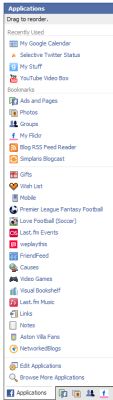
- Click on Applications. You will get a list of all of your installed Applications. Don’t click on the application you want to edit or remove.
- Click on Edit Applications
- You will be presented with a page that lists the name of the application. There are also links to Edit Settings, Profile, and Delete (x)
- To edit the settings click on the Edit Settings link. My impulse is to click on the name of the Application but that is my personalized page to interact with the application but it doesn’t usually allow me to change anything.
- Edit Settings usually has three tabs; Profile, Bookmark, and Additional Settings. Profile designates where the application is displayed on your profile (Wall, Boxes, Info), Bookmark is a bookmark for the application, and Additional Settings sets what the application is allowed to do – send you emails, auto publish stories to your wall etc.
- Profile is the main page for the application and the X allows you to remove the application.
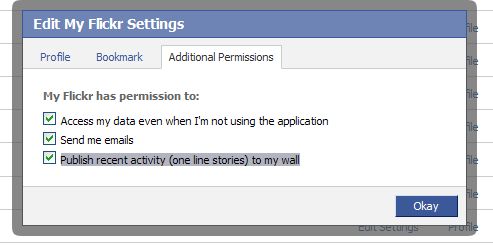
So, to stop sending your last tweet to update your facebook status either uncheck the Publish Recent Activity to My Wall under the Additional Settings in the Edit Settings section or Delete the application completely. This will work for a lot of the other applications that you use.
I hope this helps. I find Facebook applications and settings very confusing. And it doesn’t help that they move where the settings are located each time they update. Do you think Facebook is unnecessarily confusing? Or is just me? ;-)
photo credit: Vitor Sá – Virgu

Thank you for posting this! Sometimes I get confused when using Facebook trying to remember how to edit/delete one application or another. Its like I have no problem adding something – I just get stuck getting rid of it!
carla´s last blog post – Looking for fellow etailers
Hi Carla – Facebook is unnecessarily confusing. Until I started playing w
with the settings recently I could never remember how to remove and
edit applications.
And this article actually wasn’t the one I was writing when you commented on my facebook status last night ;-)
Hi Kim – Clearly, I do find Facebook confusing! I may not know how to play the game, but by golly I’m in it just the same! :D Thanks for this tutorial. You’ve done everyone (who looks at my stuff) an enormous service!
Betsy Wuebker´s last blog post – ABOUT OUR LOONS AND THEIR PONTOON
Hi Betsy – I think you figured it out before this article :-)
I had a course in grad school called Cognition and Information Retrieval – the only thing I really remember from it was the prof. telling us “you’re not stupid, it’s designed poorly”. This definitely applies to facebook.
The settings are quite confusing. It took a lot of time to figure out how to remove twitter integration. But after that i havent felt the need for removing any application . Most of them are basically quizzes and other such things.
Madhur Kapoor´s last blog post – Quickly Kill a Running or Hanging Process with ProcessKO
Hi Madhur – I was playing with a lot of applications and settings when I
made the fan page, which is why this is on my mind right now. I thought
if I’m finding this confusing, than other people are too.
The one thing I would love to have (or find, if it exists) on Facebook is a setting that new applications cannot automatically publish to your profile. I try to get in there and disable some of the applications after I install the, but sometimes that’s too late, and they’ve already published something about you adding the app. Plus, disabling the apps that your friends invite you to from writing on your wall as well.
~ Kristi
Kikolani´s last blog post – Out on the Ballroom Floor
Hi Kristi – That would be great but if it exists, I’m not aware of anything.
If you are invited, it writes to your wall? Or only if accept the invitation? I think there is a setting for the first part. I get notices of invitations but not on my wall. Have you tried Settings > Privacy Settings > Applications?
No, it surely is not just you. I created a group for my site and have been on several times and am unable to find it.
The problem with Facebook is there is just too much…
Adam´s last blog post – Chicago Vacation
Hi Adam,
It’s poorly designed. Or it grew too fast for it’s design. I usually have to
search for my fan page to locate it ;-) I should just bookmark it.
Hi Kim,
Although I have a FB account, I’ve ll but quit using it.
The value received is not worth all of the counter-intuitive hoop jumping necessary to keep it up and operational.
I appreciate the tutorial, though. You have a way of making the most difficult things easy to understand.
Cheers
George
Tumblemoose´s last blog post – 4 traits of successful children’s book writers
Hi George – I like it to connect with long lost friends and some of my
relatives. Only recently have I seen the business value of it.
I will miss your AV comments :( But I guess I will still see them on Twitter. Did you hear that Barry left for Man City? – grr…
Kim,
It is with sadness that I see the EPL season end. Yeah, Man City’s gain for certain. :-(
George
Tumblemoose´s last blog post – 4 traits of successful children’s book writers
Thanks kim for this tip.
Nihar´s last blog post – How to submit Website / Blog to Bing Webmaster Tools
Hi Nihar – You’re welcome. Facebook can be confusing.
Facebook applications are the devil.
The A-Hole Guru´s last blog post – Why You Secretly Love The Life You Say You Hate
Hi – Well, the can be annoying :-)
Fix that facebook typo, yo.
Did you know, there is a way to delete posts that you have made? No? Well then, congratulations on your use of google my friend, you’ve come to the right place. That’s right, no more having to live with posts like, “I hate being a man, maybe I should go ahead with that operation after all.” It’s easy, just follow these steps.
While logged in with the offending post or status update blaring in your face:
1. Click ‘Profile’ at the top of the page.
2. Hover over the nasty little post and you will see a ‘Remove’ button appear on the right.
3. Click that thang.
Done, and done. The offending post hath been stricken from the record, and calm has once again returned to your facebook page.
Hi – Yep! I’ve used that one a lot – usually because of typos. Though I did
get into a small battle with someone on my facebook wall one time ;-)
I am at my wits end! I am trying to get applications to display in the narrow (left) side bar and desperately need help.
I have added applications such as Flickr photosets (http://apps.facebook.com/flickrsets/), Blog RSS Feed Reader (http://apps.facebook.com/blogrssreader/) and Static FBML. I can sometimes get them to show up as a TAB but would really like to know how to get them to display in the sidebar on the page’s wall.
I think I have read every FB help page, every forum and every ‘e-book’ on the subject. Does ANYONE know how to do this or am I choosing applications that don’t have this function? If so – what apps DO let you do this?
Hi – Is this for a fan page or a profile page? On a fan page go to Edit Page. In the list of Applications click on the little pencil icon on the right and select
Application Settings. Here you can set it to display on a tab, a box, or sometimes both. If you set it as a box, it will be on the boxes tab. Go there and then click on the pencil icon again and Select Move to Wall.
On a profile page the process is almost the same but you start by clicking Applications at the bottom left of the page and then Edit Applications.
Thansk Kim – I think I am coming to terms with the fact that some apps allow you move boxes to the wall and others just don’t!
I had started out by choosing several apps that just didn’t let me do what I wanted – the journey continues!
Hi Lisa – It’s a guessing game :-) I think it’s because so many different people are developing applications that there isn’t a single standard.
I’ve been usin facebook for a long time and just today I publish one of the quiz and now I dont know to deleted off of my profile so can anybody help me?
Hi – If you hover to the left side of the quiz entry you should see a little button that says delete. It’s hidden until you hover over the correct spot.
Hi Kim,
i am an admin of my company’s page. Recently i lounched a Queeze applixation made with “Quiz Planet” but there were a couple of mistakes that took place in the text. Can i somehow edit the text of the quiz i created in my application?
Thank you!
Hi Alex – I’m not familiar with that application. But you might be able to
Go to http://facebook.com/developer
Select the Quiz
Select Edit Settings
How do I get all my apps displayed and edited on your new screens. Also I would like to comment that whenever you switch apps you have to go through your homepage which really sucks.
Please respond to both comments please
Shirley
Hi Shirley – I would be happy to answer your questions but I don’t understand them. Are you referring to the Facebook screens? I am not affiliated with Facebook – I write some articles about Facebook but have no control over the way it works.
the facebook thing has changed so now how do i do it
Hi Justyce – Go to Account in the Upper Right – then Application Settings. That’s the new location to edit and delete applications.
That toolbar is gone now?!!!
Hi Gino – Yes, with the last update it was moved. I added a note about this to the top of the article. Here’s where the app settings are now.
To edit and delete Facebook applications, go to the top right – Account > Application Settings.
I accidently deleted mafia wars from my applications when I was deleting another application I didn’t want… How do I go about getting that application back?
Hi Val – Did you hide it or remove it completely? If you removed it, go to the page for Mafia Wars (you can do a search) and then click on the Go to Application button.
Sorry, the above question is for Facebook
hey :) i was hoping u might be able to help me out i cant seem to find the tool bar so i can delete apps :( im so confused about this thing. ur help would be awsome thanks:)
Hi Chelsea – That has moved. In the top navigation bar is a link that says Account on the far right. From there go to Application Settings.
When I try to add a bookmark it tells me that I am using the maximum number of bookmarks and I have deleted almost everything. What to do……HELP
Hi Judy – I don’t know the answer to your question but based on the thread on this discussion board, others are having the same problem.
http://www.facebook.com/help/?search=bookmarks#!/help/?question=338411
thanks, helped so much
Kim,
Is there a way to delete a wall post that was sent erroneously to a friend? I’ve found a way to delete just about everything else! Thanks!
Eldoie – I believe the friend would have to delete that off of his own wall.
I cannot find the “Edit Apps” link. Can u help? THANKS!
Hi Nikki – There is a note at the top of the article that states where the new location is
go to the top right – Account > Application Settings.
I used to be able to change my settings through Account/Application Settings but the option is no more available. I’m confused.
okay so now, we are not available (at least on facebook french) to access the application settings neither through the bar at the bottom or the settings menu. We have to access it manually by typing the following address:
http://www.facebook.com/settings/?tab=applications
Hopefully that is temporary – that is not a good way to provide access to that setting.
I want to get rid of some applications on Facebook, and I can’t find the new method. Since they changed it, I am considering dumpig Facebook. Most of the games are screwed up anyway. There is no edit aplications button under Applications from my home page or my profile. Help?!
Hi Kelly – Facebook keeps moving the settings around.
This article from earlier this week should help.
http://www.allfacebook.com/delete-facebook-applications-2010-12
There is NO Application settings Tab on the upper right of my facebook homepage. Only account settings and privacy settings
The settings moved yet again. This article should help
http://www.allfacebook.com/delete-facebook-applications-2010-12
I am trying with your method to get rid once and for all of Facebook. I cannot find any place where it says Application, just Account. Can you help me please, thank you, Rita Hartjes
Try Account > Privacy Settings > Edit your Settings (under Apps and Websites)
Hi, I am having problems editing apps from a business page that I’m an admin for. None of the apps show, not even the standard ones. I’m not having problems with other pages that I update. Any ideas? Thanks, Martin
Hi Martin – I’m not sure what could cause that problem. Is it a business or group page rather than a standard profile page?
Hi Kim,
Thanks for getting back to me. It was a business page. It seems lots of other people had the same problem & it looks like Facebook managed to fix it.
Thanks again,
Martin
Great – I’m glad it was resolved.
Facebook has changed its app creating platform a lot.
What is your solution as per new platform/style or whatever of new facebook?
Hope you will update about creating/editing Facebook app on new Facebook.
First i want to thank you for writing such an informative article about this topic its been so helpful.
My question is, i want to ad some affilate links in boxes kind of like mini capture boxes for different affiliates is is necessary for me to add static html iframe tab to do that. Or can i do this without adding i frame or can i do it with Fan appz?
Please keep in mind i reallly do not want to have to pay for any usage of apps, as i understand there is a fee for some apps.
I thank you in advance for all your helpful knowledge.