
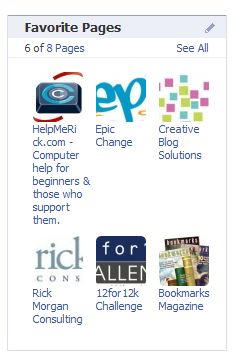
As with many things about Facebook, editing the list of favorite pages is unintuitive.
There isn’t an edit link under the pencil icon and the application isn’t even listed with the other ones under the edit this page link.
So how do you edit the favorite pages application and remove pages from it?
Believe it or not you have to go to each page and manually remove it from your favorites! This is ok for a couple of pages but what if you want to remove a lot of them?
- Visit the page
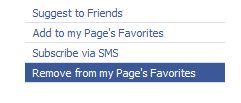
- Click on the link below the logo that says “Remove from My Page’s Favorites
- Repeat for each page you want to remove from you favorites.
There must be a better way.
photo credit: amypalko

Thank you!! You spelled it out perfectly clear. You are awesome!!
Hi Heather – Great! I’m glad it helped.
Nothing on Facebook seems to be as intuitive as it should or needs to be.
I didn’t even realy know about this myself.
Thanks!
Hi Jim – Facebook is a pain in the butt to work with. Yesterday I was going to work on a couple of fan page projects and I couldn’t. The site was super slow and the edit links wouldn’t work. And it’s true – it’s not intuitive at all.
Kim, I personally a very active Facebook user, but I didn’t know this little trick as you did! How silly of me…LOl
Hi Wilson – LOL – Like I keep saying, facebook is annoying :-)
Hi Kim,
Thank you for all this great info! I thought creating a custom fan page on Facebook would be easy but Facebook certainly doesn’t make it so! Every time I get stuck and google a question your site keeps coming up with an answer for me. I REALLY appreciate it :-)
Hi LoriAnne – Thanks! And I’m glad to know the search engines are doing their job properly and sending people my way ;-)
Kim
Every time I see a post on facebook I think I should start using it :)
I have created a account there ages ago but never use it. Your post has clear instruction. Lets see if I can make use of it :)
.-= Ravi Kuwadia´s last blog ..Free Unlimited One Way Backlinks =-.
Hi Ravi – I’m liking facebook more and more. It can be fun and I’ve found business through it.
Thank you so much, all of you are right! facebook is not intuitive =/ it’s always so slow, sometimes I don’t know why am I suscribed to some pages…
anyway
thank you for your help :D
Hi Nana – Yes, I have love/hate feelings about Facebook. I’m glad the article helped you out.
To edit fan pages, I just figured out that I can click on Friends at the top menu bar, then click on pages on the left column. This gives me a list of all the fan pages, and I can hit the X next to each page to delete them from the list. Hope this helps someone.
Hi Laura – Nice tip! That works great. Again, it’s unintuitive like so much about Facebook.
Thanks!
And yes, FB can be a pain in the #$#%#.
Walmart and others does not have a link to remove from my favorites page. It just has suggest to friends and subscribe vis sms. Could you please tell me what I’m doing wrong?
Never mind, I found it. You have to go farther down the page on some of them and it’ll say “remove me from fans” on the left hand side.
Hi Tina – I’m glad you found it. Facebook options aren’t always where you think they should be.
I’m curious to know how to go about adding pages to your favorites… when you have both a personal profile and a fan page. TIA
sorry, didn’t specify that I want to add the favorites to the fan page and not my personal profile
Hi Peter – Profile pages don’t have a “favorites” section. Unfortunately, you need to go to each page and click on the link that says Add to My Pages Favorites. If you are the Admin for more than one fan page you will then be asked to select which page you want the page to be a favorite of.
nice and helpful, thanks!
Hi Joe – Thanks for stopping by. I’m glad it helped.
I am a fan of. . . yours.
Thank you for solving this issue.
Hi Cindi – Thanks – I’m glad it helped.
Under “Info” on my profile page in Facebook, there’s a heading called “Pages” and another called “Groups”. There are links in both of these categories that I did not add and I want to delete–how do I do this?
-Bill Griffith
Hi Bill – On the Info tab there is a See All link to the right of Groups. If you click on that you can remove the Groups that you no longer want to belong to.
For Pages click on the Friends link on the very top Facebook navigation bar – this will list your Friends and Pages. You can remove the pages here.
The Facebook has been rolling out an interface change over the weekend so it’s possible that my instructions won’t work – I’m not seeing the new interface yet.
Thanks for the info on facebook pages…
I was wondering if there is any way to check what other pages have added my page as a favourite – anyone know? And is it possible to write on other pages’ walls using my page rather than my personal profile?
Hi Bobbi – We were discussing that issue on my Facebook page yesterday and no one knows a way to do it – I don’t think it can be done.
Has anyone encountered this fan page issue before? I am the administrator of a business fan page. The other day, the business fan page showed a “favorite fan page” box and only 1 page in it. Now, the page is something I’m PERSONALLY a fan of, but I am a fan of several…so why just the one fan page shows up on the business fan page I’m the administrator of? I can’t get rid of it. If I go to that fan page to “remove” myself, it removes me personally. Can’t find any business association with it. Anyone have ideas? would hate to see the business fan page promoting other businesses. I wanted to stay away from that.
Hi Robyn – I’ve found that people with business pages are unable to edit the favorites box or have trouble with it. It doesn’t, however, explain why it’s showing something that you are a fan of rather than the page. Can you remove the favorites box so it isn’t displayed at all?
I’m trying to do the same thing. I created a fan page for a business and it shows my personal fan pages. I’ve tried removing them as Robyn has. I’d hate to de-fan myself (of my favorites) but it seems like FB is forcing me to if I want to keep a wall between my personal page and my fan page. Any new ideas?
Hi Carrie – Not that I know of. Business pages were not well thought out by Facebook, in my opinion.
I joined so many groups (become a fans) on facebook that it won’t let me friend request anybody or join groups or like anything. How do I delete become a fan pages?
Hi Nicole – You need to go to each page or group that you want to leave. Near the bottom of the left column will be a link that says unlike. Click on that to leave the page or group. You will have to do this for each one that you want to leave.
Thanks, that was driving me nuts!
Saying that some Facebook editing is “unintuitive” is a nice polite way of putting it, well done for restraining yourself there ;)
Hi Rachel – Yea, it’s the politically correct version ;-)
Hi,
I’m just curious if there is a way to edit the actual order of the pages I like on facebook? I have created a fan page for a foundation and I always want that to be the first one listed on my info page. I tries to join another page but then it lists that one first. Is there a way tomanually edit the order?
Hi Gail – Unfortunately, there isn’t a way to that.
Very useful tip Gail. I had a favorited page on my fanpage that I did not put there at least I don’t remember so this is a good post as far as how to remove them.
CashFlow Queen
.-= CashFlow Queen´s last blog ..Make money with local business (webinar replay) =-.
Thanks for the very useful article! I have a question. Would you know how to create a Tab in an existing Fan Page that links to a custom Application? Meaning, when a user clicks that Tab in the Fan Page menu, it will automatically open the corresponding Application page?
I created both Fan Page and a simple Facebook Application. But I can’t seem to find the procedure to do this linkage.
Hi Will – I don’t know the answer to that.
Is it possible to tell who has left your fan page? I noticed this week I am -3 fans, just wondering who has left.
Hi Chris – Not that I’m aware of. If you don’t have many fans, it might be possible to tell by looking at the list but otherwise I don’t think there is a way to do it.
Hi Kim,
Spot on , thanks a lot. I am book marking your page !
Shuchi
there is no link below the logo any more? or at least it is not visible to me!
Hi Sue – Is the page one of your favorites? When I look at my own page the last link below the logo says ‘Remove from my page’s favorites’
Hello! A bit off topic, but if you are an admin of a fan page, how can you add a group to the fan page’s favorites? Or can you?
Hi Amanda – I did a quick test and I don’t see a way to add a group to the list of favorites. It looks like that is only for pages.
As you say it is not very intuitive. I couldn’t figure out how to add pages for a while either. I wasn’t sure whether they would come up on my profile or fan page, think I have it sorted now. Cheers for the helpful advice.
Hi Mike – Great! I’m glad it got sorted out.
On the edit page of Likes and Interests, I remember choosing which music pages and/or groups I “like” would show. Now, I have about 10 groups which show all the time, if I click “see more” 12 more are revealed, but don’t always show. To make those 12 show all the time, I can drag them up. But there are 15 more than that – which only appear in a popup box appears if I click “Show other pages”. I’d like to make a few of them show all the time again – I can’t figure out how to get them from the popup list box back to being draggable. (Sorry about the unclear wording – Clear as mud, right?)
Hi Gary,
I think the list of pages rotates through just like the list of your friends or your fans. If you change the order, it will probably just keep rotating through the list.
Thank you!!!! Most definitely appreciated!!
When I go to the page there isn’t a link to click on that says “Remove From Favorites”
I go to several and they only have add to fav.
Grrr. I can’t stand getting all the daily garbage from all of them.
HELP
Rhonda
Hi Rhonda – The link now says ‘Unlike’ and is near the bottom of the left column.
First time I got to your site through Google :-) Thanks!
Hi Manshu – Great!
So, you don’t spend your free time googling ‘Kim Woodbridge’ ;-)
This works for the favorites list associated to your personal page, but I haven’t been able to remove the favorites that appear in the page of an organization I created and that it’s associated to my personal account because since my personal page doesn’t have that favorite, I don’t have the option to remove it from the page of the organization.
Any suggestions?
Have you tried going to each page and clicking on the link that says remove from my page’s favorites? It’s the only thing I can thing of doing.
This is the issue that is frustrating me too. I want to keep my Business Page strictly Business, but early on I added some favorite pages that had nothing to do with my business. I don’t mind liking them on my personal page, but I need help removing them from my Business page.
Hi Diane,
You will need to go to each page individually and click on the link on the bottom left that says Remove from My Page’s Favorites.
I am very frustrated. I cannot even seem to find a list of pages I have ‘liked’ any more!? They used to appear in my friends list, but they’ve disappeared!? So where do I get them from?
Hi Emma – It sounds like you are referring to your personal profile …?
Go to the Info Tab – they are scattered through interests and activities and then there is a link that says More Pages.
Do you know if there is a way of liking a page without actually being on it? Of course you will have to be signed in to fb.
So any idea if something like deep-linking to like a fanpage is possible?
If someone has a like box on their website, like what I have in my sidebar you can click like and it will like the page and that doesn’t require being on Facebook’s page.
Thank you so much, this actually helped me greatly!! I found that the easiest way to delete a ton of past likes is to RIGHT CLICK on each link and press OPEN IN NEW TAB.. That makes it so much faster, and that way you know exactly where you are and you don’t have to back track so many times.. :-) Thanks again!!! -Phillip
Thanks – I’m glad it helped.
Hello,
How do you remove the spam pages on your interest pages that have expired like “Never scare a black man”. It is very annoying and will not go away. It says it is expired so I can’t just unlike it as with the other pages. Please help! Thank you!
You can edit some of them by going to Edit Profile > Activities and Interests. You can also go directly to the page and select the Unlike Link on the bottom left.
Thanks for that but as I said that doesn’t work hence why I am asking if you know any other way to get rid of this. the page comes up as expired so I can’t just unlike it
Hi Jenny – I’m really not sure. I’ve never come across an expired page before. Logically, if it doesn’t exist, it shouldn’t show up in your list of favorites. Sorry that I don’t have a better answer.
Really Helped!
Thanks!
Looking for a person to take several of our facebook account and merge them or get them together. We now have what seems to be three accounts with no control over one of them and the other two just seem to be pages with no main account we can access? Its just a mess so if you know of a FACEBOOK EXPERT and let me high-lite EXPERT since two other persons who thought they understood facebook gave up trying to fix it already. Any ideas would be great. Willing to pay for tech support on this if someone can get if fixed.