

One of the trends on Facebook fan pages is using an oversized logo to make a bigger impact. It can be up to 200px wide by 600px high.
One of the problems with an oversized logo is determining which part will be scaled down to make the avatar for the fan page. I used to think that you had to measure out the right segment and have the area you wanted to be the avatar in a specific part of the larger logo. And maybe it used to be this way and I missed that there was a better way. Or maybe the better way is a newer feature (it’s not like Facebook changes things every other day and is poor at communication).
But there’s a really easy way to select the avatar from the larger logo.
Here’s how to do it.
- Hover over the logo until you see the link that says ‘Change Picture’ with the pencil to the right
- Click on the pencil
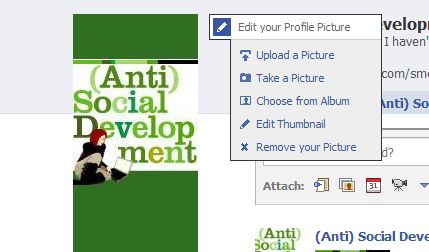
- Click on Edit Thumbnail
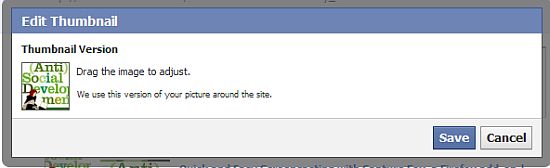
- You will get a pop-up box. There is a teeny version of your logo. Click and drag the logo around in that box. The part that fits within the square is what will be used as the page avatar.
I am not currently using an oversized logo on my own fan page as when it reappears in a fan or like box, it is scrunched and not displayed properly. I’m not sure if this is a Facebook issue or if there is something I can do to correct it.
Helpful as always. Thanks!
.-= vered – blogger for hire´s last blog ..Do You Believe That “Retail Is For Suckers?” =-.
Hi Vered – You’re welcome. I had a complete duh moment over this one.
simple but for some it is just overlooked..thanks for sharing …
.-= brian austin´s last blog ..Facebook Instant Personalization: what is it and how to control it =-.
Hi Brian – Exactly. It’s easy but it’s another example of Facebook settings not being obvious.
I’m trying to figure this out for myself. I want my logo for the page image but when its in the Avatar it is cut off. Its a Facebook thing….I wish they’d fix it.
.-= Thomas´s last blog ..Magento Product Page Optimization =-.
Now there’s an interesting tutorial.
.-= Dennis Edell | Direct Sales Marketing´s last blog ..UPDATED: Aweber Affiliate Link Contest! – This Is It!! =-.
Hi Dennis – Thanks :-)
Simple but many people don’t know…and actually Google for the same. People do not have patience and they need quick solutions and hence bang on :)
.-= Ajith Edassery´s last blog ..How to use Google Alerts effectively to improve your blogging and Online business? =-.
Hi Ajith – Thanks! It was one of my duh moments. I was having a hard time measuring out the right piece of the logo and then the answer ended up being so simple.
Simple but useful. I personally use a smaller picture as avatar, so yet not have any issue but may be some of my online friend may need it.
.-= Arafat Hossain Piyada´s last blog ..PlayStation Move coming this July? =-.
Hi Arafat – I changed back to the smaller logo because I was having trouble with it in other locations but I do know that a lot of people want to use the larger one.
I think a smaller logo that everyone can see and understand is one of the better idea’s when choosing an avatar. Most avatars I have a real hard time seeing and understanding what it is.
Hi Randy – That’s a good point. Sometimes I’m not sure what the avatar is supposed to be.
I was stumped on this and just “left it for later”. I found your article, “Add a Custom Tab to a Facebook Fan Page” and ended up here, where you solved my problem. Thanks!
.-= Jeremy´s last blog ..Super Speed Grass Video =-.
Hi Jeremy – Great! Do you have a “leave it for later” list too? ;-)