

Recently Google announced that page speed will affect google page ranking. Matt Cutts, from Google, has assured us that this will only affect 1% of the sites being ranked and that for most of us this will be a non-issue. But we can still get all stressed out about it ;-)
One thing I do have an issue with is that frequently the cause of a slow loading site is Adsense, Google Analytics, and Google Maps. So, for google to take site speed into account when it is frequently their own scripts slowing things down seems a little hypocritical. If you want a 100% page speed score, then don’t use google’s stuff (or facebook’s bling either but that will the subject of another post).
So, even though most of us won’t fall into the 1% that this affects, it is still a good idea to test your site speed and to try to improve it. Not for google’s sake though but rather for your visitors.
The article at Google Webmaster Central lists different ways that you can test the speed of your website. Since I use Firefox and already have the Firebug add-on installed, I opted to install Page Speed, which is a Firebug add-on (it seems we have add-ons for add-ons).
After installing Firebug and Page Speed, restart Firefox and then do the following:
- Tools > Firebug > Open Firebug in New Window (on the Firefox menu bar).
- A pop-up window will open that looks like:
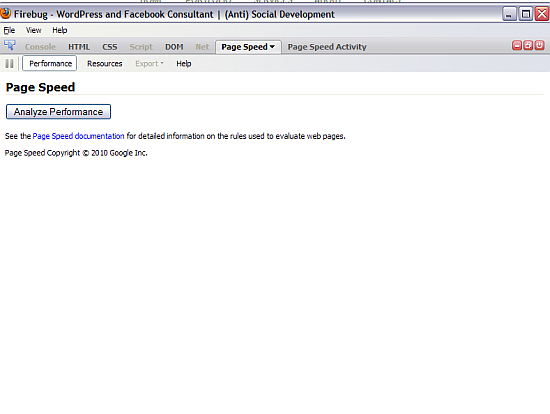
- Select Page Speed and then Performance
- When you are on the page that you want to test and it has fully loaded, click on the Analyze Performance Button.
Your analyze performance results will look like this.
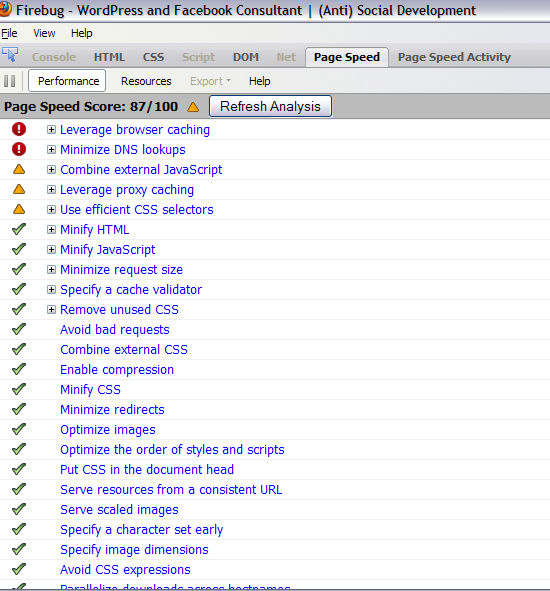
When I first tested my front page, my score was a 78. Since I’m the type of person that thinks the only good grade is an A, I wasn’t very happy about this. And since my page seems to load quickly, I was a little surprised.
I did some research, added some code to my .htaccess, installed a couple of plugins and uninstalled others and raised my score to 87. This has been variable with each test – I’ve scored between 85 and 94 depending on different things I added and removed.
Unfortunately, the documentation on what the different sections of the results mean is not written for us mere mortals but seems to be tailored toward techie robots. For example, one section suggested to “Leverage Browser Caching”. Ok, sounds swell to me but what the heck does that mean. In google’s documentation, I found the following:
HTTP/S supports local caching of static resources by the browser. Some of the newest browsers (e.g. IE 7, Chrome) use a heuristic to decide how long to cache all resources that don’t have explicit caching headers. Other older browsers may require that caching headers be set before they will fetch a resource from the cache; and some may never cache any resources sent over SSL.
To take advantage of the full benefits of caching consistently across all browsers, we recommend that you configure your web server to explicitly set caching headers and apply them to all cacheable static resources, not just a small subset (such as images). Cacheable resources include JS and CSS files, image files, and other binary object files (media files, PDFs, Flash files, etc.). In general, HTML is not static, and shouldn’t be considered cacheable.
Clear? Great! Know what to do to correct the issue? You don’t? Well, neither do I – well, I didn’t until I did some additional research.
But, you will need to wait for my next scintillating article on page speed fixes. Here I wanted to tell you how to test it and in the next article I will let you know what I did to raise the score as well as things that will raise it more but that I decided not to do. I will not be ruled by google. ;-)
And I bet you can’t wait ;-)
(I think I’ve used this photo for a previous article but am too lazy right now to check)
photo credit: – POD –

It’s worth checking the speed one’s site loads regardless of what Google is doing for the sake of one’s visitors. But as I read it the Google algo will be applying the load speed factor at a weighting of less than 1%, so if your site is not extremely slow, then it’s probably not worth the time and effort to improve it by marginal nanoseconds. Server load, time of day and caching can have more of an effect than optimising a segment of CSS or crushing the last available bytes out of a graphic.
Hi David – I agree :-) Although I did spend a morning trying a number of things to make the page load faster.
I’ve been using this website:
http://webwait.com/
Not sure how accurate it is, but it did show a considerable slowing down after I added Facebook and Twitter buttons, so I removed them.
.-= vered – blogger for hire´s last blog ..Coping With Motherhood =-.
Hi Vered – I like that site! It says my site is faster than google does ;-)
Those two buttons do slow things down – but I decided they were useful to the visitors and that I cared more about them then google. Took me a weekend of contemplation though.
Very helpful — thanks for details, looking forward to your follow-up so I can understand geek-speak, too!
Speedily yours,
~ @TheGirlPie
.-= TheGirlPie´s last blog ..TheGirlPie: @twitchinggrey @fabeku Oh you guys! *blushes* I just drop in/out for a quickie; when I come to hang I’ll find ya fer sum fun, ‘k? =-.
Hi – LOL – now I’m going to have to make sure I write the follow-up in a timely manner ;-)
I’m with David, at less then 1% I’m not worried about Google.
Iv do try to make things as fast as possible for readers though; always have. They are after all more important. ;)
.-= Dennis Edell | Direct Sales Marketing´s last blog ..A TRUE Make Money Online blog – Part 2 – Choose My Domain Name =-.
Hi Dennis – Yep – I decided visitors were more important than google too. I was able to increase the site speed a little though so testing it was useful.
When I saw the title I was curious what you would recommend, and I too am using Firebug and Page Speed to check page loading time. I seem to be doing ok now, but when I first checked I was a bit slow. I was finding some of things I iframe into a blog entry were slowing me down, like Google maps, Flickr sideshows, etc. Also, I use to keep 20ish blog entries on the home page of my blog, which made things load very slow. That has changed as well.
.-= Colleen´s last blog ..West Pasco Washington Homes For Sale =-.
Hi Colleen – 20 blog posts on the front page could definitely slow things down. I used to have more – 12 I think – but reduced it to 8.
I think it’s ironic that a lot of the things slowing down our sites belong to google.