

Theme Test Drive is a WordPress plugin developed by Vladimir Prelovac that allows you to work on and test a theme when logged in as Admin but the visitors will view the current theme.
This can be really useful when you are testing code and making theme changes but don’t want visitors to see what you are working on (or any of your mistakes).
- Download and install the plugin like any other.
- Activate the plugin
- Go to Appearance > Theme Test Drive
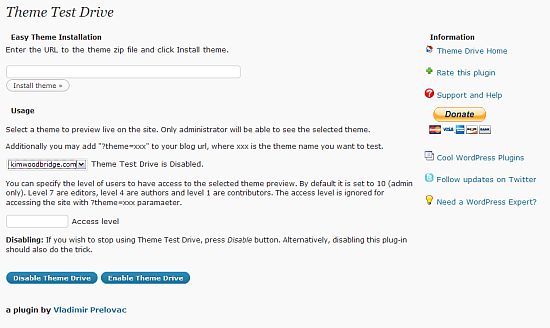
- On the settings page you can install a theme, select the theme to work on, and set levels of access as to which users can view the theme. The default is Admin only. You can also disable and enable the plugin on this page.
- When logged in as Admin you will be able to view the changes that are being made to the theme but visitors will see your current theme. This is great for development and code edits.
- You will not, however, be able to view your current theme. If you want to refer to it when editing the new one, I recommend taking a couple of screenshots of it before you start working and use those for reference.
What do you think? Is this a useful plugin? So far, I really like it.
photo credit: Destinys Agent

I haven’t tried it yet, but I will very soon. Every a simple text or color change can be a disaster if it doesn’t look right when people are browsing your blog.
.-= Carla´s last blog ..Product Review: Ecodiscoveries Airzyme =-.
Hi Carla – I haven’t used it myself but a client did and it worked great
for her.
Gotta check it out. I am on my way to release a small variation of the theme that I developed for DollarShower.
.-= Ajith´s last blog ..10 Most Annoying Ads and their irritating features =-.
Hi Ajith – Great! I hope it works out for you.
Hiya Kim, nice plugin idea.
Only issue I see is that when you’re fiddling around with widgets/pages or trying out some CMS functionality, the changes will have to be made to the live theme as well as the test theme.
.-= Dave´s last blog ..Twitter isn’t dying. It’s teething =-.
Hi Dave – Very good point! I should have mentioned that in the article.
The people that make these plugins amaze me – thats what I love about wordpress, even though I have no ide how to create a plugin like this, I have full access to it – thanks for sharing!
.-= Ale @ Vampire Halloween Costumes´s last blog ..Love Bite Vampire Costume =-.
Hi Ale – There are so many plugins – some better than others – but there is almost always something that will provide the required functionality.
Heya Kim! Just thought I would chime in on this one..
For those using the Theme Switcher plugin, this plugin is unnecessary. I have been using the Theme Switcher plugin to develop sites quietly behind the scenes for many years now. It works perfectly, and has the added benefit of actually serving as a theme switcher for your readers.
You can’t set levels, but you can allow anyone to see the new theme by giving them the URL.
.-= Jeff Starr´s last blog ..How to Protect Your Site Against Content Thieves =-.
Hi Jeff – Thanks! I will look at the one too. I haven’t spent time with it and didn’t realize that it provided both features.
I haven’t tried it, but yes – this could be useful. I usually make changes at night, or on the weekend, but this means some website visitors can stumble across a lame-looking site while I’m experimenting!
.-= vered | blogger for hire´s last blog ..Working Moms are Bad Moms =-.
Hi Vered – It’s useful when testing out changes.
What a great plugin. I’m sure there are plenty of web developers that will make good use of this. Great find, cheers!
.-= Nigel Lamb´s last blog ..UK Social Networking Statistics =-.
Hi Nigel – I’m glad you like it. It’s really useful when you feel like breaking your theme. ;-)
I am not a developer neither I tried this plug in yet. But bookmarked the post in my reader. It will become handy if I want to switch the current theme of my blog.
.-= Yohan Perera´s last blog ..Winning over worry =-.
Hi Yohan – I’m glad you think it will be useful.
Did you post this one especially for theme hounds like me? This could be dangerously upsetting for me and give my visitors seizures because I can’t sit still with my theme choices. Very cool option, however. I promise not to abuse my new found power of trying out themes!
.-= Rick Castellini´s last blog ..Printing Error Messages* =-.
Hi Rick – This will let you try things without affecting the visitors :-) Dave did point out, however, that changes to the widgets will change on both themes. Jeff also mentioned Theme Switcher, which has similar functionality.
:-)
Cool…scrolled up and read his comment (missed it last night). Now I’m reading his post on protecting content. Have a great day!
.-= Rick Castellini´s last blog ..Printing Error Messages* =-.
Kim,
Brilliant! I plan on a theme change towards the end of the month and since it will be extensive, I’ve been wondering how to lessen the effect on the readership during the construction process.
Now I know how! :-)
George
.-= George Angus´s last blog ..Apocalypse Now – The New Blog of The Week =-.
Hi George – I’m glad it will help. I’m looking forward to seeing the theme change :-)