
Facebook is planning a series of changes and improvements that will be rolled out over the next couple of months.
The most important of these changes for those of us with customized fan pages is that there won’t be any more boxes.
That’s right. No boxes! There won’t be a boxes tab, any applications that depend on boxes will need to be added, and we won’t have custom profile boxes in our sidebars.
These changes will negate the article I wrote about creating a custom facebook fan page in which I recommended that the Boxes tab be used for customization. I created a series of Static FBML boxes on my Boxes tab to make a custom page that was the default for new visitors.
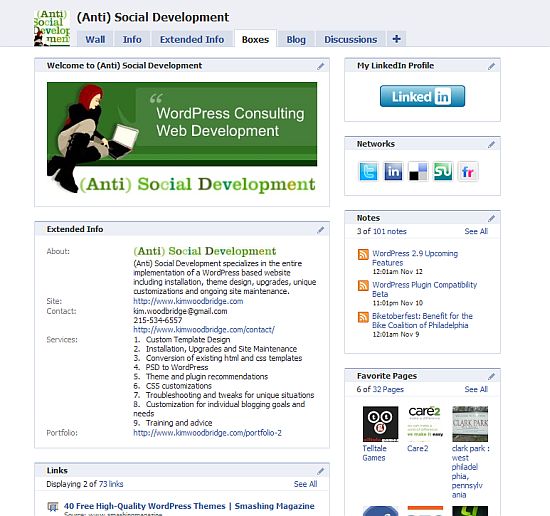
As soon as Facebook implements the changes that removes boxes and the Boxes tab, the above page will no longer exist.
The best solution is to use Static FBML to create a custom tab and then create a layout in html.
I created a new tab and default welcome page to my fan site and named the tab (Anti) Social Development.
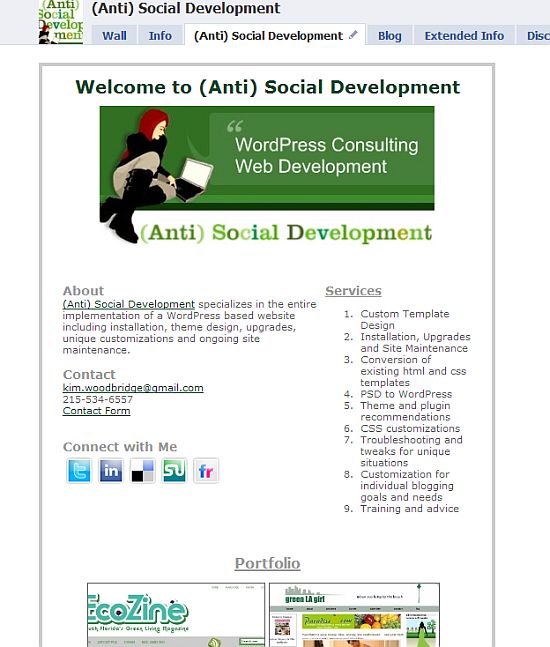
The applications tab is going to have less space and we will have 510px to work with. Even if you are already using a custom tab rather than the boxes tab, you will want to check the size and make any necessary reductions.
The plus side to this is that I wanted to create a custom tab rather than use the boxes tab and the upcoming facebook changes forced me to do so. Of course, the downside is that if I didn’t make the new tab my customizations would no longer be available.
These changes are scheduled for the end of this year or the beginning of next so there is some time to make the changes.
This does not, however, resolve the issue of other applications that use boxes or customizations I have made that use Static FBML in boxes in the sidebar. These do not warrant their own tab and some of the information has been included on the tab that I made but I will lose a level of personalization to my fan page. Hopefully Facebook will provide a replacement application for this.
This will also affect the Custom Profile box that I have on my profile page that I created to link to my fan page. Like I said, there won’t be ANY boxes used in applications. I don’t know how I can recreate this functionality but, again, am hopeful that Facebook will provide some sort of replacement.
I have not removed the Boxes tab or the sidebar boxes on the wall because I wanted to have them there as examples for this article and to compare and contrast the new tab vs the Boxes tab. I may remove them but since I have already made the new page it is fine with me if they disappear when Facebook makes their updates.
Well, it’s not fine with me but it’s one of those things that I have no control over. I’m just glad that Facebook provided advanced notification – that isn’t something they’ve been known to do.
I really am not sure what will happen to boxes such as favorite pages, the LinkedIn application, notes, etc. I suppose for them to work they will have to become tabs. But how many tabs does a page want to have? After 5 or 6 they don’t fit across the screen and can only be accessed with the dropdown arrow. I suppose we will just have to wait and see what happens.
If you need assistance converting your pages, please contact me as I provide a facebook fan page service.
For more in depth reading about these changes, please visit the following sites.
photo credit: drp

This is why I subscribe to your blog to learn about developments like this, considering I’d followed your earlier advice and created such FBML on those boxes…
.-= Ari Herzog´s last blog ..12 Million People Tweet 27.3 Million Times =-.
Hi Ari,
I had no idea 6 months ago that this would happen. Now I feel like 6 months from now there will be no more tabs and everything will be boxes ;-)
I’m glad Facebook gave us advanced notification.
THANK YOU for posting this. I had scanned through the upcoming changes but somehow didn’t get that this would eliminate the Boxes tab! I’m glad we have a little time to get things set up now, thanks to your warning! From now on I will just need to tweak some html on a custom tab I guess. Thanks again SO much for sharing with us! I’ll be sending people to read this too!
Karen
.-= Karen Clark´s last blog ..Why Blog? =-.
Hi Karen – You’re welcome. :-) I had to read a couple of articles and the comments before it really sunk in that boxes – all instances of boxes – would be gone. A lot of application developers are going to need to make changes too or their applications are going to be broken.
I’m glad this helps.
All I can say is, I’m glad I don’t have a fan page anymore. :)
.-= vered | blogger for hire´s last blog ..Restaurant Salads Scare Me =-.
Hi Vered – Or not have one that’s customized. ;-)
Hi Kim,
Can I put the Facebook fan page widget in my blog’s side bar if I follow the above instructions and create a new tab…?
Hi Yohan – I don’t really understand the question. You can add the fan page widget to your blog regardless. These instructions are unrelated.
thanks for posting this, I have been wracking my brain for over an hour trying to follow instructions to set up fan page with custom profile box, and other tricks. Biggest issue I need help with is that I started to create a fanpage, didn’t publish it yet, tried to upload photos, nothing happened so I refreshed the page to try again then the page disappeared. So then I tried again again the page disappeared. Somehow I landed on a page listing all my unpublished pages ( I had about 4!). To save my life I can not determine how to get back to the page I want to publish and delete the others. Please have mercy and advise if you are able!
Hi Jeannie – Facebook has been buggy all afternoon and is super slow right now. If I were you, I would leave it until tomorrow and see what happens.
To delete a page, go to that page, click on Edit Page and there will be a delete link at the top where it says Back to Pages, View Page and Delete.
Kim,
Love your post here. I wasn’t aware that facebook was making these changes. While were on the subject…How in the world do you change the tab names for the Static FBML items?
.-= Adam Garcia´s last blog ..Adam in the Hospital =-.
Hi Adam,
When you go to edit Static FBML you give the FBML section you are working on a name. That will be the name of the tab.
Great write-up Kim, thank you for sharing.
Hi Therese – Thanks! I hope it helps.
yeah , well that’s not really fair because now i can’t gett my videos & links & notes on the side anymore for the box tabs.. i just read this now , and it’s too late. ? not fair…
Hi Loreen – That content will have to be in a tab. It’s annoying but I keep telling myself that Facebook is free.
Hi Kim,
Great Blog. Do you happen to know WHEN facebook will be implementing the reduction of the fan page tabs to 510? I’ve been reading that this is coming, but I’ve not seen a date for it to go live.
Susan
Hi Susan – I checked the developer’s roadmap a couple of days ago and it still says Early 2010 – there is no other date on it. It is still on the list of things they plan to do though.
http://wiki.developers.facebook.com/index.php/Developer_Roadmap
Hey Kim,
Great article, super helpful!
One question I can’t seem to figure out though… how do you make your custom tab the default when someone first views your page?
The default is info, and I cant figure out how to change it…
-Nic
Hi Nic,
Go to Edit Page > Wall Settings > Edit and then change the second drop down box that says ‘Default Landing Tab for Everyone Else’.
Great it works, thanks Kim!
Hi Kim, I had heard that the new width for the facebook fan pages was going to be 520 pixels wide. You are saying 510 pixels. Where can I get definitive info on this?
Also, I have both Flash and HTML based fan/business pages using the staticFBML app. I was able to use FBJS to submit form data in my HTML page, but so far cannot communicate with FBJS via Flash. Supposedly it is possible to do this with an application, but not sure if it is allowed from a fan page. Do you know if it is possible to commuincate with FBJS from Flash? I have read the WIKI and the code samples don’t work from the fan page so far.
Hi John – Yes, it’s now 520 – or will be.
I don’t know the answer to your second question – I don’t have an article about that topic.
This information helped me a lot. Thank you so much Kim, you just rock
.-= Andy Mutt´s last blog ..Desk in a Box =-.
Hi Andy – I’m glad it helped. This articles was written last November and Facebook still hasn’t made the change even though they are still planning on it.
I followed your instructions to create a “welcome” tab for my fanpage
Gordon Community Library & Museum
It is visible to me, but no one else is able to see it.
Did I miss a step somewhere?
Hi Bill – Is the page published? Did you make a tab or is the static fbml still on the boxes page? Or is the tab all the way to the right below the arrow? If so, it can be dragged to the tab list to the right of Info.
the page is published. Here is the link – http://www.facebook.com/pages/Gordon-TX/Gordon-Community-Library-Museum/299870732225
On the edit page it was originally called “FBML” I clicked on edit, changed the name to welcome and created some HTML. Then I clicked on application settings, deleted it from Box and added it to Tab. When I did that the Box tab disappeared and I had a new tab called Welcome.
It all looked fine to me so I asked for comments from my friends, who all told me they could not see any tab called Welcome. I checked on a machine on which I was not logged in and sure enough it was not there.
I did not see a place to “publish” the tab. Is this the step I missed?
Hi Bill – I was able to see the tabs without any problems. You don’t have to publish the tab separately. The only other thing I can think of checking are the age restriction settings but that doesn’t make sense logically. Maybe ask them to clear their browser cache and try again – or maybe if they are already fans they want straight to the Wall page and didn’t notice the tab …??
Hi !
My problem is that I want to put my Profile picture and link to my profile in my fan page’s side column…
I seriously don’t know how to do that…
I want my profile link (my picture and my name) in the left side column of my fan page under ADMINISTRATORS heading…
PLEASE HELP ME !
LOOKING FORWARD ! :)
Hi Harris – The box applications that will do what you need are being removed from Facebook and no longer work properly. For now, there isn’t an alternative so it can’t be done.
okay… thanks for your reply ! :(
Hi,
I am just creating a FBML page, how do you set that as the default landing page, like you mention in your post?
Regards
Dave
Hi Dave – Go to Edit Page > Wall Settings > Dropdown box under ‘Default Landing Tab for Everyone Else’
This is the landing tab for new visitors – once someone becomes a fan or likes the page they will be taken to the wall instead – there is no way to change that setting.