
It seems like every time Facebook makes an update to the layout, as with the new profile pages, certain settings become hidden or difficult to find. If the setting can’t be located or it’s location is unintuitive then it’s poor design.
With the recent change to the profile, it has become difficult to locate the Friend’s List.
The Facebook Friend’s List is a way to organize your friends and target privacy settings. For example, I have a list called ‘NH’ for people I grew up with and another called ‘Soccer’ for all soccer related information.
Here is where the Friend’s List is now located.
- Go to Home
- Next to the Most Recent link is a tiny little arrow.

- Click on the arrow.
- The dropdown shows Most Recent, Status Updates, Photos, Links, Pages and then the lists start. The dropdown shows my first two lists and then a link that says Choose Another.
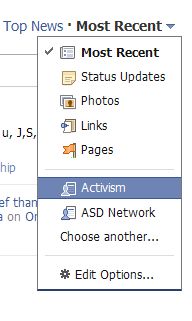
- When you click on Choose Another, all of your lists will be displayed.
Do you use Friend’s List? Did you know the location of them in the new profile?
photo credit: °Florian

I’d wondered about that, figured it was a feature FB took away. Thanks!
Hi Ari – That little arrow just isn’t intuitive. I didn’t realize my lists were hard to find until someone asked me where hers had gone.
YES, I use the Friends List and NO, I hadn’t figured out where they put it. Thank you so much!
Hi Kathy – Great! Glad it helped.
I hate the new design, I wish Facebook would let me go back to the old one. :(
Hi Dean – I haven’t heard anyone say they love it. The thing that bugs me the most is that my most recent status update isn’t at the top of the page anymore. I used to check those for my friends and now they aren’t as prominent.
Had asked this on FB a couple of days back and got this answer :) Good that you created a tip post for the same – a lot of people are wondering the same.
Hi Ajith – I kept popping up so I thought it was a good idea to do a quick write-up :-)
Confusion always comes after change. Thanks to this at least the confusion is lessened. Up to now, I’m still adjusting to the new facebook profile. I just love it because if you use profile-maker, you can definitely create a beautiful profile picture.
Hi Andrew – True. Although the little arrow is not intuitive so I think that is poor design.
I’ve played around with the photos a little – I had an idea for a new one last night but we’ll see when I find the time to test it out.
New FB profile is very interesting and I don’t use friends list so there is no worry for me. But thanks for letting us know where you can find it.
Hi Shailender – The lists can really help organize information if you have a lot of friends or have liked a lot of pages.
Hello! Can anyone tell me how to control friends visibility on the new facebook? I see random friends on the left side of my wall that i dont usually interact with. those that i interact always dont usually show up i have to search them to write/see their profiles, unlike in the old fb profile where we can control which friend we want visible always…Pls help…
Thank you…
Hi Toni,
As far as I can tell that list is randomly generated and there isn’t a setting to set specific friends to appear.
You can, however, make a friends lists and set that to appear on your profile. This can be the people you contact most frequently. You can not, however, remove the full list. You can do this by clicking on the pencil to the right of the friends box and creating a new list.
The new Facebook layouts are giving me troubles. Also finding many things have become more hard.
I’m sorry you are having trouble with the new layout – there are a number of bugs and some people seem to have trouble with one browser more than another. It does look like Facebook is trying to resolve the bugs.
Thanks for the informative article. Question: Is there any way to create a status update that is only seen by a certain list of Friends and not by all your Friends?
Hi Steve – Below the update status box is an icon that looks like a lock. The last choice is Customize. Under Customize are a number of options, such as being able to make the status available to specific people. I would, however, test it first before posting something that you don’t want someone to see and then not having the customize work properly.