

One of the new features in WordPress 2.8 is the Syntax Highlighting in the theme and plugin editor. This was one of the features that I was eager to use as it would be more like the way I currently work. The syntax highlighter color codes the components of the code and numbers lines. It also includes a tag/code documentation lookup.
But I have to admit that I am a little disappointed. I’m not quite sure what I expected but I don’t like using it as much as I thought I would. After testing is for a couple of days I’m going to continue to pretty much work in my text editor, Notepad++.
Here are some of the reasons why I’m not all that excited about the new theme and plugin editor.
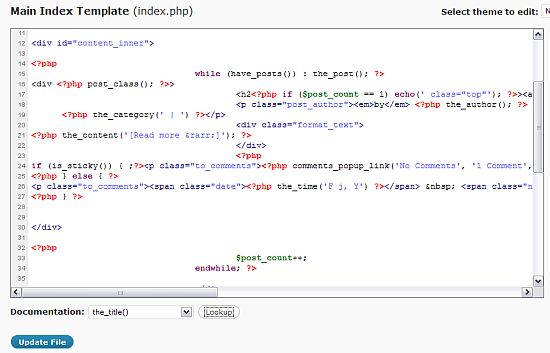
- The editor has some sort of delay when loading. Maybe this is my site or host but there seems to be a pause when loading the highlighting and the line numbering.
- The editor doesn’t have wrapping. I have to scroll over to see the full line of code, which I’m not accustomed to at all. This may that the code wasn’t originally formatted properly but it’s not all my own code. The scrolling really slows me down.
- The highlighting doesn’t use the same colors that I’m used to. And I don’t see a way to edit this – although I suppose this can be done in one of the core files.
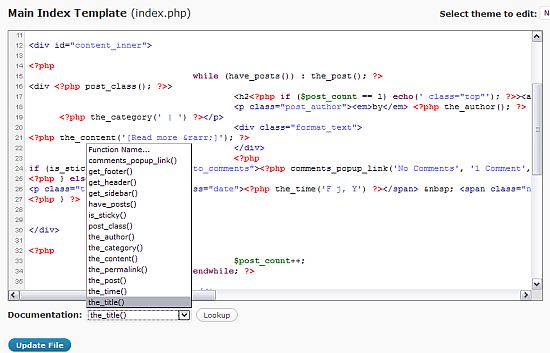
- The documentation lookup for functions takes you to php documentation for WordPress. It is useful but it is definitely intended for developers. For example, I used it to look up the the_title() function.
This was the description.the_title (line 45)
Display or retrieve the current post title with optional content.
* return: Null on no title. String if $echo parameter is false.
* since: 0.71null|string the_title ([string $before = ”], [string $after = ”], [bool $echo = true])
* string $before: Optional. Content to prepend to the title.
* string $after: Optional. Content to append to the title.
* bool $echo: Optional, default to true.Whether to display or return.Clear now? Good. ;-)
Don’t get me wrong. The new theme editor is a big improvement. I guess I just expected something magical. ;-) Or something that was just like Notepad++. I think my expectations were unrealistic.
photo credit: Valerie Everett

Well the way i see it, the theme editor, is for a quick, dirty, on-the-fly edit of a file. It is not meant for development, not yet that is. As for the word wrapping i am sure some sort of CSS is applying there ;)
stratosg´s last blog post – Lines from “Whose Line”
Hi Stratos – Good point. I would like it a lot better without the side scrolling.
The highlighting looks more like the tools I use on Linux. :)
Function lookup : cool.
Side scroll: not cool. :(
Andrea_R´s last blog post – Installing in a subfolder
Hi Andrea – Completely agree on the side scroll.
Syntax Highlighting is very cool one which i expected. It’s something like the php editors we use daily.
Thanks for sharing the review Kim.
TechZoomIn´s last blog post – 15 Latest Free WordPress Themes..!
Hi – It’s similar to Notepad++ which is my editor of choice.
I liked the feature. But it slow when loading…
Nihar´s last blog post – Extract RAR and ZIP files using PeaZip Archive Manager
Hi Nihar – It is kind of slow – it’s like there’s a brief delay. I don’t know what causes that.
I think this is a big improvement, now we can do theme editing more conveniently. But it seems this is for simple tasks for making big changes the old way (notepad++) is still the best way.
I also recommend editing themes offline unless you are very proficient with css and php codes , I am not , so several time I have made some changes and my whole theme suddenly became blank or turned very ugly and it made me very nervous as I know this will drive away those who are visiting my site at that time .
Chinese Girl´s last blog post – Photo Chengde Putuozongcheng Temple17
That’s very good advice. I frequently edit them directly but almost always make a copy of the file first.
All though I have yet to really play with this feature and still plan to do so, your review is very detailed in comparison to other reviews I have seen.
It also looks like they need to go back to the drawing board on this one, wouldn’t surprise me if a few of the issues you named above aren’t fixed in the next few updates.
Extreme John´s last blog post – My CommentLuv Project
Hi John – I would be happy if word wrap was enabled – I can live with
all of the other aspects.
Hi Kim. It is interesting how we can get excited about new things and our expectations get way ahead of us. All this coding looks and sounds way too complicated for me. You have a brilliant mind.
Davina´s last blog post – It’s All About Me — Or Is It?
Hi Davina – Very true. I usually try to keep my expectations low – then
I am rarely disappointed and sometimes pleasantly surprised.
I’m not brilliant :-) It’s just what I am interested in. There’s lot of things
I’m terrible at – like knitting – I can’t figure it out.
One thing I noticed is that while it worked in FireFox, it didn’t work with Google Chrome, at least not the last time I looked anyway. I have to admit it does make it easier when referring to a particular line for editing.
Sire´s last blog post – The Argument For Paid Reviews
Hi Sire – I’ve only tried it in Firefox – I haven’t even looked at it in IE. So far, I haven’t used Chrome. And you are right – it’s a lot easier to find a line of code – the line numbering is a great idea.
Yep. I actually do most of my edits right in WordPress. Saves the hassle of FTPing stuff all over the place. Now that it has numbers and all I reckon I’ll have even less need of the FTP program.
Sire´s last blog post – From Birth To Realization Of The Word
How can they expect us to work with code where there is no wrap function.
That’s an absolute must.
I’ve used Edit Plus for my text editor. Dreamweaver works well, too.
John Hoff – WpBlogHost´s last blog post – Time For A Rant About Poor Customer Service (HelloThemes.com)
Hi John – I don’t want to scroll either :-)
Kim, Just like you, I am really looking forward to the syntax highlighting as I keep making changes to the theme code on the fly and many times forget the end php tag or a semicolon. Though, a dropdown of functions is great…the ideal thing would have been intellisense (code completion) which will be too much to ask on a web editor :lol:
Thanks for the review… I am yet to get on to 2.8
Ajith Edassery´s last blog post – 10 ways to increase your Twitter followers
Hi Ajith – I forgot to mention that – it does auto-complete quotes and brackets. That actually annoys me because then I expect it to auto-complete everything.
I didn’t upgrade this site yet either :-) This was from a site I was working on.