
TweetDeck is a new Adobe Air twitter application that includes an integrated summize search and a grouping feature. It is currently in beta but the developer is very responsive and is answering inquiries on twitter and is currently adding suggested improvements and fixing noted bugs. A TweetDeck forum has been setup at UserVoice for this purpose.
I first heard of Tweetdeck from Louis Gray’s article posted on July 4th. Since I mostly like Air apps, I installed it, tried it out and went back to using twhirl. It wasn’t that I didn’t like it, but I am loyal to applications that I like and I have been happy with twhirl since I started using it 3 or 4 months ago. On Saturday night, however, Graham English was talking about Tweetdeck on twitter and answered a couple of questions that I had so I have been trying it out since that conversation.
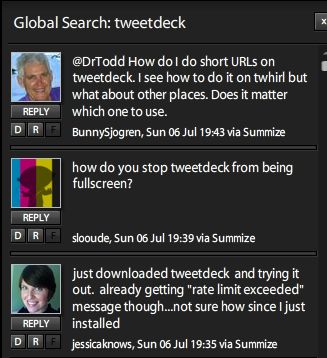
And a lot of twitter users have been trying it out over the holiday weekend. Summize shows it as one of the top 10 trending topics along with Wimbledon (it has been the week for Spain), John McCain, Hancock, and for some reason, Philly (I haven’t been able to figure that one out unless everyone in Philly is tweeting about the crazy rain we are having this afternoon). It was refreshing to see people excited about a new twitter application rather than the usual “fail whale” and “twitter sucks” discussions.
Here is my list of pros and cons. Please keep in mind that the app is in beta and the developer is working on the issues so the cons may be resolved quickly.
Pros:
- Groups – I love the group feature. I follow soccer news and other soccer fans on twitter so I have made a soccer group. Many people have noted that not all of the people you are following show up in the list when you want to add them to groups. Last night Graham English told me that it took a full day for TweetDeck to scan and all of the users. I have since discovered, however, that a user has to be actively using twitter since you start using TweetDeck to show up in that list. If they don’t tweet, they won’t populate the list.
- Interface – The interface is pretty. A choice of themes would be a welcome addition, but I am sure that will be added soon.
- Search – The integration of Summize is brilliant. The screenshot to the left of TweetDeck discussions is of a summize search from within the application.
- Panes – Having a separate pane for replies is another useful feature.
Cons:
- Resize Issue – I maximized TweetDeck three times and each time I could not figure out how to resize the application and could not remember how I made it smaller. When I did a summize search on tweetscan I discovered that a lot of people were having the same problem. This is unfortunate but knowing others were having the same problem made me feel less stupid. If you right click on the program in the taskbar and select restore, you will be able to resize the program. I believe this is a windows solution and I’m not sure that it works for everyone. Another user mentioned holding Alt and dragging the side of the window also worked. This did not work for me so it may have been a Mac solution. Since this issue has been so widely reported, I am sure it will be corrected soon.
- Deleting a Group – I didn’t realize that closing a pane for a group would delete the group. So, after creating my soccer group I closed it, lost it and had to recreate it. Not a huge problem but definitely annoying.
- Follow – As far as I can tell there isn’t a way to follow users through TweetDeck. There is a grayed out F next the direct message and reply buttons so it looks like this feature will added soon as well.
- Can’t clear buffer – In twhirl there is a little trashcan that allows you to clear the screen after reading all of the tweets. Twhirl also keeps my place if I am halfway through the screen when new tweets arrive. In TweetDeck there is no way to clear the buffer, as far as I can tell, and if new tweets come in while I am reading, I get bumped to the top of the screen and have to scroll back down to where I was on the screen. This annoys me more than any other issue that I have encountered in the program.
- Memory Usage – TweetDeck uses too much memory. When I checked it after it had been running for about 9 hours it was using 170,000K. When it starts it is already at 60,000K, which is about the highest twhirl gets even after it is open for a very long time. I understand that TweetDeck has a lot more features but this may keep me from using the program long term
So far, I am really happy with TweetDeck and if some of the memory and other issues are resolved it may replace Twhirl, at least on my home machine. I do, however, still really like Twhirl and feel a little guilty – almost as if I am cheating on it.
Below is an image of my Soccer/Football group.


[…] 25 Incredibly Useful Twitter Tools and Firefox Plugins Noupe has provided the ultimate list of twitter resources. Personally, I use the web, twitter search, and tweetdeck. […]