

Recently, I came across a Firefox add-on called Capture Fox, which creates quick and easy screencasts of your screen or browser area.
In the past I’ve used Jing but I wanted to try this add-on since I don’t need to go to another site to use it.
Of course, one of the best programs for screencasts is Camtasia but I don’t make enough videos to justify purchasing it at this time.
- Install the add-on like any other add-on for Firefox and restart your browser. If you don’t know how to install an add-on, there are instructions here.
- In Firefox you can go to Tools > Capture Fox > Settings or click on the icon in the status bar.

- You will then have the window for the settings.
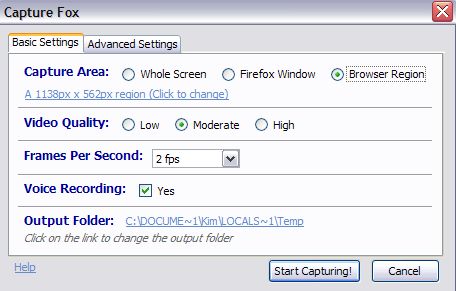
- I left the settings at the default except for the Capture Area. I changed it to Browser Region and selected the part of the screen that I wanted to record. I did this because on my first test I had the whole browser and when the video was uploaded to youtube the screen wasn’t clear after yourtube resized the video. One thing I like about the Capture Area / Browser Region setting is that the area is retained until you change it again.
- I made a quick video about the Media Settings in WordPress (because I didn’t really have a topic to make an actual video about), uploaded it to youtube and embedded it below.
- The quality is pretty good considering it was created by a free Firefox add-on. Enjoy all the uhh’s and actuallys that came out when I attempted to talk and record myself in the early morning.
photo credit: ericbegin

Awesome, awesome, awesome! Thanks Kim! :-)
.-= Lisa Marie Mary´s last blog ..Sponge Bob And Article Marketing? =-.
Hi – You’re welcome :-)
That is great! Is there a limit to the length of the video? I’ve been using screenr.com but it is limited I think to 5 minutes. Thanks for sharing!
.-= Karen´s last blog ..My Facebook for Business Checklist =-.
Woops not available for my platform – Mac OS. Wah.
.-= Karen´s last blog ..My Facebook for Business Checklist =-.
Hi Karen – Sorry, I should have mentioned the platform. I try to forget that Macs exist ;-)
Sounds very doable – thanks!
.-= vered – blogger for hire´s last blog ..Do You Believe That “Retail Is For Suckers?” =-.
Hi Vered – Yep – it was easy. I expected something to go wrong and it worked fine.
a) LOVE your posts coming into my inbox, I always learn something and find your style perfectly clear but personable
b) LOVE that you found this tool for me, and demoed it on something I actually need to send to a client to learn — ha! (Ever want to demo again? Teach her how to resize/condense images so they’re not megabites in her blog!)
c) LOVE your voice! You got no complaints on that one, chick — you sound swell, a good test of the audio (just your PC mic?), and all pauses were acceptable — and way cleaner than some of the ‘pros’ — good job!
Your pal,
~GirlPie
.-= @TheGirlPie´s last blog ..TheGirlPie: Smart, eloquent, perfect ~ RT @adbroad: "…Brand Fiction interview [held] too early after nite of SXSW party http://bit.ly/ahXABW" =-.
Hi – Thank you so much! Nicest comment – I’m almost embarrassed. ;-)
Thank you for the nice post about Capture Fox.
Thanks! The add-on works great. I was pleasantly surprised.
I’ll have to check this one out! We’ve been using screenr.com It’s free and intended for use on Twitter, however, we do not opt to tweet the screencast and select the option to upload to YouTube. We’ve had nice results in optimizing our YouTube channel and using screenr to garner localized longtail traffic. For instance, if you search “panoramic heights kennewick wa homes” you’ll see the video ranking that we used screenr to produce. The only downside is there is a 5 minute limit, but that’s probably ok as folks typically like 3 minute videos.
.-= Colleen´s last blog ..Tri Cities Washington Cold Winter Nights Makes For Abundant Springtime Babies =-.
Hi Colleen – Someone on twitter told me about screenr but I haven’t tested it yet.
I don’t think this one has a time limit. But you’re right – not many people want to sit through something that is over 3-5 minutes. Personally, I prefer written instructions to video ones.
Excellent find Kim, definitely a keeper for my resources file.
I’m a wee behind though; still looking for the easiest way to capture and send a simple screenshot…much less video. lol
.-= Dennis Edell | Direct Sales Marketing´s last blog ..Aweber Affiliate Link Contest! – This Is It!! =-.
Hi Dennis – Do you want to capture the screen through a Firefox add-on or something else? I usually use the print screen button on my keyboard, paste it into a graphics program like Irfanview, save it and then attach it to an email.
http://www.irfanview.com/
Print screen doesn’t seem to work for me, nothing happens.
.-= Dennis Edell | Direct Sales Marketing´s last blog ..UPDATED: Aweber Affiliate Link Contest! – This Is It!! =-.
This is so cool, Kim. I’ve not seen anything so fun and appropriate for a while. I’m anxious to go have a look so I’m off!
George
.-= George Angus´s last blog ..Vintage: Finding Your Writer’s Voice =-.
Hi George – It’s great for a quick video or to send instructions for someone. If I was going to do videos all the time I would purchase something like Camtasia but this is perfect for my needs.