
A year ago I wrote about how to add a share button to a custom Facebook tab.
Based on some information received by one of my commentators it seems that the share button is not working as expected.
The share button does share the page but then redirects the user to an unexpected location.
I tested this on a couple of different share buttons. On my Demo tab there are two share buttons at the bottom. If you click on one of them and then click share in the pop-up, the page will be shared and posted to your Facebook profile.
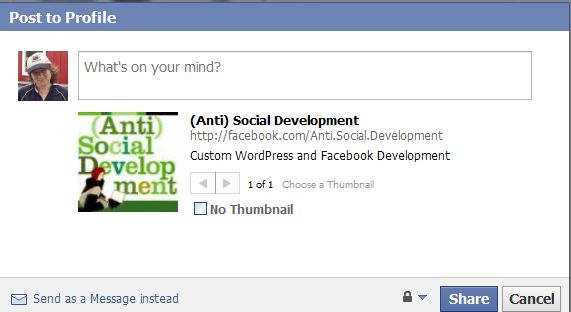
Instead of staying on that tab, however, you will be redirected to the links tab for your personal profile and will no longer be on the page that you shared.
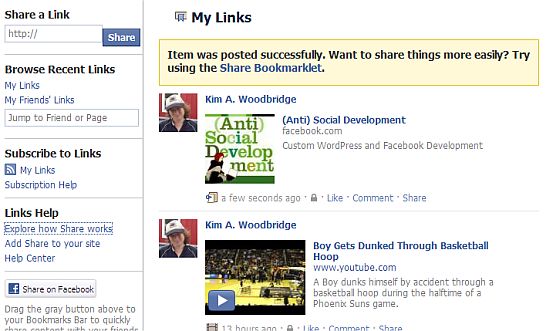
When I wrote about this a year ago and up until recently, the share button did not go to the links page.
The issue has been reported in the developer’s forum but a solution has not been posted.
I have not located a fix for this (bug?) and want to know if any of you have encountered this and, if so, if you were able to fix it. Or, did Facebook change something and is this the way the share button is supposed to work now?
Oh Facebook …
photo credit: Laineys Repertoire

I feel your pain! I’ve tried all sorts of things and not been able to change that redirect! I suspect there isn’t a way and we’ll just have to live with it. And, natch, Facebook is mum on the topic.
Hi Tim – Thanks for stopping by. Do you know when this started? I know that it used to work but wasn’t aware of this problem until someone left a comment about it.
I too was concerned about this issue, One of my friend informed me about it since then there is no solution.
Hi Shailender – So far, I haven’t come up with a solution either.
I am having the same issue. I think it’s a Facebook issue and not a “Share” plugin deal.
Pasting the url from a WordPress post yields the same error. If anyone learns of a fix please post it here!
Hi Andy – So far, there hasn’t been any info about it. Tim Ware in the comments above gets a lot of good info from FB and he doesn’t have any info about it either :(
Strange that facebook share button page has been replaced with like button but they are not actually the same. Seems like facebook want ppl to use like button instead.
The redirect problem is happen to me, everytime I use friend request for facebook apps but they solved this by providing new request feature. I guess ppl will just stop using share button, but they won’t fix or update on this..
Hi Evan – You might be right – maybe they don’t intend on fixing it. They don’t have a page anymore with the code for it – it’s too bad – I like the share better than the Like.
Hi Kim,
I’ve just added share button on my page using the code you posted in another post. Great job, thank!
I’ve noticed the redirect too, which actually was both positive and negative for me. The negative side is of course that the share button will take visitors away from my page, but the good news is that I finally found the way to see all my shared links. Since the Links box was removed from the new profiles I couldn’t find the way to view them.
So my guess is – could that “bug” appear with the new FB user profile, maybe?.. It seems like it. So maybe it’s not a but but a purposeful solution…although I can’t seem to see the logic.
What do you think?
Hi Julia – I’m starting to think it’s intentional and not a bug. I think Facebook wants us to use the like button and not the share. They don’t even have the code available on their site anymore for the share button.
yes, I’ve noticed about the code. Probably this is the case, judging by the changes in the post layout now when you like something on the web. It does look like shared post looked before.
There’s also a possibility to use fb:request and fb:multi-friend selector for pages, but still it’s a bit different way of sharing.