

Update 2/17/11: After March 11, 2011 the Static FBML application will no longer be available. It will continue to work on existing custom tabs but all new tabs will need to be created with Iframes. Please see my tutorial on how to create a custom Facebook page tab with Iframes.
People often ask how to rename the page tabs on their facebook fan pages. Unfortunately, this functionality does not currently work. Facebook used to have this feature but it hasn’t worked since the last update.
You can, however, use the fbml application to create a custom box that is used as a tab. The tab will be whatever you name it, such as Welcome or Services, and that tab will contain whatever data you included in that fbml box.
- Install the Static FBML application on your fan page.
- Select the link that says ‘Add to My Page’.
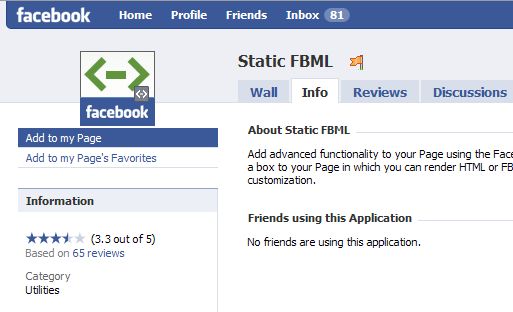
- Go to the main page and click on Edit page
- Select the FBML application and click on the pencil icon to begin editing the page.
- Name the box and add your html or text. Then save the changes. By default this will be a new box or your boxes tab.
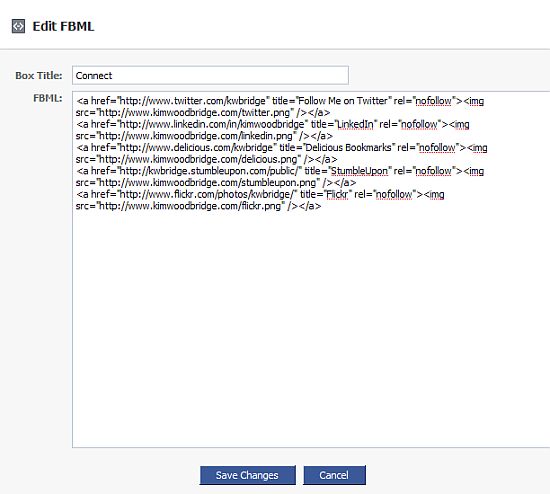
- Go page to the Edit page that lists all of your applications. Locate the fbml box that you just created and select Application Settings under the pencil icon.

- Click on remove to get rid of the box and then click on add to convert the new box into a tab. Then click on ‘Okay’.
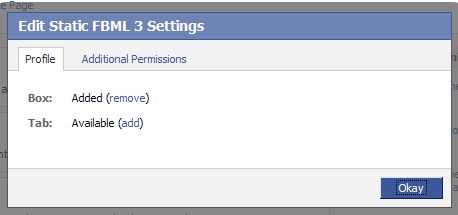
- You will have a new custom tab with the content that you added to the FBML box.
- Unfortunately, you can’t add more fbml boxes to the custom tab so everything you want under this tab needs to be contained in that one box.
- If you want to make more custom boxes or tabs, edit the fbml box that you have already made and then scroll to the bottom of the page. Here is where you can add more boxes – a new browser tab or window will be opened to do this. Once you use fbml for the first time, it no longer looks like the application is available and people think they can only use one box. It’s just that the application is replaced by the boxes that you make and at the bottom of the edit screen is where you can create more of them. I don’t know why that it but it’s super confusing.
I made a tab to test this and deleted it. I already have the information that I want on my fan page but I suppose I could create a separate tab for Services, Portfolio, or Contests.
For information on adding content to your custom tab, please read How to Add Content to Your Custom Facebook Tab.
You can view my fan page at http://facebook.com/Anti.Social.Development.
photo credit: joeshlabotnik

Hey you are really getting a lot of work to facebook since you started freelancing huh? Is it because you have more time or you find it a good client-recruiting place…?
stratosg´s last blog post – The theme change
Hi Stratos – I’m getting visitors to the site from facebook. I’ve getting
some work from that but mostly to work on facebook rather than WordPress.
Thanks! I finally set up my facebook fan page but it’s sooooo plain!
I’m curious like Stratos, how is facebook working for you in connecting with potential clients?
My blog gets some traffic from FB, but I think it’s people posting links in their status updates, because I can’t see where the referrals are coming from.
Tracy´s last blog post – My two favorite emotions are lucky and enthusiastic
Hi Tracy – So far I’m getting more people finding out about me through
facebook than work. And the work I’ve found that way has been to
work on facebook, which is fine with me. Facebook is a bit of a pain
but I find it to be a nice break from WordPress. ;-) Most of my business
right now is coming from recommendations – people I’ve worked with
are recommending me to others.
Yeah – you can see that the referrals come from facebook or
networked blogs but nothing more specific than that.
My MomGrind fan page is so basic. I need to save these and spruce it up a little, when I have the time.
Vered – MomGrind´s last blog post – Retouching As An Act Of Kindness
Hi Vered – Do it all at once when you’re already cranky because facebook
can be such a pain. It’s not hard but it’s so unintuitive.
I really like how the ASD Facebook page is looking. Great job. And glad to hear its getting people to your site. :-)
Thanks Jim
Did you ever try Tab? It is disgusting.
Thanks, your instructions were perfect, and I was able to set up the new tab that I wanted on my Facebook page.
.-= Debra Dalgleish´s last blog ..14 Basic Skills For Excel Users =-.
Hi Debra – Great! I’m glad it worked for you.
Hi there,
This information that you have provided is brilliant. I am completely new to all of this and wanted to ask:
In stage 5 of your article “How to Add a Custom Tab to a Facebook Fan Page” where you state information on “Edit FBML” how can I get hold of the correct HTML data to paste in to the “Edit FBML” box?
Thank you!
Hi Shay – The html would be different depending on what content you want to place in the box. In order to use the Static FMBL application you really need to know some html.
Thanks for letting me know. Do you know where I could really simply html data from to create a standard tab template?
Hi Shay – It really depends on what you want on the template. I’m not aware of anywhere to obtain specific html.
You could hire Kim! She does an awesome job. :-)
.-= John Haydon´s last blog ..The Killer Blog Strategy Mind-Map For Simple Minded Bloggers =-.
Thanks John!
Excellent! I was wondering how some people put custom tabs to their pages. I thought it’s a premium option in FB. Thanks for sharing this great piece of information. Added you to my RSS :-)
.-= Ami´s last blog ..The Tataki-dai Principle =-.
Hi Ami – Great! I’m glad this helped you out.
The Add to my page link does not appear when I go to the Static FBML page. It only says Add to my page favorites. How can I actually add the application to utilize it? Thanks!
Hi JW – Static FBML is only for fan pages and doesn’t work with profile pages. If you are unable to add it, you are either not the admin of a fan page or you have already added the application to the fan page.
Otherwise there is a bug in Facebook and I would recommend trying again later.
Thanks for your help. Yes we are a biz fan page, I’m the only admin and am logged in as such. I don’t think it is loaded since I’m the only one touching the page. Hmm… I tried again today and no luck.
Not sure if there is a setting I need to activate or what to get it to work. Any other tips?
Hi – Is you page published yet? It seems that some people have not be able to add it before the page is published.
Here’s the discussion area for the app where I found that thread.
http://www.facebook.com/apps/application.php?id=4949752878&v=app_2373072738&viewas=629152408&ref=search
JW
Were you ever able to get the static FBML “add to page” link? I’m having the same problem and it’s frustrating. We have a published fan page and I’m the admin. Let me know what worked for you.
I am having the same problem…only option is to add to page’s favorites. Did anyone ever figure this out? (yes, this is a business page, I am the admin, I am logged in as admin, the page is published, and it has not been added before…)
Yeah, encountering the same problem here!
What exactly is wrong?? =(
If the fan page is associated with a business profile rather than a personal profile, the fbml application will not be available. It can’t be used on fan pages associated with business profiles.
Thank you for the great post perhaps you can help.
I have the same problem as mentioned above (only get “add to fav” option.
What does it mean – associated to a personal profile?
How do you do that? Can it be changed. You mean to tell me that a major brand like FedEx could only use FBML if Joe Smith profile was tied to it? What if Joe leaves the organization?
Very confusing
Hi, I´m having the same problem – I´m trying since weeks and I just can´t add static FBML – everytime I click on the application link I end up on my personal profile, although I´m admin for the page. So your guess with the personal profile can´t be right cause I do have a personal profile tied to my page.
If you have a personal profile associated with the fan page and you can’t add FBML, there must be a different problem. I have no idea what that might be. Try going to Edit Page and scrolling to the bottom – is there a link there to add FBML?
Facebook fan pages are tied to personal profiles. If you have a business profile and have made a fan page, you can not add the FBML application. I don’t know why Facebook set it up that way but that’s the way it currently works.
I have solved the dilemma of adding applications to pages administered by a facebook business profile. You must still have your own personal account and profile, however. There may be a simpler, ore more direct method, but this is how I accomplished it.
From your personal profile, become a fan of your page by clicking “Like”. From your business profile, view your page. Open the list of all Fans of your page and scroll down to find your own name. Click “Make Admin”. Logout and log back into your personal account. Search for the Static FBML application and you’ll now be able to “Add to my page”. In the next popup box, you can select any page that you administer. Now view your page from your personal account (search for it if needed). Click “Edit Page” at the top left and you can now pickup from the instructions listed in this article!
Hope this helps everyone!
Hi Mike – Interesting. Do you have a working example of this?
Mike’s instructions worked perfectly
Hi I was wondering how I can add the become a fan tab to the profile page
Hi Angie – I don’t believe you can add a custom tab to a profile page – only to a fan page.
Hi ive followed your instruction up till edit page which directs you to the page edit but however when I click on FMBL pencil theres only ‘browse more’ thats comes up in the admin selection theres no edit selection. can you help please
Hi Shaila – I tested this on my own fan page and it is working fine. Make sure that you are the admin and try logging out of Facebook and back in. Sometimes Facebook is buggy – when that happens I stop working on it and come back later.
thanks Kim,
ive figured it out. check out
http://www.facebook.com/pages/Lavazza-A-Modo-Mio-Club/162437154203?v=app_4949752878&ref=nf
does it show up in your computer.
:) we had issues with displaying on some and not in some.
can you help?
Hi Shalia – It looks great! I wonder if the problem is a browser issue. I looked at it Firefox 3.5 and IE 7 and it worked in both.
thanks heaps Kim,
we fixed it on friday. took us a whole day but so worth it. Be a fan if you get a chance. we trying to get a 1000 so we can get a personal url name. Please suggest us to others. lavazza is a great coffee.
take care :)
Kim,
Any idea on how to add multiple Static FBML tabs to a page? It seems that you can’t add a second or third tab with different code in it.
Thanks for the help!
John
.-= John Haydon´s last blog ..Why Twitter lists are huge for your non-profit or small business [video tutorial] =-.
Hi John – After you create one FBML box and set it as a tab, go back to edit that box – Edit Page > Name of FBML box > Pencil Icon > Edit. At the bottom will be a link to create another FBML box. Create the new one just like you did the first one. Once it is saved go to Edit Page > Name of new FBML box > Pencil Icon > Application Settings >Add Tab. You can also remove the box.
The new tab might now show up because there isn’t enough room for it. Click on the arrows on the tab row – you should be able to reorder the tabs by dragging it to the correct location.
I found this post very helpful! I quickly added a custom tab to my Facebook fan page (at http://www.facebook.com/pages/Intel-Atom-Developer-Program/136829464493). The instructions were clear and correct. Thank you for posting!
The correct link is actually this (the parenthesis got in the way in my previous post):
http://www.facebook.com/pages/Intel-Atom-Developer-Program/136829464493
Hi Gina – Looks great! I’m glad the tutorial helped. :-)
How do I go about having the contents of this custom tab (say it is an image/banner with a click thru) to be featured on the left hand column of a business page??
Hi Jieun – You would go to Edit Applications, locate the name of the fbml tab, click on Application Settings and select Add as Box. The Box will go to the Boxes tab so go to that tab. Select the pencil icon and choose move to Wall – it will them be on the left hand column.
Please note that boxes will be removed by the end of the year and it will no longer appear in the left hand column so you might not want to do this.
http://www.kimwoodbridge.com/upcoming-facebook-changes-to-boxes-and-the-box-tab-that-will-impact-your-custom-fan-pages/
Thank you Kim…
While I am following your instructions very carefully, when i select the pencil, the only option i am given is to Delete the tab.
Is there any other way or another application i can use to accomplish what i am trying to do?
as an example – see the Shop Mavi banner and Sign up for email banner : http://www.facebook.com/pages/Vancouver-BC/Wallop/48459801271?v=app_4949752878#/pages/Mavi-Jeans/136768585045?ref=search&sid=543135098.1529563427..1
Hi – You have to go to the Boxes tab, where the box should be located and then select the pencil icon on the item that you want to move to the Wall sidebar.
I can’t see the pencil icons on your page because I’m not the Admin of it. I did, however, test the instructions on my own page and it worked.
awesome, yes it worked. thank you so much!
I’ve added the static fbml app uploaded the following code to box and the email form appears but does not work. this msg appears –
The page you requested was not found.
You may have clicked an expired link or mistyped the address. Some web addresses are case sensitive.
* Return home
* Go back to the previous page
looking to get a fix for this. Again looking to add a email opt in box to a facebook page
code:
Name:
Email:
Comment:
Hi Tone – If you are getting that error, it sounds like something is wrong with the code for the email form – not with the fbml appplication.
I’m trying to create a auto responder template and put it on the Fan Page as the instructions above but for some reason the Aweber template will not show up.
is there limitation on size..etc
I see John Assaraf has done it and I would like to do the same thing. here is the link to his fan page.
http://www.facebook.com/search/?flt=1&q=fan+pages&o=65&sid=649535286.4014107715..1&s=10#/johnassarafpage?v=app_11007063052
I would love some help to configure this.
Thank you,
Hi Brandon – Did anything show up? Were there any scripts on the page? Facebook will allow a html form but scripts will not work.
The content on a tab can currently be 600px but will be reduced to 510px very soon.
Hello,
I love the layout of this page and wondered if Kim or anyone else could help me with my landing page, I have added the image but am having problems with the like box.
I have used the html code that Facebook provided but it didn’t work and also tried a few others. I then found your share button demo and it worked perfectly the only problem I had is its showing at the side of the page and I would prefer it at the top, do you how I cold place it at the top?
In terms of the like button are you able to help me with the html or direct me to a demo for the like button text and how to place it at the top of the page?
Any help would be amazing.
Best wishes
Emma
Hi Emma – If the button isn’t appearing where you want it to you need to add CSS to change that or place the code in a different location.
Hello,
I wondered if Kim or anyone else could help me with my landing page, I have added the image but am having problems with the like box.
I have used the html code that Facebook provided but it didn’t work and also tried a few others. I then found your share button demo and it worked perfectly the only problem I had is its showing at the side of the page and I would prefer it at the top, do you know how I cold place it at the top?
In terms of the like button are you able to help me with the html or direct me to a demo for the like button text and how to place it at the top of the page?
Any help would be amazing.
Best wishes
Emma
Thanks for the helpful info. REALLY appreciate it. Al
Hi Al – Great! I’m glad it helped.
Hi Kim;
Thank you for a great tutorial – very helpful.
I have followed your instructions and created a tab that contains my content (rather than a Box), I would however also really like to have the content of the tab show up in the left hand column. Is this possible when using tabs?
Thank you again for sharing your insights, much appreciated.
Hi Therese,
Unfortunately, not anymore. All boxes and the Box tab are going away any day now. Facebook said this would happen at the end of this year or the beginning of next. It’s best to just focus on creating tabs.
I have an article about this issue.
http://www.kimwoodbridge.com/upcoming-facebook-changes-to-boxes-and-the-box-tab-that-will-impact-your-custom-fan-pages/
Thank you for taking the time to reply Kim, much appreciated.
Hi Therese – I try to answer all comments :-) And I didn’t want you to spend too much time with Boxes when they are going to be going away …
Thank you!!! You rock!
I’ve finally named my “Welcome!” tab….. and everyone else seems to think Facebook has disabled that feature! Once again thanks!!!
Hi – I’m so glad it worked :-) I’ve been making tabs so that feature still works – the boxes tab, however, can’t be renamed.
Hi Kim,
Really great blog!
So I created a new tab on my fan page but I have a few questions:
1. Is it possible to embed a picture into this new tab? (Specifically if the picture is not already on the net somewhere) (Can you add the pic to facebook and reference that?)
2. Is is possible to change the background color of the tab? Do you have any examples of how?
Thanks in advance !
Hi Paul – If an image doesn’t exist on another server, the only images that can be used are the logo for the fan page or your profile picture. And then FBML code must be used to make it work. It’s a lot easier to upload the pictures somewhere and link to them.
As far as I know the actual color of the tab can’t be changed but you can change the background color of the fan page. That would require inline CSS or pulling in a style sheet that sounds the color of the background.
kim im trying to add the fbml to my page but its not giving me the option to it only says add to favorites? please help me thanks
Hi Candace – Are you doing this from your profile page or your fan page? Static FBML can’t be used on profile pages.
Hi Kim!
I was trying to add a tab, but after I added it, I went to edit it and deleted it instead. Now when I try to add a tab again, my fan page doesn’t show up in the list…how would I fix this??
Thanks in advance for your help!
Hi Hannah – The fan page is missing? If you didn’t delete it, that is odd. I would do a Facebook search for it and also try logging out of Facebook and back in. It sounds like Facebook bugginess to me.
Sorry, I should have clarified: I was trying to install it, and editing the tab didn’t work, so (like any tech newbie) I thought that deleting and reinstalling it would solve the problem. Is there any way to recover/relink it FBML once that’s happened?
Hi Hannah – Maybe. See if you still have the Static FBML app and go to add a new instance of it. At the bottom is a add new link. Frequently when I add a new instance of FBML for a new tab old FBML blocks/tabs come back – even ones that I really wanted to be deleted.
If it doesn’t come back when you do this, then, unfortunately, the code is gone and it will need to be recreated.
Thank you…
thank you……
thank you……..
thank you………
thank you……………. veryyyyyyyyyyyyyyyyyyyyyyyyyyyyyyyyyyy Much… My biggest headache is solved through this article…
T H A N K S
(n_n)
Hi Ahmed – Great! I’m so glad it helped.
Hello Kim.
Thank you for taking the time to instruct people on Facebook customization. I cannot believe how non-intuitive it is to set up business pages :(
I tried to follow your instructions to set up a custom tab.
When I get to Step 2 and go to the FBML app page, I am not presented with an option to “Add to My Page” – the only option I see is “Add to my pages’s favorites”.
Can you provide any advice on what’s going on?
Thanks so much.
Sandor
Hi – I’ve found that if you don’t have the option to add the app to your page that you have either added it before or you aren’t the admin of the page. Are you the admin of the page that you are trying to add the application to?
I am having the same problem… the only option I get is to “add to my page’s favorites” – no option to “add to my page”. This is a business page, I am the admin, I am logged in as admin, and I have never added it before. Did you ever figure this out?
I am having the same issue as L. Jolliffe. Any suggestions? All the same circumstances are the same for me.
Thank you,
Hillary
Hi – Are these business pages associated with a business rather than personal profile?
If so, there are limitations that don’t exist with fan pages for personal profiles.
http://www.facebook.com/help/?page=721
Correct, in my case this is a business account for an agency which manages fan pages for clients (other businesses).
So a customized tab can only be created using FBML with a personal profile?
My fan page is for my business. Facebook specifically states that businesses cannot have personal pages, only business pages. I thought static fbml was only available for business pages anyway, and not available for personal profiles.
I have the same problem as you L Joliffe and so far I have not seen an satisfactory answer to the problem.
I don’t of anything that can be done about it unless Facebook changes their policy.
That is only half the problem. When I was setting up my account, I read on Facebook in countless comments that the FBML App was only for business pages and not for profile pages. Then I read that you can’t add Apps with a business page. Then I read that you can add FBML to a fan page. Then I read that a business page and a fan page are the same thing. Then I read that you can’t have a fan page unless you have a personal profile. This is all from clicking on Facebook’s Help link and FAQs. With help like that, it’s no wonder I and others have been banging our heads wondering what we were doing wrong.
Look at how many people on your site alone asked the same question. I’ve seen it on many other sites as well. What does that tell you? It means a lot of people are being fed bull**** advice straight from Facebook. People are asking this question because they are not being told from the beginning that you can’t add Apps with a business page, which I just found out after reading from several sources that the FBML App is for business pages. Had I known this from the beginning and not been given erroneous information from numerous sources, I wouldn’t have been pulling my hair out trying to install it. When that many people are asking the same question, doesn’t anyone wonder where we are getting the information from? The answer is Facebook itself.
I am not directing this at you but at Facebook itself. Hopefully someone who is having the same problem will read this and save themselves a whole lot of time and trouble.
I lovelovelove your blog- you’re my secret weapon for making my fanpage a wow!
I’ve got a question for you: I’m sad to see boxes go away! I don’t know html or fbml, and I’m worried that my fb page is doomed to nothing but wall posts. Are there good wysiwyg apps out there (ha! What a strange question to ask an html pro, huh?). I’m not looking to do anything fancy- just create special tabs containing images for brand updates and special offers.
Thank you!
Hi Jenny – Thank you so much :-)
There isn’t a wysiwig app on Facebook to work with the custom tab. You could, however, use one on your computer to create the layout and then copy the code over. Keep in mind though that you don’t want to start the page like a regular html page – you would remove the html, head and body beginning and ending tags and just start with the code.
I’m hoping to offer some templates to help people get started in the near-ish future.
Templates! I wish that’s what I had before Facebook snatched my boxes away!
Thanks!
Hi Jenny – I copy the code and save it in a text file in case it lost.
Hi,
I am having trouble editing the FBML tab. Once I added FBML to my page, I clicked on the BOXES tab- then the picture of the pencil (in the FBML box). The only options available are MOVE TO WALL TAB and REMOVE BOX (the EDIT BOX option is grey & not available). Does this mean that we can no longer make custom tabs on Facebook?
Thanks!!!
Hi Brandi – Try this
1. Go to the Fan Page
2. Click on Edit
3. Find the FBML box that you just added
4. Click on Application Settings
5. Select Add under Tab and Remove under Box.
Thanks, I found this post very helpful.
.-= Jayson DeMers´s last blog ..Let’s go camping! =-.
Hi Hilary – Unfortunately, that is correct. Personally, I was not aware of this
limitation until recently as I have only worked with fan pages associated with profiles. I actually thought something was wrong with the pages until
I came across that Facebook help page.
Hi L Jollife – I think it’s all very confusing and don’t know why they have different types of fan pages for different types of accounts.
Applications, like Static FBML, can not be added to a personal profile. But a personal profile can set up a fan page that is tied to their business. For example, I have a personal profile, Kim Woodbridge, and a fan page associated with that profile, (Anti) Social Development.
If I set up a business profile I can make a fan page associated with it but it has limitations.
I don’t know why Facebook set it up this way and think it is unnecessarily complicated and confusing. Keep in mind that I’m just
the messenger that is repeating information found via a google search.
Is there a solution to this besides deleting my current account and starting over? That would mean I lose all my fans that I currently have…
It seems that a business profile can be converted into a personal one.
http://www.facebook.com/help/?faq=12843
I have not, however, located information on how to do it – do you start creating the new one and transfer it over of if support needs to be contacted to make this happen …
hi,
i read your reply to paul in regards to the background. do you hav any examples of the codes?
Hi Zing – You could wrap the content in a div that has a style for a background color. Something like
<div style=”background:#000000;”>
content
</div>
That would make the background black.
Here is an article about inline CSS styles.
http://www.w3schools.com/css/css_howto.asp
Thanks for posting this little gem of a tutorial. I’ve already put it to use :)
.-= Paul OFlaherty´s last blog ..Does Social Bookmarking Need A White List? =-.
Hi Paul – Great! I’m so glad it helped.
Ahhhhh, this is actually reasonably simple, I just need pointing in the right direction. For some reason, I’d decided in my head that I was going to have to learn how to use the Developer tools in Facebook.
Thanks!
.-= Sam Brown´s last blog ..Bye Bye Bebo – It Wasn’t That Social Anyway =-.
Hi Sam – You will need to use some html and css but you don’t need the developer tools to make a custom tab.
Why is it like that? i can’t click the edit page it’s color grey
Hi Kimberly – Are you an admin of the page? Or is it a business fan page?
Dear Kim,
thank you so much for your great tutorial! I have created a welcome tab, but I would like it to become my starting page. Any idea of how I could do it? Thank you in advance for your help.
Hi Jennifer,
It can only be set for new visitors to your page. Once someone is already a fan they will be taken straight to the the wall – that can’t be changed.
Go to Edit Page > Wall Settings, Edit, Default Landing Tab for Everyone Else – select the custom tab
Tw questions…
1. How did you create that custom link?
2. How do I set my page so the visitor does NOT need to be signed into facebook in order to view the page?
Thank you.
Hi Scott,
1. Which custom link?
2. Go to Edit Settings > Settings and check the age restrictions. I’ve heard that it’s not available to everyone it might not be indexed by google. If it’s a brand new page, it might take a bit to get indexed.
1. Your link to your example above is: http://facebook.com/Anti.Social.Development. Instead of something like http://facebook.com/113197535364846?v=app_4949752878. How did you get that link?
2. Thank you.
-Scott
Scott – Aaah … go to
http://facebook.com/username
I believe that currently a fan page needs to have at least 25 fans to get a custom name.
Great, thank you!
Hi Kim,
thank you for the information-unfortunatly I cannot see the “Add to my site” link on the fbml app site-there is only “add to favourites” visible. I have a company page and I am the adminstrator-but i cannot see it .
Hi Steve – Has it already been added? You might already have the application which is why you can’t add it again.
Also, if you have a business profile with a fan page then the application can’t be added. Fan pages associated with business profiles can’t be customized.
Hi Kim, no it hasn’t been added yet. From the very beginning I could not see “Add to my site”.
I have creted a site with “Create a Page for a celebrity, band or business.” and the selected “Brand, product, or organization”- I do have fans yes but I also saw other brand/company websites with modified tabs by fbml.
Hi Steve – I think part of the problem is that Facebook’s terminology is very confusing. A “business” fan page can be associated with a personal profile or with a business profile. Personal profiles are much more flexible than business ones – I think your fan page must be associated with a business profile, which is why you can’t add the application to it.
I don’t know how far along you are with this but if you want to customize the fan page you will need to remove your business profile and fan page and then create a personal profile and make a fan page that is associated with it.
You can also ask facebook to convert your business account to a personal one. I don’t know how successful people have been with that but it can be done.
ok now its clear…i created a normal profile and now I could access the fbml…thank you !!!
I have the awful feeling that Facebook won’t allow you to add custom applications to accounts that do not have a personal profile attached. I have a few business pages, and for the business account there is no way to add custom applications to its pages. The option to add to any page never appears, and yes they are Fan pages, and yes I am the admin.
Facebook is basically still broken when it comes to business pages, because it was never designed for them. Yet instead of allowing a relatively simple solution — let a business have faux personal profile — they tell you to just create a business page, despite the fact that without a personal profile, much of the site is broken. Because it was never designed to work without a personal profile.
Hi Scott – You are absolutely right. The best thing for a business to do is have someone with a personal profile and then make a fan page associated with that profile, if customizations are required.
The problem with that is if that individual stops working for the business the fan page can’t be transferred to another individual’s profile. That could lead to a number of problems.
So I seem to be encountering the problems that others are having, in that in trying to set up a business fan page for a business FB account (I have no personal FB account–have avoided it until now), I cannot add the Static FBML app.
I assume that if I were to switch over to a personal profile and create by business fan page from there, I’d be able to add the app, and build all the wonderful customizations that others have (such as a Welcome tab).
Facebook’s logic in all this is incomprehensible to me, but I’ll save that rant for another day.
My question is: If I create the personal profile, will my name then be visible all over Facebook? I have no personal interest in participating in Facebook, only a business interest. I only want my business identity available in FB. Will I be able to keep my “worlds separate”?
I appreciate any insights anyone may have.
.-= Dave´s last blog ..More Ideas for Your Wedding Processional =-.
Hi Dave – You are correct about the fan page linked to a personal profile and one linked to a business profile. The one linked to a business profile can’t have applications like Static FBML added to it – I have no idea why FB set it up this way.
You can make the personal profile settings pretty secure – so that info is only available to friends. It also isn’t readily apparent who the admin of a fan page is. But if you are concerned about privacy, you probably don’t want a Facebook personal profile.
Dave – I just went through the same thing. What I ended up doing was going to the top of the business page to the “create my profile” button. I made a personal profile, but it is essentially blank – no photos, names, etc. I also went into the privacy settings and entered the highest privacy settings possible. My personal profile won’t even come up in a search. It is almost as though it doesn’t exist. And if for some reason someone did stumble upon it, there is nothing there to see. On a related note, if you ever go to set a custom username for your fan page, realize that you will be setting one for your personal profile first, and only after that will you be able to set one for your fan page. Don’t worry, that won’t affect any privacy settings.
Kim you are an absolute wealth of information. Thank you soooo much for all of the time you have put into answering all of us confused people :)
I have 2 questions for you.
1: I am trying to put a youtube html code into my FBML box but it comes up blank. Can this be fixed?
2: I’ve had a look at your page http://facebook.com/Anti.Social.Development. and it looks like you have 6 or 7 boxes on the one page. HOW did you do that?
According to step 9 ” you can’t add more fbml boxes to the custom tab so everything you want under this tab needs to be contained in that one box.” – so does this mean that everything that is on YOUR page has been created in ONE FBML box? If so, how do you place info from left to right and sectioned off etc?
Many thanks for your expertise.
Hi Kelly – Thank you!
1. I have an article about how to do that – http://www.kimwoodbridge.com/how-to-add-a-flash-video-to-a-custom-facebook-fan-page-tab/
2. I’m using old school html and everything is in tables to get that sort of layout – it’s all in one fbml box.
http://www.w3schools.com/html/html_tables.asp
hi how do you make the sort of page where you have to become a fan/like the page to see the pic please help
Hi Tom – I have an article about that here
http://www.kimwoodbridge.com/how-to-encourage-people-to-fan-your-facebook-page/
Hi. I have made 5 fbml static pages. Then, with fb:tabs I have created a second row of tabs linking to them. Up to here everything is fine. The problem arrives when I choose not to show tabs for the fbml pages, since I don’t want them to clutter the Facebook tabs. They become inaccessible via their link. Even keeping them added to the box, the link redirects to my user’s wall. Is there a solution to this? I mean, there isn’t much point in offering the tab as an option when unselecting it seems to unpublish the page. Thanks so much for your help.
Hi Jose – I don’t know any more about this than what is in the developer wiki – are you using tab item with fb tabs?
http://developers.facebook.com/docs/reference/fbml/tab-item
Hello, and thanks for this very helpful page.
I’m having problems with a custom tab I’ve added to our facebook page. The html page shows up OK under the “boxes” tab but under the actual custom tab, the page comes up blank. Have you ever come across something like this, or have any idea what the source of the problem might be? Thanks!
Just a quick update that I solved the problem by working around it, ditching the css inherited from our website and using a simple html table to do the positioning. Using that new html, the problem went away, suggesting it had something to do with the complex css we were using. Not sure exactly what the cause of the problem was, though.
Hi Derek – I’m glad you resolved the problem. I suppose there was something in the code that Facebook didn’t like. You did what I would have done – removed the code line by line until I found the source of the problem.
Hockey – When I first made a fan page, all I had on Facebook was a personal profile and I didn’t know all that much about fan pages. At that time, about a year ago, I didn’t even know there was a difference between fan pages for business profiles and for personal profiles.
Facebook’s documentation is a mess, they barely have any customer support, and the terminology is confusing. I completely agree with you on all of those points.
You might be interested in this open letter to facebook written last week.
http://www.techipedia.com/2010/an-open-letter-to-facebook/
Kim, thanks for the link. I read every single comment and it opened my eyes to many more existing problems with Facebook and has me reconsidering my options. As a matter of fact, I already used one of those options and created a “business page” at Myspace. I know it’s not nearly as popular as Facebook but I was able to achieve everything I wanted to with Myspace without any of the absurd restrictions imposed by FB.
For now I will leave my FB business page idle and maybe someday FB will pull its head out of its butt. If that happens, I might return to it but until then FB is useless as a business page.
I don’t speak computer but i have managed to get this tab done thanks to your instructions. Now my problem is putting anything into the box. What i want is to put pics with click on links to my website.
I have tried dragging the link into the box but it doesn’t open anything up.
I am horribly stupid & dyslexic, how do i get the HMTL for my site info i want linked?
I am guessing you do this for a living? And if so can i just pay you (or can you recommend someone?) to do it? Otherwise i may end up kicking this laptop…..
Binks
Hi Bink – You would need to know html to customize the static FBML box. You can’t drag and drop and it’s not a visual editor.
This is part of what I do for a living. You can email me, if you like. My contact information is on the top left of the page.
hiii !! how can i add other pics other than my profile pic in my customised fan page tab !!! pls help me mam !
Hi – You would use the html img tag
http://www.w3schools.com/tags/tag_IMG.asp
how do you make it so the custom tab can only be viewed after clicking like (i.e. becoming a fan)? I can’t find the info anywhere!
Hi David – As far as I know you can’t hide an entire tab. You can, however, hide content on the tab.
http://www.kimwoodbridge.com/how-to-encourage-people-to-fan-your-facebook-page/
cheers!
hi kim,
i have added a blog tab to my facebook fan page but i don’t know how to import a blog into it. could you please show me the way ?
Hi Akin – Did you make a custom tab or are you using a Facebook application? On my page I use the Networked Blogs application, which creates the tab and brings in my Blog feed.
http://www.facebook.com/networkedblogs
hi again kim, i made a custom tab by using fbml, and I want to import my blog to this tab. i didnt like the networkedblog thing it directs the original blog. i want the visitors to stay in fb. how can i do that ? or is there a way to change the “notes” tab’s name ?
Akin – A custom application needs to be used to import a feed directly into a custom tab. Custom apps tend to be pricey.
The Notes tab can’t be renamed.
Hi Kim,
I put a comment box in a static fbml tab, which works great except that I’d like to be able to monitor it much like wall, so I tried wrapping it in an if statement like this:
where the uid is my id and the xid for both is the same. However then I can’t see the comment wall at all. Is what I’m trying to do possible or is there another way I might moderate this comment box?
Thanks for your time.
well that didn’t work, here’s the pastbin of my missing code http://pastebin.ca/1876202
Thanks again if you have time to look at it
Hi Meghan – Your question goes beyond the original topic of this article. Unfortunately, I can no longer answer questions that aren’t directly related. Additionally, I am no longer offering free assistance as it has been cutting into too much of my work time.
http://www.kimwoodbridge.com/faq/
Good luck with your project.
Sorry for the misplaced question and thank you for your response.
btw.. there are facebook page templates already! created especially for the FBML application.. not much of them though.. for instance here – http://www.flashmint.com/show-type-facebook.html
Hi Tim – Good to know. I don’t know if there were any last summer when I wrote this article.
Dear Kim,
Many thanks for your help, this page is very good.
I test it in my facebook pages, but I have two tables. How could I make just one table:http://es-es.facebook.com/pages/Debrecen-Hungary/DiMahu-Kft/345062253488
Many thanks in advance.
.-= DiMa.hu´s last blog ..Holnaptól ingyen domainek!Szurkoljatok! http://www.uefakupa.hu =-.
Hi – You would need to redo the layout so that all of the content is within one table. There is information about the code for tables here
http://www.w3schools.com/html/html_tables.asp
Hello,
Many thanks i understant but the table not enough width. Do ihave change something in my code?
Hi,
Unfortunately, I can not provide html assistance here in the comments. With a table, however, you can usually set the width with width=”520px’
VERY helpful, thanks so much! Quick Q: is there anyway to insert a link within the FBML text box?
Hi Zena – Yes. You can use the html code for links
http://www.w3schools.com/html/html_links.asp
oh one more Q: When adding a new FBML tab, is there anyway to have the “re-named” title of it show on the profile page? it just says “boxes” still, even though it allows the title to be changed under ‘edit’
The fbml tab isn’t replacing the boxes tab – it’s creating a new tab. If you don’t see it along the row of tabs, click on the arrow to the right of the tabs and it should be down there. You can drag it to the top row to the right of Info.
how do I get additional tabs down the left hand side? Like Topshop’s facebook page for example?
http://www.facebook.com/Topshop?ref=ts
I have added FMBL in the tab at the top but want them down the side?
Thanks
Hi Byron – They are probably using a Box application like Custom HTML Box.
i just wanna add some pages of my website on my new tab. like you can see this (http://www.facebook.com/pages/astwrt-aljyl/155554406001#!/AmrDiab?v=app_10531514314&ref=ts) fan page which is from an arab singer and he has copied all these information from his website. can you please tell me how to do it.
Thanks in Advance.
Mady
sorry this one
http://www.facebook.com/pages/astwrt-aljyl/155554406001#!/AmrDiab?v=app_10531514314&ref=ts
Hi Mady – You would set up the tab with the instructions on this page. The design of the page needs to be done in fbml and html.
Thank you Kim :) and wish you best of luck.
Ok, I have everything in my tab expept the photos aren’t showing up. Where do I need to have the photos uploaded to in order to direct the html to the right place? I hope that makes sense, I am not the most savy html talker :)
Hope you can help me! Thanks for everything else tho
Hi Sarah – You need to have them on your server or somewhere else that you can host photos or files. The html for the images then links to that location.
Thanks ^_^ Adding this to my page now!
@Fubusama
.-= Fubusama´s last blog ..Ultimate Guide to Poker- 25 Essential Tips to Make you a Winning Player =-.
Great! Hope it works out :-)
I cAnt fInd that pencil icon on….????(Step n0.4)
Help me…..:((
Hi Zomal – It’s a blue link now that says Edit.
Hi Kim,
This may be quite an amatuerish question, but how do you create something like this?
http://www.facebook.com/#!/pages/Berocca/105725222793620?ref=ts
Hi Kenneth – That is community page, not a fan page.
Here’s some info about them.
http://blog.facebook.com/blog.php?post=382978412130
i can.t get Static FBML on my facebook all i get is No friends useing this
wan i click in add to my page what can i do ?
Hi John – It needs to be a fan page associated with a personal profile not a business profile. Also make sure that you aren’t trying to add it to a community page or group. FBML doesn’t work with personal profiles either.
Add Static FBML to your Page
Select which Page you wish to add Static FBML to what do i do if i can’t ?
Hi John – You can’t select a page or you can’t add static fbml?
Does anyone know how to make your FBML tab full page so you dont get the panels running down the left hand side of the page.
Look for instance what quill does.
http://www.facebook.com/quill#!/quill?v=app_7146470109
thanks!
Hi Ginn – That is the way they should currently work. They will no longer work that way after Facebook reduces the page width on 8/23. The Quill page is going to need to reduce the width of the tabs by that date or their content is going to be cut off.
http://www.kimwoodbridge.com/facebook-removing-boxes-and-reducing-width-of-fan-page-custom-tabs-very-soon/
Hi Kim — for some reason, when I add my FBML, it appears fine on the tab, other than the fact that my the entire left side of the page has the same content as you would find if I were on my default fan page or wall page for instance. I can’t seem to find any setting to surpress this and only show the FBML content. Oddly, i have another facebook page where the left panel is surpressed, so either i have a setting wrong, or something changed.
Any ideas if I am missing something? By the way, I like your site. thanks for sending the link.
Hi Ginn – On the pages on which I am the admin I am seeing them the way you describe. On other pages they are still the “old” way. If you are the admin on both of those pages, I’m not quite sure why you are seeing one with the sidebar and one without. It’s possible Facebook is rolling out the changes differently than we expect.
Thanks!
Hi Kim, I am trying to find out how to have the content in an fbml tab be an iframe. Do you have or know where I can find a “recipe” for that? assuming it is possible to put an iframe there…
any info or hint would be much appreciated :)
Hi Karianne – You could start here
http://developers.facebook.com/docs/reference/fbml/iframe
Personally, I haven’t done much work with iframes – I tend to use fbml.
thank you. i looked at that but couldn’t quite get it to waork, but i’ll see if i can figure it out. actually, i see the “big news” today is that facebook is moving away from fbml:
http://www.allfacebook.com/facebook-moving-away-from-fbml-2010-08
so maybe i’ll just wait… :-)
Hopefully they will have more info and some standard ways of using the iframes.
And, of course they are – they wouldn’t want us to not have to redo our work every couple of months ;-)
Thanks for the info!
Since FB has made changes to fbml, is there a new way of creating custom tabs for fan or like pages? I’d really like to create something. Thanks!
Hi Gloria – The instructions in this article still work – the only difference is that there aren’t boxes anymore so it has to be set as a tab.
It doesn’t show box, only tab…
Hi Tasa – Boxes have been removed since I wrote this article – it can only be used as a tab now.
Many thanks :)
hi!
could you please help me, as it seems facebook is just ignoring my plight for 3 weeks already. my facebook fanpage is gone. we are 2 administrators, and it doesn’t come on search or our pages list anymore. none of our fans can see it, nor us the administrators.
we did not delete it, and it has been gone for 3 weeks already?
thanks!
Hi Herman – Unfortunately, there isn’t anything I can do. Facebook needs to resolve this for and they have really poor customer service. The best I can tell you is to keep trying to contact them.
Hey Kim, I think you’re amazing for helping us…thanks so much!
My question is I started a fan page for my church and uploaded pictures. Is there anyway you can have it as a box on the left hand side & not just a tab?!? Please help!!! :(
Hi Christine – All boxes have been removed – only tabs can be used now.
Hi Kim,
Thanks for this article!
I just don’t seem to get it to work the way I want it to… I added the static fbml app and customized the tab. But it doesn’t seem to grab the html code I pasted into it. Do you think this is because it refers to a custom made video player (an application, really) through which multiple videos can be watched? Code starts with ‘<object…..' etc.
This app that I am trying to put in the tab, has actually been made into a facebook app, but you can't add it to a fan page nor is there a tab available (that's why I was so excited to read about the static fbml work around!).
Do you have any suggestions to make this work?
Best!
Hi Iris – The object is probably the problem. Did you try removing it to see if the rest of the html works properly? Any sort of script object is not allowed by Facebook on a fbml tab.
Yes I tried that, so the object could be the problem. We’re trying something else now. Thanks for your help!
Hi! I wanted to say ‘Thank You!’ for the wonderful and clear instructions on how to add a custom tab. It was so easy and it is so nice to see the new tab. Brilliant, thanks so much!
Thanks Callie – I really appreciate it :-)
Hi Kim, It work and now its on my facebook like page tab. But one thing that I dont really understand. Under the box title writed FBML. What should I write or paste at there? My tab is work but nothing appear. Please teach me~
Hi Aizen – You need to use html to create the content on the custom tab. Some people use an image that links to their site or more elaborate code.
http://www.w3schools.com/html/default.asp
Hello,
I am trying to ad fmbl to my page in order to custumize a tab.
This is the fb page. http://www.facebook.com/pages/Dont-Tread-On-My-Junk/179502848731382
Why won’t it let me customize the tab.
When i click the “edit settings” under managing applications, it only allows me to add or remove.
When I click the the pencil on the tab, it only gives me the option to delete tab..
So I have the page set up wrong?
Thanks
Hi Mark – Is it a page associated with a profile or with a business page. If it’s a business page, you won’t be able to use FBML.
Also, sometimes Facebook is buggy – you could try removing the app and adding it again.
I’ve just spent over an hour trying to figure out why my custom page wasn’t appearing in the list. All I had to do was remove the app and add it again. You’ve saved me! Damn Facebook.
Glad it finally worked out.
hi.
how can i add background color to my fbml tab ?
thanks
Hi Oren – The best thing to do would be to add a background color to a div that includes the entire page.
http://www.tizag.com/htmlT/htmldiv.php
This article is now outdated, unfortunately Facebook have deprecated FBML and even if you can create tabs at the moment like this, they’ll be disappearing soon.
Yes – that’s what the first paragraph of the article says – it’s in bold.
Argh! Do I understand correctly that FBML is no longer available? I can’t get beyond the first step. I click on go to app and it sends me back to my normal FB landing page. Frustrating! Is there another option to customize a FB landing page?
Hi Ty – Yes, FBML has been deprecated and can only be used by pages that already had it installed.
Landing pages are now created with iframes
http://www.kimwoodbridge.com/how-to-make-a-custom-facebook-page-tab-with-iframes/
there is app for that : http://apps.facebook.com/tab-editor
As u told that Install the Static FBML application on your fan page.
So where from Install that “Static FBML application “
Static FBML is no longer available to pages that aren’t already using it. You might want to look for one called Static Iframe Tab.
Though FBML is similar to regular HTML codes, I better stick to HTML. I can add jQuery and PHP to my code easily, and I think that’s not a problem for most web developers. Another cool feature is to use Facebook developers API to integrate core functions – share, invite, comment, reviews.. don’t u agree?
FBML is being phased out so it’s now better to use iframes.
You no longer can “Add to My Page”
This used to be simple, using the facebook UI. Unfortunately facebook removed this.
You can add it using http://www.facebook.com/dialog/pagetab?app_id=YOUR_APP_ID&next=YOUR_URL
I put this an html and publisched it below. Just visit, enter your app params, hit submit, and our done.
http://www.jibecompany.com/2012/add-a-facebook-page-tab-application-to-your-page
Thanks – I have a post about this issue – http://www.kimwoodbridge.com/how-to-add-your-custom-facebook-application-to-your-page-now-that-the-view-app-profile-page-link-is-gone/