

With two code snippets added to the WordPress templates and a custom image it is possible to add a Facebook share button to your website without a plugin. It is also possible to designate a custom image or your site’s logo so you control what image is displayed when your article is shared on Facebook.
Facebook provides the share button code on their Facebook widgets page.
There are a couple of options, such as the style of the button and whether or not a counter is included.
The code for the button like the one on this page is:
<a name="fb_share" type="box_count" href="http://www.facebook.com/
sharer.php">Share</a><script src="http://static.ak.fbcdn.net/
connect.php/js/FB.Share" type="text/javascript">
</script>
- Add this code to the template where you want the button to appear. I use mine on single.php next to the title code.
- You may need to add some styling to the button so it appears where you want it to. Because I also have the tweetmeme button I needed to float the share button to the right and give it a little bit of padding. I was lazy so instead of adding a class to the stylesheet I used some inline styling.
<div style="float:right;padding-left:5px;">button here </div>
- Upload the image or logo that you want to be used when your article is shared. The image should be no more than 100px by 100px. I’ve found that the most common reason for it not appearing is the size and you may need to make it even smaller, such as 80px by 80px. You can upload it to your media gallery or to your web directory via ftp. Make a note of the path to the image.
- In your header.php add the following line of code before the </head> tag.
<link rel="image_src" href="http://yourdomain.com/logo.png" />
- Be sure to change yourdomain.com/logo.png to the path and name of your own image or logo.
Now, when an article is shared to Facebook your designated logo or image will be included and will look like the following:
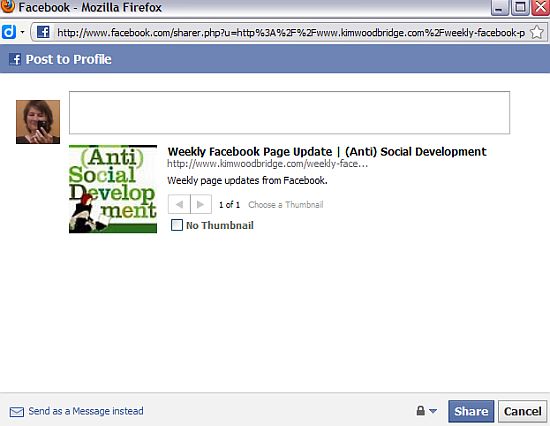
I’ve found that if the image doesn’t show up when you first test the share button, that it probably needs to be resized.
photo credit: ryancr

Interesting, Kim! Do you find that compared to the other sharing options out there this one is more effective. I know I like Tweetmeme. and the positioning plus the branding option seems to be helpful. Let me think about this a bit.
.-= Julie Walraven | Resume Services´s last blog ..Getting in the door: Networking with Informational Interviewing =-.
Hi Julie – I’ve found that since I installed them that my articles are getting shared a lot more – especially on twitter, which is easier for me to track. I don’t think the buttons I used to have were doing much of anything.
I like the branding because otherwise the share will pull the first image it locates – for many people this ends up being the tweetmeme button – I’m sure you’ve seen that with a lot of people’s articles on Facebook.
This reminds me, did you get my last reply email?
.-= Dennis Edell´s last blog ..Comment Contest and Bonus Winners – March! =-.
Hi Dennis – I think so – I got one a couple of days ago. It made me laugh because I had forgotten that I had sent you one.
You replied to that one and I replied to that reply…with me? lol
.-= Dennis Edell´s last blog ..Will DEDC Comments Remain Do-Follow? It’s Up To YOU! =-.
I had a share on facebook below my posts a while ago. Need to probably move it up along with tweetmeme button with a good styling as you mentioned.
However, by default somehow it appears on my facebook notes as links. Could be from feedburner?
.-= Ajith Edassery´s last blog ..Should students blog? =-.
Hi Ajith – Notes does work with a RSS feed so that’s probably why that is happening. Some people put the buttons at the top and the bottom of the articles. Since I added them, I’m finding that the top works pretty well.
Yes, the button on the top works great. I watched myself and found that I scroll up to the top too when i liked the article – if I need further information I click on the links below.
Maybe you first want to check the “first impression” of the article before sharing it, that’s why you scroll up.
Hi – Interesting. I hadn’t thought about it too much but if I like the article and want to share it, I do scroll back up to the top and then use one of the buttons.
Guinea pigs! They don’t share…
Use the “shareThis” button and it works well. It can be sent a number of places with comments.
I’ve never been fond of the share this code/button but a lot of people seem to use it.
HI,
This is good and I ahve done this but I want to add more than one thumbnail for the user to choose from and FB does not talk about that. Can you help?
Ive seen it on other pages, where the user can choose which tumbnail to sue, for example on http://www.cnn.com.
Thank you
Hi Christof – When there are multiple images on a page, you can choose which one you want to choose when you share something on Facebook. This is part of Facebook and isn’t something that you code for.
“In your header.php add the following line of code before the tag.”
where ? more exacly please. doesn’t work for me. I tried to put before
thank you
Hi – The article has been fixed. It should go before the </head> tag.
it doesn’t work for me. my image is here. Before the and nothing. Try it to see. Thanks.
ok. it works. I don’t do anything. only wait. thank you very much.
great tutorial
i want to post a custom image with the fAcebook like button. If i put that code in at is there anything I need to add to make it link somehow with the Facebook like code that I have put somewhere else in the template?
Hi Mike – As far as I know that can’t be done – the code for the like button doesn’t have an image parameter.
Thanks Kim,
Here’s the code you instruct to put before
I don’t understand how this connects with the rest of the Facebook code that you put elsewhere in the template…does this connect with an image parameter somewhere?
The image code goes in the header of your website and is an image that you have designated to be the share image when the page is shared. If you click on the share button at the top of this page, you will see a logo for this site in the share box. If an image isn’t designated, it will usually pull the first image it finds on the page.
Hi Kim,
I am sort of stuck at the moment and need help….
what I have done was I did the resizing before inserting the image with size 80px x. 69px. as informed by you and also uploaded the image to the desired location as follows:
http://www.laylayuniverse.com/FacebookIcon/injustice.jpg
through calling the image by the follow HTML code:
y
but the image still fails to be loaded whenever the share button is press….
Any help is very much appreciated!!! Many Thanks! ;)
Hi Lay – I’ve had trouble with the image showing up and it’s usually the size. I’m not sure why this is or what the rules are – it might need to have the same height and width. The one that I’m currently using is 75×75.
Hey Kim,
The issue on “Facebook Thumbnail selection” has finally resolved!!! It worked alright in IE 8 but not in Firefox. Your, this guidance is really a gem! ;) Keep it up! Cheers! Many Thanks!
Hi Lay – I’m glad it’s resolved for you.
Thanks!
how can i use the same as the “share the knowledge” option in my site ? pls suggest anybody..
Hi – That is done with the sexy bookmarks plugin for WordPress and some styling with CSS to create the box.
Thanks, this article helped a lot!
I had been doing pretty much the same steps, but I didn’t know that the size of the logo was important. I set it to 80×80 after reading this, and now it works!
Thanks once again! :)
Hi Emil – Yes, the size of the logo can really make a difference as to whether it works or not.
Can you please provide exactly url to share..
Example url without changing image :
http://www.facebook.com/sharer.php?u=https://www.facebook.com/mtvroadies&t=mtvroadies
now i want to change image while sharing page.. image url is as under.
http://www.recipester.org/images/1/18/Background-image05.gif
then what will be url ? give me exat url.