
The first burning question here is what the heck is a taxonomy.
Simply, it’s a way to group things together. You are probably familiar with this with your music collection – it can be grouped by genre, artist, release year, etc. You may also remember taxonomies in Biology class when you learned about Linneaus and his classification of plants, animals and minerals.
In WordPress, a taxonomy is a way to group together types of posts.
You are already using three taxonomies that are built into WordPress – categories, tags and link category. Custom taxonomies have been available since 2.3 but haven’t really been practically used since versions 2.9
In the following example, I will be creating custom taxonomies for a video game collection.
The Function
First you need to add a function to your functions.php file to make custom taxonomies available. As always, back up your functions file before making any changes to it. You will also be defining your taxonomies so this would be a good time to make a list of what the taxonomies for your topic would be. For video games, I have condition, developer, genre, release date, operating system and date played. I’m not using title because the title is used in the title field of the blog post. Other possibilities could be publisher, rating, etc.
add_action( ‘init’, ‘create_pc_db_taxonomies’, 0 );
function create_pc_db_taxonomies() {register_taxonomy( ‘condition’, ‘post’, array( ‘hierarchical’ => false, ‘label’ => __(‘Condition’, ‘series’), ‘query_var’ => ‘condition’, ‘rewrite’ => array( ‘slug’ => ‘condition’ ) ) );
register_taxonomy( ‘developer’, ‘post’, array( ‘hierarchical’ => false, ‘label’ => __(‘Developer’, ‘series’), ‘query_var’ => ‘developer’, ‘rewrite’ => array( ‘slug’ => ‘developer’ ) ) );
register_taxonomy( ‘genre’, ‘post’, array( ‘hierarchical’ => false, ‘label’ => __(‘Genres’, ‘series’), ‘query_var’ => ‘genre’, ‘rewrite’ => array( ‘slug’ => ‘genres’ ) ) );
register_taxonomy( ‘release’, ‘post’, array( ‘hierarchical’ => false, ‘label’ => __(‘Release Date’, ‘series’), ‘query_var’ => ‘release’, ‘rewrite’ => array( ‘slug’ => ‘release’ ) ) );
register_taxonomy( ‘os’, ‘post’, array( ‘hierarchical’ => false, ‘label’ => __(‘Operating System’, ‘series’), ‘query_var’ => ‘os’, ‘rewrite’ => array( ‘slug’ => ‘os’ ) ) );
register_taxonomy( ‘dateplayed’, ‘post’, array( ‘hierarchical’ => false, ‘label’ => __(‘Date Played’, ‘series’), ‘query_var’ => ‘dateplayed’, ‘rewrite’ => array( ‘slug’ => ‘dateplayed’ ) ) );
}
You can register as many taxonomies as you want to use for your subject. You can see that the taxonomy is placed in four different places when it is registered; the actual taxonomy, the label for it, the variable used in queries, and what the slug (what shows up in a url).
Edit Post Screen
After the function and register taxonomies are added, you will have new fields on your Edit Post screen that looks just like the section for Post Tags and are listed below that section.
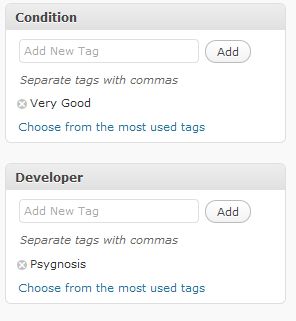
You will fill in the fields just like you do for tags. In my example, I’ve listed the physical condition of the game as very good and the developer as Psygnosis.
How to Display
So, now we are like great – I have this new data but they don’t show up anywhere. What am I supposed to do with this? You will need to add the following code to the template file where you want the taxonomies to be displayed. In my example, each game is a post so I want the taxonomies to be displayed on the single post page, which is single.php. Again, backup of the file before editing it. Add the following for each taxonomy that you want on the single post page and make sure this code is within the loop. I’ve set mine up to display next to the thumbnail of the video game box, which is above the rest of the content about the game.
<?php echo get_the_term_list( $post->ID, ‘condition’, ‘Condition: ‘, ‘, ‘, ” ); ?>
<?php echo get_the_term_list( $post->ID, ‘developer’, ‘Developer: ‘, ‘, ‘, ” ); ?>
<?php echo get_the_term_list( $post->ID, ‘genre’, ‘Genre: ‘, ‘, ‘, ” ); ?>
<?php echo get_the_term_list( $post->ID, ‘release’, ‘Release Date: ‘, ‘, ‘, ” ); ?>
<?php echo get_the_term_list( $post->ID, ‘os’, ‘Operating System: ‘, ‘, ‘, ” ); ?>
<?php echo get_the_term_list( $post->ID, ‘dateplayed’, ‘Date Played: ‘, ‘, ‘, ” ); ?>
get_the_term_list has 5 parameters and the first two are required. They are ID, taxomony, before, separator, after. There is more information about this in the codex.
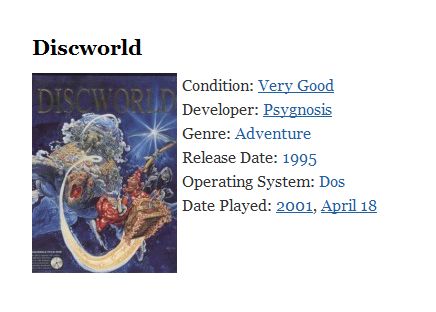
Displayed next to the thumbnail the taxonomies look like the following.
The End
If you notice from the screenshot, the taxonomies are links. If you click on them, you will be taken to an archives page that contains all of the posts that fall within that taxonomy. For example, clicking on the genre, adventure, will take you to a list of all adventure games. Custom archives can be made so they don’t look like the default archives, but that will be a post for another day.
So, that’s how custom taxonomies are added to a WordPress theme. Can you think of any subjects, other than videogames, that you would use this sort of post classification system for?
photo credit: denn

Thanks for info. i am trying on my new blog, i will let you know, if i meet problem.
thanks !!!
Colleen
Very cool, although not quite sure what I’d use it for.
Hi Dennis – A catalog of DVD’s?
Now this is one thing I did not know about WordPress. Probably I’m satisfied with the category function. Perhaps I will be needing this application in the future. :-)
Hi Walter – It certainly isn’t for everyone but there are some good uses – such as creating an online collection.
Great overview, Kim. I’d heard the phrase before, but like you mentioned at the start, my initial response was WTF? :)
I think this could be used fr a great many options – ebooks, for example, or white papers (as well as the lists you mention here and in the comments).
While I’m not sure it’d be suited for my personal blog, I can see a use over at 12for12k for sure (explaining more about the charities, for example).
Thank you!
Hi Danny – Using taxonomies as a way of organizing the information about charities is an excellent idea! I wouldn’t have thought about that.
I’ve also been thinking about a way of cataloging recipes but that would take a lot of thought about the best taxonomies to use.
This is something I’ve been meaning to play around with for quite some time – I finally sat down and spent a day with it.
Thanks!
Hello, thanks for this info! I’m planning on adding a directory of sorts to my blog. I saw a template that used taxonomies to create a searchable template and it was awesome.
This helps get me going in the right directions…awesome!
Thank you!!!
Hi Tony,
The new version of WordPress also has Custom Post Types built in, which might make it a lot easier to set up the taxonomies. I haven’t spent any time working with them yet.
Hi Kim,
Thank you…I have the latest version so I’ll look into that. Anything that can make it easier :) Have a great day!
Tony
Hi Kim,
It’s very interesting post, i search something like this but i need two things.
How can we hide/display the “genre:” if empty field.
How can i have no link on operating system?
i try with get_the_term_list or get_terms without result.
thanks you!