
Quite a few people subscribe to blogs via email as well as RSS – I have a number of them.
Call me slow on the uptake, but recently I noticed a couple of features for feedburner email that will allow for some minor customizations.
You can add a logo for your site and you can add the title of your article to the subject line and heading of the email.
Here’s how to do it.
- Login to Feedburner. (Create an account first if you don’t already have one.)
- Click on the name of your feed.
- Switch to the Publicize Tab
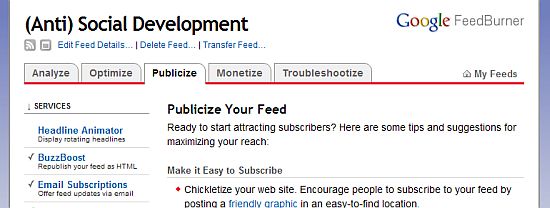
- Click on Email Subscriptions in the left side navigation.
- Click on Email Branding on the submenu in the left side navigation
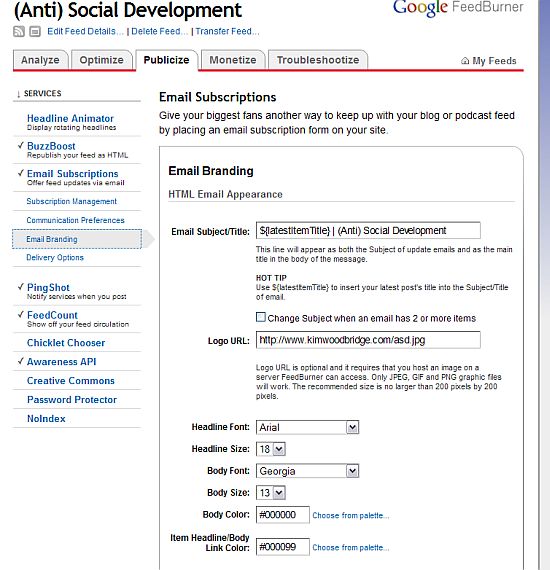
- Email Subject/Title – if you add ${latestItemTitle} to the email subject line, the name of the article will be in the subject line and title of the email. If there is more than one post, you can click on the box that says Change Subject Line when email has 2 or more items, and you will get additional choices for customization. Before I added the title my subject line only had the name of this site.
- Logo URL
- Headline Font and Size – you have a choice of 5 fonts for the headline and can adjust the size.
- Body Font and Size – you can set the font and the font size for the body text like you can for the headline.
- Body Color – the color of the email background can be changed.
- Item Headline/Body Link Color – the color for the all the links can be set to any color.
There are a number of things you can set to customize your feedburner email.
– You can add the URL to a logo that exists on a server that Feedburner can access. The logo has to be in .jpg, .gif, and .png formats and shouldn’t be bigger than 200 by 200px.
The bottom of the Email Branding screen will show you what you changes look like. Here is mine with the title of the post added to the headline and my logo.
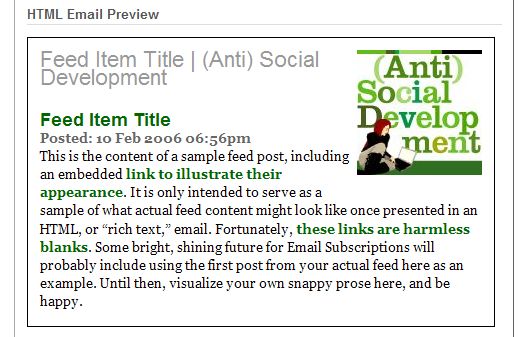
Make sure you save all of your changes.
Now you have a slightly customized feedburner email.
photo credit: K a t e y

It seems like most non-bloggers use email subscriptions rather than RSS.
.-= vered | blogger for hire´s last blog ..I Suck At Personal Blogging =-.
Hi Vered – I have a confession. I’ve started using email subscriptions
again … I just don’t have time to go through my feeds. I need to clean them out …
I use email a lot of the times now too. I check my feed less these days; maybe twice a week. Email is so much more streamlined for me.
.-= Carla´s last blog ..Body Image Confessions =-.
Hi Carla – Oh good, I’m not the only one :-)
I’ve already been using the subject for some time now and will try and get the logo for the email too. Although I font really understand where to save the image for feedburner.
I added a shiny new banner just yesterday so this post is timely for me. Do check the banner out Kim. Thanks for the post.
Hi Manshu – I love it!! I haven’t actually been to your site because I get your posts via email. It’s great!!!
Feedburner will let you upload it from your computer – it just needs to be a certain size to work best.
I recently found the subject line thing myself. lol
I also have a feedburner post in draft; this will make a nice backlink for more info. ;)
.-= Dennis Edell´s last blog ..4 Plugin Package – 75% Off! =-.
Hi Dennis – I don’t know exactly when it started. I very rarely log into
Feedburner.
nice blog and precise information too.. i like how easily you have have explain….just by putting directly images… image can explain more then a words
.-= Gamerdiehard´s last blog ..Divinity 2 Ego Draconis|RGP Game|Adventure|Dragon Game =-.
Hi – Thank you. I’m glad you find the instructions useful.
Oh wow, this is so fantastic! Your blog is not only varied in its content, but useful to boot. Thank you so much for all the resources. Looking forward to reading your future posts.
All the best,
Sezin
in my feedburner email, i am not getting any logo & socialize link down on email. here
http://feeds.feedburner.com/makemycreative-feed
i want my email like this
http://feeds.feedburner.com/nettuts
Please help me !
i done all setting accordingly your post , in email branding !
Hi Yashpal – You would need to select the correct feedburner options to have those items show up in your feed. I believe what you are looking for is under Optimize > Browser Friendly.
This article, however, is about subscriptions by email – not the RSS feed.
This post came up FIRST in my search on how to add a logo to feedburner email!! Nice job Kim. Thanks for the info.
.-= Rick Castellini´s last blog ..Computer Help Show Podcast 06-16-2010 =-.
Hi Rick – Very cool! Thanks!
Thank YOU! Keep up the extremely good work Kim.
.-= Rick Castellini´s last blog ..Computer Help Show Podcast 06-16-2010 =-.
nice trick, i’ve been implementing your tutorial on my blog :)
Hi – Glad it helps.
anyone know how i can add the post image into feedburner and also add the list of related posts (like that appears at the bottom of posts on single.php)
craig
Craig – If you are using thumbnails, you will need to edit some files for them to show up in feedburner.
This article should help.
http://cdharrison.com/2009/12/16/the_post_thumbnail-for-rss-feeds/
I don’t know how to show related posts and a quick google search didn’t located anything.
Hi Kim,
I hope you can help. I’m just moving to Blogspot after my previous host closed. My skills are limited, but I think I have it up and going as I would like. I’m using Feedburner for email subscriptions and would like to send only part of the post with a link to the site, rather than sending the whole post. I know it can be done because that is what I received from sites to which I’ve subscribed. Can I make that happen for me, too??
Thanks so much,
Donna
Hi Donna – In WordPress there is a setting to show a full or partial feed. Blogspot may have a similar setting but I don’t know where it would be. It is, however, a setting within the blogging software rather than feedburner.
How do I add a logo to my feed page? Instead of adding it to the email feed.
Hi Gustavo – As far as I know the feed can not be customized in the same way as the email.
Hey thanks i am already been using the Tips for some time now and will try and get the logo for the email too
Hi – The logo does make for a more personalized feedburner email.