
Since WordPress 3.0 custom menus have been available in WordPress under Appearance > Menus. Whether or not your theme supports custom menus depends on the theme you are using and if the code has been added.
Recently I was asked how to make a link on a custom menu open in a new window or tab.
The solution turned out to be related to screen options, which is similar to the solution for viewing all of your plugins on one page.
- Go to Appearance > Menus
- Click the down arrow on one of the menu items. You will see that there is no option to make the link open in a new window.
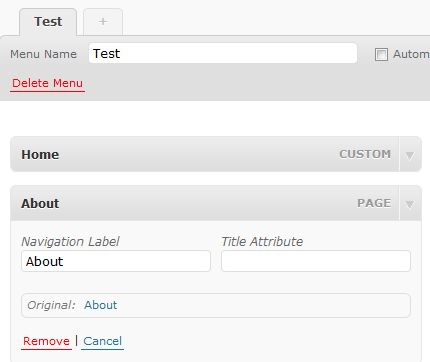
- Click on the Screen Options tab on the top right of the page.

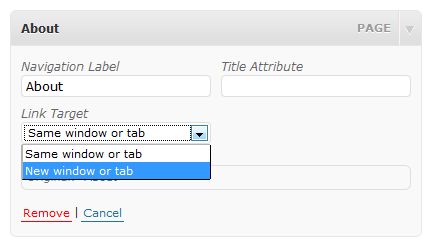
- Check the box for ‘Link Target’.

- You will now have a link target option for each item in your custom menu.

If you theme doesn’t support custom menus, you can always test creating one by making it and then adding the custom menu widget to your sidebar. Of course, you do need to be using version 3.0 or higher of WordPress.
photo credit: foilman

I have not gotten into menus at all yet, but this is very cool for me when I finally do. I make all links on my blog open in a new window if I can.
Dennis Edell@ Direct Sales Marketing recently posted..100 Down Thousands to Go!
I don’t use them on my site because my nav menu is really simple. I’ve worked with them on other sites and have been learning more and more about them as well as appreciating how great they are ;-)
Kim,
Great tip here. I am learning WordPress basics right now as I am going to use it for my online business I am getting ready to launch. This will help me greatly, thank you for sharing and have a great weekend :)
the majority of new WP themes support already menu customization but if the client is asking for a different menu on an ancient theme your post may come in handy. Thanks for sharing! :)
Thanks for sharing this. So useful. I don’t know why I didn’t think to check out the screen options. I use menus on every site that I do, so this is super useful.
Frequently the screen options are hiding something useful and it isn’t the first place I look ;-)